

Snug: Bookmark Export, Import & Backup
23 ratings
)
Overview
Export, import and back up your bookmarks in common formats, from Chrome or Safari, on a schedule. Everything stays local.
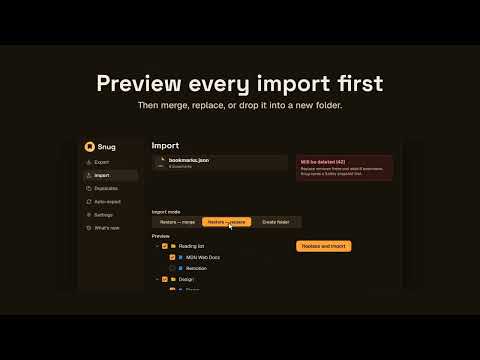
Snug moves your bookmarks between browsers, exactly as you left them — nothing sent anywhere, no account required. Export your whole bookmark tree or just the folder you choose, in common formats such as HTML or JSON. Import files from other bookmark managers, a Chrome profile Bookmarks file, or Safari bookmarks, with a preview first of what will be added, skipped and deleted. Pick or drop several files at once. Then merge into your existing bookmarks, replace them outright, or drop everything into a new folder — your call every time. Before any replace, Snug saves a safety snapshot of your bookmarks, so you can Undo it. The latest five are kept on your device. A Duplicates page finds repeated bookmarks and deletes only the ones you pick, and imports can skip duplicates. Set up a schedule once — hourly, daily, weekly, and more — and Snug backs up your bookmarks on its own, in the formats you pick, to your Downloads folder or a folder you choose. Retention keeps only the latest backups, and a notification tells you if one fails. Filenames can include the date and time automatically. Snug runs entirely on your device — no account, no cloud, no server. Every operation reads and writes your browser's own bookmarks tree, and that's the whole trust story. The bookmark tree works fully with the keyboard and screen readers, and Snug speaks 10 languages. Works on Chrome and any other Chromium-based browser (Edge, Opera, Brave) from the same listing.
4.7 out of 523 ratings
Details
- Version2.2.0
- UpdatedOctober 12, 2026
- Offered byAndryOre
- Size639KiB
- Languages10 languages
- Developer
Email
hello@andryore.dev - Non-traderThis developer has not identified itself as a trader. For consumers in the European Union, please note that consumer rights do not apply to contracts between you and this developer.
Privacy

This developer declares that your data is
- Not being sold to third parties, outside of the approved use cases
- Not being used or transferred for purposes that are unrelated to the item's core functionality
- Not being used or transferred to determine creditworthiness or for lending purposes
Support
For help with questions, suggestions, or problems, visit the developer's support site