

SNS Assistant – NAVER Blog & Instagram Manager

Overview
Korean-first tools for NAVER Blog replies, neighbor management, Instagram, Threads, NAVER Clip, and scheduled workflows.
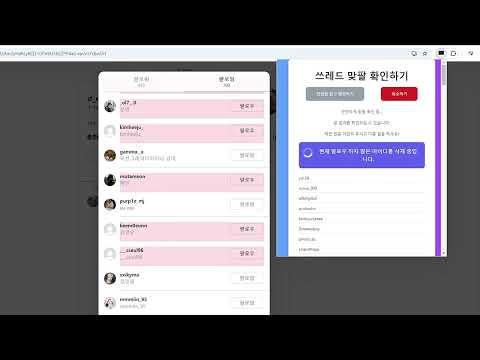
SNS Assistant is a Chrome extension for managing NAVER Blog, Instagram, Threads, and NAVER Clip activities. Important: This extension is primarily designed for Korean users. Some screens, instructions, and features are available only in Korean. Users can choose the account, target range, quantity, interval, and comment settings before starting a workflow. [Main Features] ■ NAVER Blog * Review blog visitors and reply targets * Generate AI-assisted comments based on post content * Support blog reply and reaction workflows * Manage NAVER Blog neighbors and mutual neighbors * Configure comment style, greeting, closing text, and emoticons * Keep records of previously processed accounts ■ Scheduled Workflows * Add multiple tasks and process them in order * View the currently running task and status * Check completed quantities and results * Save frequently used accounts and settings ■ Instagram * Compare followers and following lists * Find accounts that do not follow you back * Review accounts you do not follow back * Exclude selected accounts from management * Save previous scan results and resume later * View processed and remaining accounts ■ Threads * Review follower and following relationships * Manage accounts that do not follow you back * Support post and comment workflows * View processed accounts and results ■ NAVER Clip * Review reply targets * Support reactions and comment workflows * Finish safely when there are no available targets * View completed quantities and results [Important Information] Please review your selected account, target range, quantity, interval, and comment settings before starting. Features may be affected by changes to supported websites. Use reasonable quantities and intervals and follow the rules of each platform. Some features may require an account, points, or a premium subscription. SNS Assistant is an independent service and is not affiliated with, endorsed by, or officially connected to NAVER, Instagram, or Threads. Updates and support: https://blog.naver.com/sns-assistant0610 Website: https://unfolloweasy.com
5.0 out of 579 ratings
Details
- Version1.8.6
- UpdatedOctober 26, 2026
- FeaturesOffers in-app purchases
- Size595KiB
- Languages16 languages
- Developer
- Non-traderThis developer has not identified itself as a trader. For consumers in the European Union, please note that consumer rights do not apply to contracts between you and this developer.
Privacy

This developer declares that your data is
- Not being sold to third parties, outside of the approved use cases
- Not being used or transferred for purposes that are unrelated to the item's core functionality
- Not being used or transferred to determine creditworthiness or for lending purposes
Support
For help with questions, suggestions, or problems, please open this page on your desktop browser