

SnowScreen — Snow on the Web

Overview
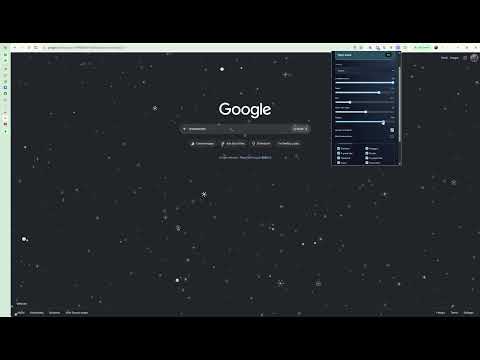
Snowfall on every web page with layered depth, wind and eight snowflake shapes.
Bring a little winter to your browser with SnowScreen. Enjoy animated snowflakes falling across your favorite websites while you browse, read, or work. Choose your weather: • Gentle Snow — a light, relaxing snowfall. • Blizzard — a lively flurry with stronger wind. • Magical — larger snowflakes with a dreamy feel. • Custom — adjust the snowfall to your liking. Make it your own: • Choose from eight snowflake shapes. • Adjust snowflake count, speed, size, opacity, and wind direction. • Add random wind gusts or let the wind follow your mouse. • Start or stop the snow with one click. Snowflakes move through three depth layers for a natural sense of distance. The overlay lets you click, scroll, and select text as usual, and your settings are saved automatically. SnowScreen pauses animation when a tab is hidden and respects your system’s reduced-motion preference. Privacy: SnowScreen stores settings locally in your browser. It does not collect browsing history or send data to external servers. Please note: SnowScreen works on standard HTTP and HTTPS websites. Browser internal pages, extension stores, and some built-in viewers do not allow the effect. Enjoying SnowScreen? Support its development through the optional Buy Me a Coffee link in the extension.
0 out of 5No ratings
Details
- Version1.0.2
- UpdatedNovember 5, 2026
- Offered byanhb
- Size29.18KiB
- LanguagesEnglish
- Developer
Email
hoangbinhana3@gmail.com - Non-traderThis developer has not identified itself as a trader. For consumers in the European Union, please note that consumer rights do not apply to contracts between you and this developer.
Privacy

This developer declares that your data is
- Not being sold to third parties, outside of the approved use cases
- Not being used or transferred for purposes that are unrelated to the item's core functionality
- Not being used or transferred to determine creditworthiness or for lending purposes