

SnipVault
2 ratings
)
Overview
Save web highlights to your personal markdown note vault
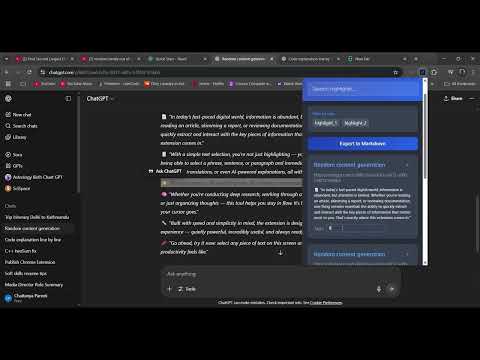
SnipVault – Save & Organize Web Highlights Save text highlights from any webpage into your personal vault. Fast, simple, and always accessible. SnipVault helps you save and organize important text snippets from across the web — directly in your browser. Key Features: 📌 Right-click to save – Select any text on a webpage, right-click, and save it instantly. 🗂 Organize with tags – Add tags to group and filter your highlights. 🔍 Search & filter – Quickly find saved snippets anytime. 💾 Local storage – Your data stays on your device, private and secure. 📤 Export to Markdown – Take your notes anywhere. 🔔 Instant feedback – Notifications confirm your highlight was saved. Perfect for: - Students saving research quotes. -Writers collecting inspiration. -Professionals keeping references for projects. -Anyone who loves quick, organized note-taking. How It Works: -Highlight text on any website. -Right-click and choose “Save to SnipVault”. -View, search, and organize all your saved highlights in the popup. Privacy: - SnipVault does not collect, share, or store any of your data online. Everything is saved locally in your browser.
5 out of 52 ratings
Details
- Version1.0
- UpdatedAugust 13, 2025
- Size1.02MiB
- LanguagesEnglish
- Developer
Email
chaitanyap.work@gmail.com - Non-traderThis developer has not identified itself as a trader. For consumers in the European Union, please note that consumer rights do not apply to contracts between you and this developer.
Privacy

SnipVault has disclosed the following information regarding the collection and usage of your data. More detailed information can be found in the developer's privacy policy.
SnipVault handles the following:
This developer declares that your data is
- Not being sold to third parties, outside of the approved use cases
- Not being used or transferred for purposes that are unrelated to the item's core functionality
- Not being used or transferred to determine creditworthiness or for lending purposes
Support
For help with questions, suggestions, or problems, visit the developer's support site