


Overview
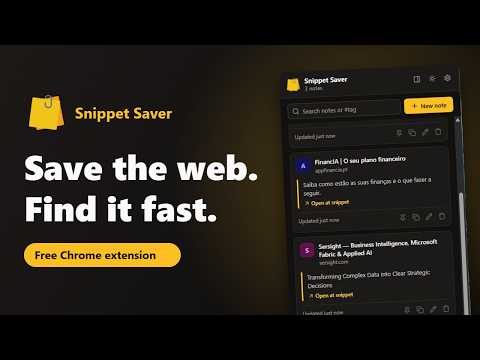
Save text and images from any page into organised, searchable notes.
Snippet Saver keeps the bits of the web you want to remember: a paragraph from an article, a code sample from the docs, a quote for your thesis, an image from a design you like. Select it, save it, and find it again in seconds, without leaving the page you're on. No account, no ads, no tracking. Your notes stay in your browser, or in your own Google Drive if you choose to sync them. SAVE IN ONE STEP • Select text, right-click and choose "Save to New Note", or add it to a note you already have with "Save to Existing Note…" (pinned and recent notes are listed first) • Right-click any image and choose "Save Image to Note" • Or just press Alt+Shift+S to save the selected text, and Alt+Shift+O to open Snippet Saver (both shortcuts can be changed) • Every snippet keeps the title of the page it came from and a link that takes you back to the exact passage you highlighted • A short confirmation appears on the page, so you know it was saved WRITE, ORGANISE AND FIND • Write your own notes, or add your thoughts to saved snippets • Format your notes with Markdown, using the toolbar or keyboard shortcuts • Checklists can be ticked straight from the notes list • Code blocks get syntax highlighting for the most common programming languages • Add tags with suggestions as you type, then filter by #tag • Search across all your notes: titles, text, snippets and the pages they came from • Pin the notes you use most, so they stay at the top • Copy a note with its formatting and paste it into a document, email or chat PRIVATE NOTES, ENCRYPTED Some notes are nobody else's business. Mark a note as private and it's encrypted on your computer with a PIN or passphrase that only you know. • Private notes appear blurred until you enter your PIN, and lock again when you close Snippet Saver or press the lock button • Their title, text, snippets and tags are encrypted (AES-256) before they're stored, synced or backed up, so they can't be read in your browser's storage, your Google Drive or a backup file • Your PIN or passphrase is never stored anywhere. A passphrase of a few words gives much stronger protection than a short PIN • Private notes are left out of search and of the right-click menu while they're locked RIGHT NEXT TO YOUR READING Open Snippet Saver in Chrome's side panel to keep your notes beside the article, documentation or video you're working with. Everything you save appears in the panel straight away. IMAGES THAT DON'T DISAPPEAR Snippet Saver can keep a local copy of the images you save, so they stay visible even if the original link breaks or you're offline. Images from the page's own site are copied automatically. For images hosted elsewhere (such as on a CDN), you can grant access in Settings; this permission is off by default and only used to download the images you choose to save. SYNC WITH YOUR OWN GOOGLE DRIVE (OPTIONAL) Turn on sync in Settings to keep your notes, images and settings the same on every computer where you use Chrome. • Everything is stored in a private app folder of your own Google Drive that only Snippet Saver can see. It can't access any of your other files • There is no Snippet Saver server: your data goes straight between your browser and Google • Changes sync a few seconds after you make them, and every 15 minutes in the background • Edits made on different computers are merged, and deleted notes are deleted everywhere • Private notes are synced encrypted, and open on your other computers with the same PIN • Snippet Saver works fully offline and catches up the next time you're connected BACKUP AND EXPORT • Export a complete backup as JSON, including your saved images, and import it again on another computer. Importing merges with your notes and never replaces a note with an older copy. Private notes stay encrypted in the backup • Export your notes as Markdown to use them in other note apps • See how much space your notes and images use DESIGNED TO STAY OUT OF YOUR WAY • Light and dark themes, following your system or your choice • Available in English, Portuguese, Spanish, Chinese, Hindi and Japanese, following your browser's language or the one you pick in Settings • Keyboard-friendly: shortcuts to save, open, format, and Ctrl+Enter to save a note • Undo after deleting a note • Small and fast: no frameworks, no external scripts YOUR PRIVACY • Snippet Saver only reads a page when you ask it to save something from it, and then only the text you selected or the image you chose • Private notes are encrypted on your computer; nobody without your PIN can read them, the developer included • No analytics, no advertising, no tracking, and no code loaded from the internet • The developer never receives your notes or any personal data • The full privacy policy is linked on this page WHO IT'S FOR Developers collecting code samples and documentation, students and researchers gathering quotes and sources, writers keeping ideas and references, and anyone who has ever lost something useful in a pile of open tabs. FREQUENTLY ASKED QUESTIONS Where are my notes stored? In your browser's extension storage. If you turn on sync, a copy is also kept in your own Google Drive. What happens if I uninstall Snippet Saver? The notes stored in that browser are deleted. Export a backup first, or turn on sync so your notes are kept in your Google Drive. Can I use it on more than one computer? Yes. Turn on Google Drive sync with the same Google account on each computer, or move your notes with a JSON backup. What if I forget the PIN of my private notes? They can't be recovered: the PIN is never stored, so there is no reset. You can change or remove the PIN in Settings at any time while you still know it. Can I change the keyboard shortcuts? Yes. Go to Settings → Keyboard shortcuts → Customize shortcuts. Why does Snippet Saver ask for access to all sites? It doesn't by default. You can allow it in Settings if you want local copies of images hosted on other sites; it's only used to download the images you save, and you can revoke it at any time. SUPPORT SNIPPET SAVER Snippet Saver is free, with no ads and no tracking. If it's useful to you, you can support its development with a small donation from the Settings page. Thank you!
0 out of 5No ratings
Details
- Version1.5.0
- UpdatedOctober 29, 2026
- Size149KiB
- Languages6 languages
- DeveloperWebsite
Email
snippetsaver.support@gmail.com - Non-traderThis developer has not identified itself as a trader. For consumers in the European Union, please note that consumer rights do not apply to contracts between you and this developer.
Privacy

Snippet Saver has disclosed the following information regarding the collection and usage of your data. More detailed information can be found in the developer's privacy policy.
Snippet Saver handles the following:
This developer declares that your data is
- Not being sold to third parties, outside of the approved use cases
- Not being used or transferred for purposes that are unrelated to the item's core functionality
- Not being used or transferred to determine creditworthiness or for lending purposes
Support
For help with questions, suggestions, or problems, visit the developer's support site