

SnipPage — Full-Page Screenshots & Annotation

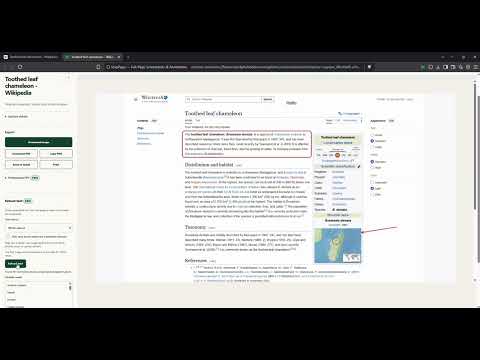
Overview
Capture full-page screenshots, scrolling panels, and selected areas—then annotate, redact, and export locally.
Capture complete webpages, scrolling panels, visible areas, or precise selections—then annotate, redact, and share the result from one local Chrome workspace. SnipPage helps you: • Capture full pages, visible areas, selected regions, and scrollable panels • Annotate with text, arrows, shapes, highlights, pen marks, and crop • Cover sensitive pixels with solid redaction (Pixelate is a visual effect, not secure redaction) • Search captures and organize them into local projects • Export PNG, JPEG, or PDF; copy PNG to the clipboard; print; or attach an image/PDF to a Gmail compose draft without downloading it Text extraction is a Pro workflow. It combines available webpage text with optional packaged local OCR only when you request it. It is best-effort, runs on your device, and does not upload page content. Free includes all capture modes, annotations, crop, solid redaction, local history, projects, Find in capture, standard image/PDF export, clipboard copy, print, and Gmail attachments. Pro adds text extraction, Professional PDF options, project-report export, batch download, and URL-list capture. A no-card 14-day Pro preview starts after your first successful Pro action. Free features remain available after the preview ends. No account is required. Captures, extracted text, annotations, projects, and reports stay in your browser profile. The extension does not use advertising, watermarks, usage analytics, or telemetry. No capture content is uploaded or synced; only the small Pro-preview timer may use Chrome Sync when enabled. Protected pages such as chrome:// pages cannot be captured. Learn more: https://snippage.cc Support: https://snippage.cc/support Privacy: https://snippage.cc/privacy
5 out of 52 ratings
Details
- Version4.2.2
- UpdatedOctober 25, 2026
- FeaturesOffers in-app purchases
- Size7.46MiB
- LanguagesEnglish
- DeveloperWebsite
Email
smartguy.development.us@gmail.com - Non-traderThis developer has not identified itself as a trader. For consumers in the European Union, please note that consumer rights do not apply to contracts between you and this developer.
Privacy

SnipPage — Full-Page Screenshots & Annotation has disclosed the following information regarding the collection and usage of your data. More detailed information can be found in the developer's privacy policy.
SnipPage — Full-Page Screenshots & Annotation handles the following:
This developer declares that your data is
- Not being sold to third parties, outside of the approved use cases
- Not being used or transferred for purposes that are unrelated to the item's core functionality
- Not being used or transferred to determine creditworthiness or for lending purposes
Support
For help with questions, suggestions, or problems, please open this page on your desktop browser