

Snip Snip — snip & collage the web

Overview
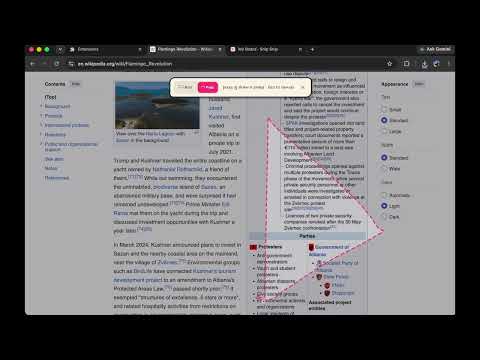
A little pair of scissors for your browser. Snip anything off a page and stick it on your doodle board.
# Snip Snip ✂ — snip & collage the web A little pair of scissors for your browser. Click the icon, draw a shape on any page, and it snips that piece out as a die-cut sticker you can copy, save, or stick on your doodle board. - **Box cut** — drag a rectangle. - **Free cut** — draw any shape freehand. - Snipped pieces → **Copy**, **Save** (PNG), or **Stick to board**. - **My Board** — a scrapbook page where snips land; drag, rotate, scale, download. **What it can snip:** anything visible in the current tab (text, images, a video frame, even cross-origin iframes — it snips pixels, not the DOM). **What it can't:** things outside the browser window, and protected pages like `chrome://…`, the Chrome Web Store, and the new-tab page. --- ## Try it locally (2 minutes) 1. Go to `chrome://extensions` 2. Turn on **Developer mode** (top-right) 3. Click **Load unpacked** 4. Select the `snip-snip` folder (the one that contains `manifest.json`) 5. Pin it: click the puzzle-piece icon → pin Snip Snip 6. Open any normal website, click the icon (or press **Alt+Shift+S**), pick a mode, and draw a shape Edge is the same at `edge://extensions`. --- ## Publish it to the Chrome Web Store — step by step ### Step 1 — One-time developer account 1. Open the **Chrome Web Store Developer Dashboard**: https://chrome.google.com/webstore/devconsole 2. Sign in with the Google account you want to publish under. 3. Pay the **one-time $5** registration fee. 4. Complete the account setup (verify your email and, if asked, your identity/publisher name). ### Step 2 — Build the upload package - The store wants a **.zip whose root contains `manifest.json`** (no extra wrapping folder). - Use the ready-made **`snip-snip.zip`** included here, or zip it yourself: open the `snip-snip` folder, select everything **inside** it, and compress that. ### Step 3 — Create the listing 1. In the dashboard click **Add new item**. 2. Upload `snip-snip.zip`. Wait for it to process. 3. Fill in the **Store listing** tab: - **Description** — what it does + how to use it (paste the intro above). - **Category** — *Productivity* (or *Fun*). - **Language** — English (add more later if you like). - **Icon** — 128×128 is taken from the package automatically. - **Screenshots** — at least **one**, sized **1280×800** or **640×400**. Grab shots of: mid-snip on a page, the sticker result bar, and the board. - **Small promo tile** (optional) 440×280 helps you get featured. ### Step 4 — Privacy tab (this is what reviewers check) 1. **Single purpose** — write: *“Let users select and save a region of a web page.”* 2. **Permission justifications** — one line each: - `activeTab` — capture the page only when the user starts a snip. - `scripting` — draw the selection overlay on the page. - `storage` — keep the user's board of snips on their own device. - `clipboardWrite` — copy a snip to the clipboard. 3. **Data usage** — check that you **do NOT collect** any user data. (Snip Snip stores everything locally and never sends data anywhere.) Tick the compliance checkboxes accordingly. 4. **Privacy policy URL** — if the form requires one, publish a one-line policy on any public page (GitHub Pages, a Notion public page, etc.): *“Snip Snip does not collect, transmit, or store any user data. Snips are saved only on the user's own device.”* Paste that page's URL here. ### Step 5 — Distribution & submit 1. **Visibility** — Public (searchable), Unlisted (link only), or Private (specific accounts). Unlisted is nice for a soft launch. 2. Pick regions (default: all). 3. Click **Submit for review**. 4. Review usually takes a few hours to a few days. Because Snip Snip uses only `activeTab` (not broad host permissions) and sends no data, it tends to clear review quickly. You'll get an email when it's live. ### Step 6 — After launch - Update by bumping `"version"` in `manifest.json`, re-zipping, and uploading a new package to the same item. - (Optional) Publish to **Microsoft Edge** too — same zip, free, via **Microsoft Partner Center → Edge**. --- ## Files ``` snip-snip/ ├── manifest.json extension manifest (MV3) ├── background.js screenshot capture + shortcut ├── content/clip.js the on-page scissors overlay + die-cut crop ├── popup/ the icon popup (Box / Free / board / recent) ├── board/ the scrapbook board page └── icons/ 16 / 48 / 128 icons ``` ## Tweak later - Colors / fonts of the overlay: `content/clip.js` → `css()`. - Want clean cuts without the white sticker border: in `content/clip.js` → `crop()`, remove the “white die-cut rim” block. - Board keeps the last 20 snips; raise the limit in `clip.js` → `saveToBoard` (add the `unlimitedStorage` permission if you go big).
0 out of 5No ratings
Details
- Version1.0.1
- UpdatedJuly 7, 2026
- Size28.34KiB
- LanguagesEnglish
- Developer
Email
cheney6110@gmail.com - Non-traderThis developer has not identified itself as a trader. For consumers in the European Union, please note that consumer rights do not apply to contracts between you and this developer.
Privacy

Snip Snip — snip & collage the web has disclosed the following information regarding the collection and usage of your data. More detailed information can be found in the developer's privacy policy.
Snip Snip — snip & collage the web handles the following:
This developer declares that your data is
- Not being sold to third parties, outside of the approved use cases
- Not being used or transferred for purposes that are unrelated to the item's core functionality
- Not being used or transferred to determine creditworthiness or for lending purposes