

Snip - Save Text and Notes from Any Website

Overview
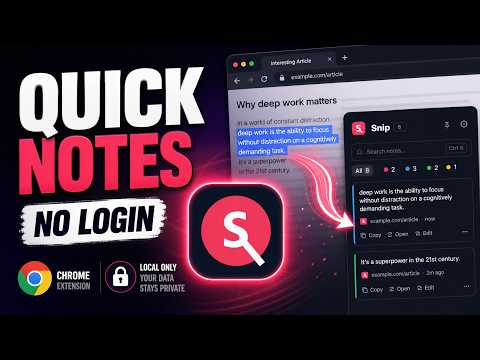
Save text and notes from any website in one click. Search, tag, copy, and export local notes.
Snip is a simple Chrome extension to save text and notes from any website. Select text, right-click, choose “Snip this text”, and your note is saved instantly with the source URL, page title, favicon, and date. No account. No login. No cloud sync. Your notes stay in your browser. Snip is built for researchers, students, writers, developers, marketers, and anyone who saves useful lines, quotes, ideas, references, or research notes from the web. WHAT YOU CAN DO • Save selected text from any website with the right-click menu • Use Ctrl+Shift+S to save the current selection • Search saved notes instantly • Organize notes with color tags • Copy saved text in one click • Reopen the original source URL • Edit or delete notes • Export notes as Markdown, TXT, or JSON • See your saved-note count on the extension badge WHY SNIP Most note-taking tools are too heavy for quick web capture. Snip keeps the workflow simple: Select text → save → find it later. It is designed for fast capture, lightweight organization, and local-first privacy. USE CASES • Save quotes from articles • Collect research notes from websites • Keep useful code snippets • Save product ideas or writing references • Store source links with every note • Export notes into your own archive PRIVACY Snip stores notes locally using Chrome storage. It does not create an account, send notes to a server, sell data, or track browsing behavior. The extension only uses permissions needed for its core features: • storage: save notes locally • contextMenus: add the “Snip this text” right-click action • activeTab and scripting: read selected text for the keyboard shortcut and show the saved confirmation toast EXPORT FORMATS Export your notes anytime as: • Markdown • TXT • JSON Good for moving notes into Obsidian, Notion, Google Docs, a research folder, or your own archive. Snip is made for one job: saving useful text and notes from the web with as little friction as possible.
0 out of 5No ratings
Details
- Version1.0.0
- UpdatedMay 19, 2026
- Offered bywilly grizellat
- Size20.66KiB
- LanguagesEnglish
- DeveloperBOUZIDA MOHAND OAULI
7 Rue des Fauvettes Toulouse 31200 FREmail
grizellat@gmail.com - Non-traderThis developer has not identified itself as a trader. For consumers in the European Union, please note that consumer rights do not apply to contracts between you and this developer.
Privacy

This developer declares that your data is
- Not being sold to third parties, outside of the approved use cases
- Not being used or transferred for purposes that are unrelated to the item's core functionality
- Not being used or transferred to determine creditworthiness or for lending purposes