

SnapType — Text Expander

Overview
Expand short triggers into full text snippets on any website. Free forever locally. Optional paid sync across all your devices.
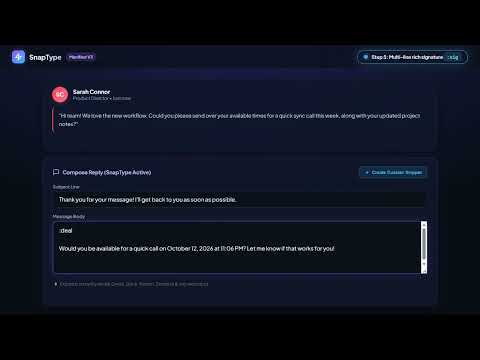
# SnapType – Instant Text Expander for Chrome ⚡ **Type less. Reply faster. Stay productive.** SnapType is a lightweight text expander for Google Chrome that turns short triggers into complete messages, reusable templates, and frequently typed text. Save time on repetitive typing without installing a desktop application or creating an account to get started. ## 🚀 How It Works Create a snippet, assign a short trigger, and type that trigger into a supported text field. SnapType replaces it with your saved text instantly. Examples: - `:ty` → Thank you for reaching out! I appreciate your message and will review it shortly. - `:sig` → Best regards, [Your Name] - `:meet` → Would you be available for a quick call? - `:deal` → Your team discount code is FLASH20! 🎉 ## ✨ Key Features **Instant Text Expansion** Replace repetitive typing with reusable snippets using short, memorable triggers. **Dynamic Templates** Use variables such as dates, times, and custom fields to personalize messages before inserting them. **Quick Search Palette** Press `Alt + Shift + S` to search your saved snippets and insert the right template without browsing through your entire library. **Snippet Health Check** Identify conflicting trigger prefixes and review snippets that may no longer be useful. **Local-First Suggestions** SnapType can suggest snippets based on repeated phrases, helping you identify text worth saving. This feature is designed to operate locally in your browser. **Cross-Device Sync** Keep your snippets synchronized across devices with the Pro plan. Your changes can sync when connectivity returns. ## 🌐 Where You Can Use SnapType SnapType is designed for everyday text entry in supported Chrome text fields, including messaging, email, customer support, and productivity workflows. Compatibility with advanced editors may vary. ## 🔒 Privacy Comes First - **No desktop app required:** Get started directly in Chrome. - **Local storage:** Free-tier snippets are stored locally in Chrome. - **No general keylogging:** SnapType processes text to detect configured triggers for expansion. - **No advertising trackers:** SnapType is designed without third-party advertising trackers. - **Data control:** Manage or delete synchronized data through the available account settings. See the privacy policy for complete details about data collection, storage, synchronization, and deletion. ## 💎 Simple Pricing **Free:** Save up to 25 snippets with local storage and text expansion features. **Pro:** Get unlimited snippets and encrypted cloud synchronization across devices. Start with SnapType and spend less time typing the same things repeatedly.
0 out of 5No ratings
Details
- Version1.0.0
- UpdatedOctober 17, 2026
- FeaturesOffers in-app purchases
- Offered byabilienttechsolutions
- Size89.84KiB
- LanguagesEnglish
- Developer
Email
abilienttechsolutions@gmail.com - Non-traderThis developer has not identified itself as a trader. For consumers in the European Union, please note that consumer rights do not apply to contracts between you and this developer.
Privacy

SnapType — Text Expander has disclosed the following information regarding the collection and usage of your data. More detailed information can be found in the developer's privacy policy.
SnapType — Text Expander handles the following:
This developer declares that your data is
- Not being sold to third parties, outside of the approved use cases
- Not being used or transferred for purposes that are unrelated to the item's core functionality
- Not being used or transferred to determine creditworthiness or for lending purposes