


Overview
Capture, annotate, beautify & record. Full-page, redaction, OCR, mockup frames & screen recording with Pro.
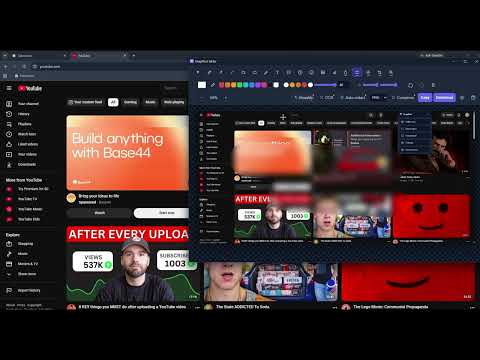
SnapShot is the fastest way to capture, mark up, and share what is on your screen, all on your own device. CAPTURE - Visible area in one click (Ctrl+Shift+S) - Drag to select any region (Ctrl+Shift+R) - Pick a single page element - Full-page scrolling capture, stitched into one image (Pro) ANNOTATE - Pen, line, arrow, rectangle, ellipse, highlighter - Word-style text boxes: fonts, size, bold, italic, underline, alignment, outline - Speech bubbles, numbered steps, emoji stamps - Insert your own images as movable layers - Eraser, drop shadow, recent colours, eyedropper, multi-select, layer order, undo and redo PROTECT AND POLISH (Pro) - Blur, pixelate and spotlight with a sized brush, painted exactly where you want - One-click auto-redact of detected emails, phone numbers and card numbers - Beautify with gradient or solid backgrounds, padding, rounded corners, shadow and browser or window frames - Crop and magnifier - Adjustable redaction strength and corner radius EXTRACT AND RECORD (Pro) - OCR text extraction, fully on-device (no upload) - Screen recording of any screen, window or tab with microphone and system audio - Export recordings to WebM or animated GIF SAVE - Export as PNG, JPG or WebP - Compress and resize before download - Copy straight to the clipboard - Light or dark interface, optional subtle interface sounds Private by design: your screenshots and recordings stay on your device. SnapShot does not collect, upload, or sell your content. No analytics, no tracking, no account needed to use the free features. Free to use. Pro unlocks the power features: $1.99/month, $11.99/year, or $29.99 lifetime.
0 out of 5No ratings
Details
- Version0.31.1
- UpdatedJune 30, 2026
- Size8.86MiB
- LanguagesEnglish
- DeveloperYu Xiang WuWebsite
224 Pump Hill Rise Southwest Calgary, AB T2V 4C8 CAEmail
celexlytech@gmail.comPhone
+86 183 0125 2573 - TraderThis developer has identified itself as a trader per the definition from the European Union and committed to only offer products or services that comply with EU laws.
Privacy

SnapShot - Screenshot & Annotate has disclosed the following information regarding the collection and usage of your data. More detailed information can be found in the developer's privacy policy.
SnapShot - Screenshot & Annotate handles the following:
This developer declares that your data is
- Not being sold to third parties, outside of the approved use cases
- Not being used or transferred for purposes that are unrelated to the item's core functionality
- Not being used or transferred to determine creditworthiness or for lending purposes