

Screen Recorder & Screenshot - SnapRec

Overview
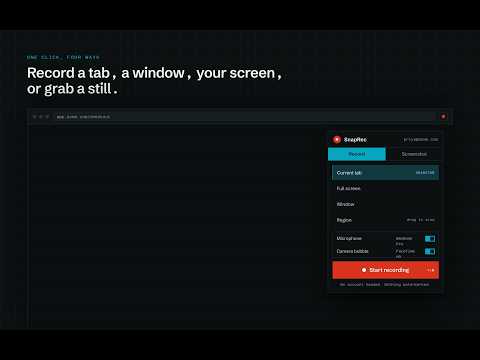
Screen recorder & full page screenshot tool. Record in 4K, annotate with blur/arrows/text, add webcam overlay, and share instantly.
100% Free. No watermarks. No time limits. No account required. Record your screen, capture full-page screenshots, annotate with blur/arrows/text, add a webcam overlay, and share instantly — all from Chrome. WHY SNAPREC? ✓ Free forever — no hidden limits, no paywalls ✓ No watermarks on any recording ✓ No signup required to start recording ✓ 4K recording quality ✓ Full-page scrolling screenshots ✓ Built-in video editor SCREEN RECORDING - Record your entire screen, a browser tab, or a specific window - 4K resolution - Webcam Picture-in-Picture overlay - Microphone narration + system audio - Auto-zoom on mouse clicks - Export as MP4 or save to Google Drive SCREENSHOT CAPTURE - Full page capture — save an entire webpage beyond the visible viewport - Region selection — drag to capture a specific area - Visible area capture — capture the current browser view ANNOTATION & EDITING - Arrows, shapes, text labels - Highlight and blur sensitive information - Crop or resize SHARING - Generate a shareable link instantly - Viewers can react and comment with timestamps - Upload to cloud or download locally KEYBOARD SHORTCUTS Windows/Linux: Ctrl+Shift+1 (full page) · Ctrl+Shift+2 (region) · Ctrl+Shift+3 (visible) · Ctrl+Shift+4 (record) Mac: Cmd+Shift+1/2/3/4 PRIVACY SnapRec only requests permissions required for recording and screenshot functionality. Your data is never sold or shared. Questions? Email founder@snaprecorder.org
4 out of 54 ratings
Details
- Version2.0.5
- UpdatedAugust 24, 2026
- Size523KiB
- LanguagesEnglish (United States)
- DeveloperGhulam MuhammadWebsite
Near Gosia Masjid New Colony Dahri house Shahpur Chakar 68200 PKEmail
ghulammuhammadddahri@gmail.comPhone
+92 305 8389683 - TraderThis developer has identified itself as a trader per the definition from the European Union and committed to only offer products or services that comply with EU laws.
Privacy

Screen Recorder & Screenshot - SnapRec has disclosed the following information regarding the collection and usage of your data. More detailed information can be found in the developer's privacy policy.
Screen Recorder & Screenshot - SnapRec handles the following:
This developer declares that your data is
- Not being sold to third parties, outside of the approved use cases
- Not being used or transferred for purposes that are unrelated to the item's core functionality
- Not being used or transferred to determine creditworthiness or for lending purposes
Support
For help with questions, suggestions, or problems, visit the developer's support site