

SnapPrompt

Overview
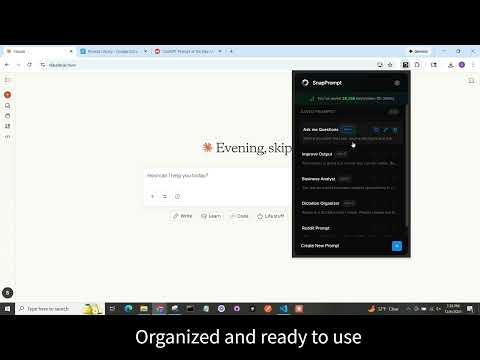
Quickly insert pre-configured text snippets into any text field through right-click context menu
SnapPrompt - Your AI Workflow Accelerator SnapPrompt eliminates the tedious search-copy-paste cycle when working with ChatGPT, Claude, Gemini, and other AI tools. Store unlimited custom prompts organized in folders and deploy them instantly into any text field across the web with keyboard shortcuts or one click. Perfect For: - Developers managing code review templates, debug instructions, and documentation prompts - Content creators with brand voice guidelines, SEO frameworks, and editing checklists - Data professionals running recurring analysis queries and report templates - Researchers organizing literature review questions and synthesis frameworks - Product managers with user story templates and stakeholder communication scripts Pain Points Solved: ✓ No more hunting through chat history for that perfect prompt you used last week ✓ Stop retyping the same instructions across multiple AI conversations ✓ Eliminate context-switching between note apps and AI tools ✓ Never lose carefully crafted prompts when browser tabs close ✓ Instantly share prompt libraries across your team Key Features: - Instant Deployment - One-click insertion or keyboard shortcuts (Ctrl+Shift+1-4) for your top 10 prompts - Full Customization - Edit titles and prompt text anytime; drag-and-drop to reorder - Universal Compatibility - Works seamlessly across all websites and Web applications. Copy feature for Desktop Applications. - Privacy First - Local storage keeps your prompts completely private and accessible offline - What's New Banner - Stay informed about new features and updates - Keystrokes Saved Tracking - See how much time the app has saved you - Zero Performance Impact - Lightweight design that doesn't slow down your browser Transform your AI workflow today—stop interrupting your flow to recreate prompts from scratch! What's New in Version 1.5.2: - Change in Analytics to Posthog - Implemented Users surveys at key events - Corrected issues with User Surveys Previous Updates: V1.4.0 - Updated UX, Keyboard Shortcuts, notifications and back-end Analytics V1.3.0 - Update Alerts V1.1.0 - Extended character limit to 5,000 characters per prompt; added edit functionality V1.0.0 - Initial release with 5-prompt storage and one-click insertion Initial release with 5-prompt storage and one-click insertion</p>
0 out of 5No ratings
Details
- Version1.5.2
- UpdatedDecember 24, 2025
- Size810KiB
- LanguagesEnglish (United States)
- Developer
Email
loladev2026@gmail.com - Non-traderThis developer has not identified itself as a trader. For consumers in the European Union, please note that consumer rights do not apply to contracts between you and this developer.
Privacy

This developer declares that your data is
- Not being sold to third parties, outside of the approved use cases
- Not being used or transferred for purposes that are unrelated to the item's core functionality
- Not being used or transferred to determine creditworthiness or for lending purposes