Item logo image for Snappi - Switch Search Engines Instantly

Snappi - Switch Search Engines Instantly

5.0(

5 ratings

)
Item media 5 (screenshot) for Snappi - Switch Search Engines Instantly
Item video thumbnail
Item media 2 (screenshot) for Snappi - Switch Search Engines Instantly
Item media 3 (screenshot) for Snappi - Switch Search Engines Instantly
Item media 4 (screenshot) for Snappi - Switch Search Engines Instantly
Item media 5 (screenshot) for Snappi - Switch Search Engines Instantly
Item video thumbnail
Item media 2 (screenshot) for Snappi - Switch Search Engines Instantly
Item media 3 (screenshot) for Snappi - Switch Search Engines Instantly
Item media 4 (screenshot) for Snappi - Switch Search Engines Instantly
Item media 5 (screenshot) for Snappi - Switch Search Engines Instantly

Overview

Switch Search Engines Instantly

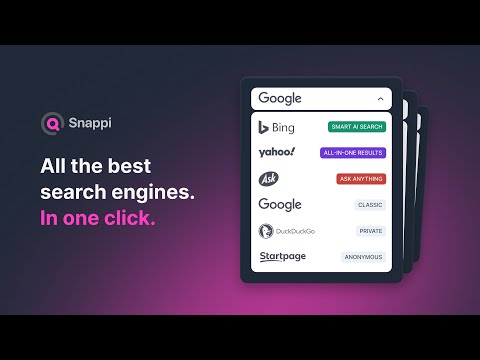
Tired of being stuck with one search engine? With Snappi, you can instantly switch between the most popular search engines — like Google for speed, Bing for images, Yahoo for news, DuckDuckGo and Startpage for privacy, or Ask.com for quick answers — all in just one click. Why Snappi? 🔍 Better results — every search engine has its own strengths. ⚡ One-click switching — change your search engine instantly. ⌨️ Keyboard shortcuts — speed up your workflow. 🎛️ Customizable hotkeys — set your own shortcuts in Chrome’s extension settings. 🛡️ Privacy first — Snappi never tracks or stores your queries. Discover what each search engine does best • Use Google when you need fast, reliable results. • Try Bing for powerful image and video searches, plus Microsoft Rewards. • Explore Yahoo for integrated news, finance, and trending topics. • Ask questions directly with Ask.com for quick, clear answers. • Choose DuckDuckGo or Startpage when privacy matters most — no tracking, fully anonymous. Why users love Snappi • Simple setup — no complex settings. • Lightweight — doesn’t slow down your browser. • Privacy-focused — your search history stays yours. ➡️ Install Snappi today — it’s free, fast, and the smartest way to search.

Details

  • Version
    1.2
  • Updated
    September 15, 2025
  • Offered by
    Blumello
  • Size
    421KiB
  • Languages
    5 languages
  • Developer
    Ratsinskaya Natallia
    Krowia 6 3 Warszawa 03-711 PL
    Email
    heyblumello@gmail.com
    Phone
    +48 572 352 333
  • Trader
    This developer has identified itself as a trader per the definition from the European Union and committed to only offer products or services that comply with EU laws.

Privacy

The developer has disclosed that it will not collect or use your data. To learn more, see the developer’s privacy policy.

This developer declares that your data is

  • Not being sold to third parties, outside of the approved use cases
  • Not being used or transferred for purposes that are unrelated to the item's core functionality
  • Not being used or transferred to determine creditworthiness or for lending purposes

Support

Related

OmniSearch Plus - ChatGPT, Claude, YouTube, Bing Search Bar

0.0

Quickly search across popular AI assistants, video platforms, and search engines directly from your address bar.

Easy Filters

0.0

Easily accessible filters to narrow Google search results

Multi Search Engine

0.0

Search multiple engines at once with a single click. Supports various search engines for general, video, and shopping purposes.

Change Default Search Engine

4.4

Easily set your browser's default search engine to Bing, Yahoo, or others with the Change Default Search Engine extension.

Search Engine Switch

4.0

Easily switch among multiple search engines without having to retype the search repeatedly.

Leap Search

4.4

Quickly switch between search engines without retyping keywords

Google Search Site Switch

0.0

Adds search engines to Google's results page

Instant Search Switcher

0.0

Adds a convenient dropdown menu to switch between different search engines while preserving your search query

Bing search

5.0

Upgrade your browsing with the Search Bing extension. Optimize SEO with Bing Search Engine AI-powered.

Kill Switch

0.0

Closes all tabs, opens new ones, and clears history.

Search Switcher

0.0

Easily toggle search results between Google and Bing! Supports text, image, video, and news searches.

Search Switch

5.0

A simple extension to add 'Search with Google' option in context menu even if you have some other search engine as default.

OmniSearch Plus - ChatGPT, Claude, YouTube, Bing Search Bar

0.0

Quickly search across popular AI assistants, video platforms, and search engines directly from your address bar.

Easy Filters

0.0

Easily accessible filters to narrow Google search results

Multi Search Engine

0.0

Search multiple engines at once with a single click. Supports various search engines for general, video, and shopping purposes.

Change Default Search Engine

4.4

Easily set your browser's default search engine to Bing, Yahoo, or others with the Change Default Search Engine extension.

Search Engine Switch

4.0

Easily switch among multiple search engines without having to retype the search repeatedly.

Leap Search

4.4

Quickly switch between search engines without retyping keywords

Google Search Site Switch

0.0

Adds search engines to Google's results page

Instant Search Switcher

0.0

Adds a convenient dropdown menu to switch between different search engines while preserving your search query

Google apps