


Overview
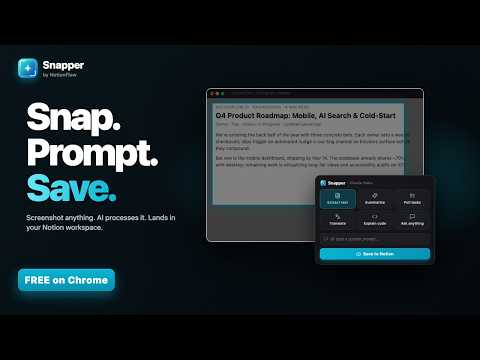
Capture any screenshot, prompt with AI, and save the result straight to Notion. Custom prompts, no copy-paste.
Screenshot it. Prompt with AI. Notion keeps it. Snapper turns any region of your screen into structured, searchable Notion content in about five seconds. Hit a keyboard shortcut, drag to select an area, pick an AI action — or type your own prompt — and the result is in your Notion workspace before you remember why you wanted to save it. ━━━━━━━━━━━━━━━━━━━━━━ HOW IT WORKS ━━━━━━━━━━━━━━━━━━━━━━ 1. Press Cmd+Shift+X (or Ctrl+Shift+X on Windows / Linux). 2. Drag to select any region of the page. 3. A floating widget appears with your snap and five AI actions. 4. Tap an action — or type a custom prompt. 5. Review the result, pick a Notion destination, hit Save. That's it. No more screenshots rotting in your Downloads folder. ━━━━━━━━━━━━━━━━━━━━━━ BUILT-IN AI ACTIONS ━━━━━━━━━━━━━━━━━━━━━━ • Extract Text — OCR-style text extraction with formatting preserved. • Summarize — Distills the screenshot into clear bullet points. • Create Tasks — Pulls action items out as a numbered checklist. • Translate — Detects the language and translates to English (or vice versa). • Explain Code — Plain-English breakdown of any code in the image. • Custom Prompt — Ask anything: "extract the recipe", "identify this font", "rate this pitch deck". ━━━━━━━━━━━━━━━━━━━━━━ NOTION-NATIVE ━━━━━━━━━━━━━━━━━━━━━━ • One-click Notion OAuth — connect your workspace in seconds. • Save to any page or database. Create new pages without leaving the widget. • Smart defaults remember your most-used destinations. • The screenshot itself is attached alongside the AI result. ━━━━━━━━━━━━━━━━━━━━━━ WHO IT'S FOR ━━━━━━━━━━━━━━━━━━━━━━ • Knowledge workers archiving Slack threads, dashboards, and docs. • Developers saving code snippets, error messages, and architecture diagrams. • Students turning lecture slides and textbook pages into clean study notes. • Multilingual professionals translating on the fly. • Managers extracting follow-ups from meeting screenshots. • Anyone who treats Notion as a second brain. ━━━━━━━━━━━━━━━━━━━━━━ PRIVACY-FIRST DESIGN ━━━━━━━━━━━━━━━━━━━━━━ • Screenshots are sent to Anthropic's Claude API for processing and are NOT stored on our servers. • Your Notion access token is stored only in your browser's local storage — never on our servers. • Bring-Your-Own-Key (BYOK): plug in your own Anthropic, OpenAI, or Google AI key and your screenshots go directly to that provider, bypassing our backend entirely. • No browsing tracking. Snapper only runs when you invoke it. Full policy: https://notionflow.io/snapper/privacy ━━━━━━━━━━━━━━━━━━━━━━ 100% FREE ━━━━━━━━━━━━━━━━━━━━━━ • Unlimited snaps and unlimited saves to Notion — every feature included. • 25 hosted AI actions per month on us (our Claude API key). • Want unlimited AI? Add your own API key (Anthropic, OpenAI, or Google) in Settings → AI Provider — your screenshots then go directly to your provider and never touch our backend. • No subscription, no license key, no catch. ━━━━━━━━━━━━━━━━━━━━━━ WHY SNAPPER ━━━━━━━━━━━━━━━━━━━━━━ vs. raw screenshots — Snapper structures and stores them. vs. copy-paste — Snapper works on images and preserves formatting. vs. Notion Web Clipper — Snapper captures specific regions, not whole pages, and applies AI before saving. vs. standalone OCR — Snapper also summarizes, translates, extracts tasks, and lands directly in Notion. vs. ChatGPT direct — Snapper is one shortcut, not five tabs. ━━━━━━━━━━━━━━━━━━━━━━ SUPPORT ━━━━━━━━━━━━━━━━━━━━━━ Questions, feedback, bug reports: support@notionflow.io Built by NotionFlow.
0 out of 5No ratings
Details
- Version1.0.3
- UpdatedOctober 8, 2026
- FeaturesOffers in-app purchases
- Size1.18MiB
- LanguagesEnglish
- DeveloperBeast Creative LLCWebsite
30 N Gould St Ste N Sheridan, WY 82801-6317 USEmail
treyinchina@gmail.comPhone
+1 503-308-8900 - TraderThis developer has identified itself as a trader per the definition from the European Union and committed to only offer products or services that comply with EU laws.
- D-U-N-S143977674
Privacy

Snapper: Screenshot to Notion with AI has disclosed the following information regarding the collection and usage of your data. More detailed information can be found in the developer's privacy policy.
Snapper: Screenshot to Notion with AI handles the following:
This developer declares that your data is
- Not being sold to third parties, outside of the approved use cases
- Not being used or transferred for purposes that are unrelated to the item's core functionality
- Not being used or transferred to determine creditworthiness or for lending purposes
Support
For help with questions, suggestions, or problems, visit the developer's support site