


Overview
Capture, edit and export screenshots and screen recordings of web pages on your device. No Snapora account. Cloud sync is opt-in.
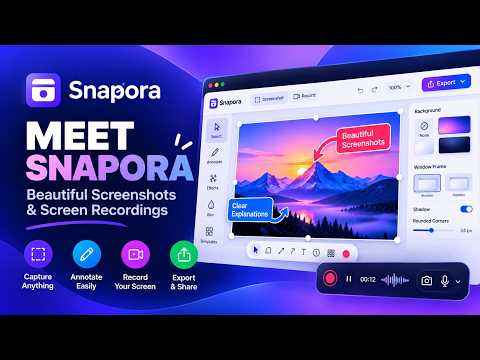
Snapora turns any web page into a screenshot or a recording worth sharing — and everything happens on your device. No account. Nothing you capture is uploaded. CAPTURE • Visible area, a region you draw, a single element, the full scrolling page, or several pages in one go (up to 25 at a time). • Keyboard shortcuts: Alt+Shift+S opens Snapora, Alt+Shift+A captures a region, Alt+Shift+F captures the full page, Alt+Shift+R starts or stops a recording. MAKE IT LOOK GOOD • Backdrops, gradients, window frames, shadows, rounded corners and ready-made templates. • Arrows, shapes, text, highlights, numbered steps, spotlight and artwork. RECORD • Record a tab, a window or your whole screen, with your voice and your camera. • Zooms are added where you click. Trim, split, detect silences and add music on the timeline. PROTECT PRIVATE DETAILS • Blur or pixelate emails, names and card numbers. The original pixels are not in the exported file. • On-device text recognition using Chrome's built-in model (Chrome 138 or later on Windows, macOS or Linux). EXPORT • Quickly export your screenshots and recordings, copy them to the clipboard, or save them directly to your computer. PRIVATE BY DESIGN • No account, no analytics, no tracking, no ads. • Your captures, projects and settings stay in your browser's own storage. • On the free plan Snapora makes no network requests at all. If you activate Pro, it checks your licence key with Freemius, the store that sells Pro — nothing you captured is sent. FREE AND PRO Free has every capture mode, recording and the full editor. Free exports carry a small Snapora mark, and video exports go up to 1080p. Pro removes the mark and exports video above 1080p. Pro is a monthly or yearly subscription, or a one-time lifetime licence. One key works in one browser at a time: activate it in a new browser and the old one switches to Free by itself. Cloud sync. 50 LANGUAGES Available in 50 languages, including right-to-left languages. Changelog v1.1.0 • Cloud sync (Pro): send an export or a recording to your own Google Drive or Dropbox — from the export dialog, or automatically after every export. The file is saved on your computer first. • Smoother video preview: playing, pausing or scrubbing no longer flashes black or drops the sound. • Screen and area recordings with the camera on no longer show your face twice. v1.0.0 • Initial release
0 out of 5No ratings
Details
- Version1.1.0
- UpdatedOctober 15, 2026
- FeaturesOffers in-app purchases
- Size4.02MiB
- Languages50 languages
- DeveloperWebsite
Email
itsibrahimriaz@gmail.com - Non-traderThis developer has not identified itself as a trader. For consumers in the European Union, please note that consumer rights do not apply to contracts between you and this developer.
Privacy

Snapora – Screenshot & Screen Recorder has disclosed the following information regarding the collection and usage of your data. More detailed information can be found in the developer's privacy policy.
Snapora – Screenshot & Screen Recorder handles the following:
This developer declares that your data is
- Not being sold to third parties, outside of the approved use cases
- Not being used or transferred for purposes that are unrelated to the item's core functionality
- Not being used or transferred to determine creditworthiness or for lending purposes
Support
For help with questions, suggestions, or problems, please open this page on your desktop browser