

Snapi
1 rating
)
Overview
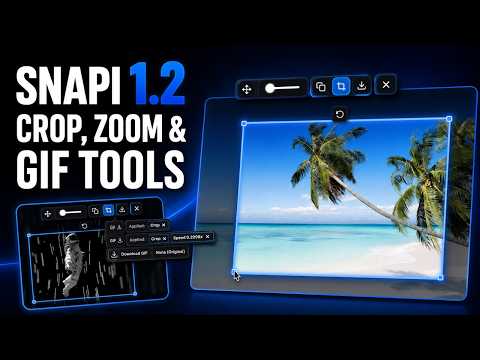
Hover media to copy, crop, download, zoom, scrub GIFs, capture frames, or record videos as GIFs.
Snapi adds a small toolbar to images, GIFs, and videos when you hover over them. You can copy, crop, download, zoom, capture frames, and record GIFs without using right-click menus or looking through the page source. WHAT’S NEW IN 1.2.0 • Added a crop tool. You can drag any side by itself or drag a corner to resize two sides at the same time. • You can also click and drag inside the crop to move the whole crop area. • The crop follows the current size and position of the media while you zoom or move it. • If you zoom out and part of the crop moves outside the media, Snapi brings that edge back to the media. • The crop reset button restores the crop to the media’s current size and position. It then keeps following the media until you manually change the crop again. • The download menu now tells you what will be applied before you download. • PNG downloads can include Crop and Zoom. • GIF downloads can include Crop, Zoom, and Speed. • ORG always downloads the original file without changing it. • Each Crop, Zoom, and Speed label has its own reset button. This lets you remove one change without resetting everything else. • GIF downloads now match the speed shown in the preview. This also works better with very fast GIFs. • You can use the mouse wheel to zoom while the pointer is inside the crop. • GIFs keep playing while you adjust the crop. • The toolbar stays above the dark crop overlay, so the buttons remain easy to see. • Added a separate Crop toggle in the popup. • Fixed the popup toggles so they respond correctly. • Turning off the Zoom slider now fully hides it. This also applies inside the enlarged viewer. • Fixed slider spacing on websites that use their own slider styles. • Added extra download protection. A website cannot directly use Snapi’s internal download page. • Snapi can now handle fetched images up to 100 MB. • Added support for English, Spanish, French, German, Brazilian Portuguese, Japanese, and Korean. Snapi follows the language used by Chrome. ---------------------------------------------------------- WHAT IT DOES • Copy Copies an image to your clipboard as a PNG. Snapi tries to find the best version of the image available. This can include srcset images, lazy-loaded images, and linked originals. If you applied Crop or Zoom, the copied image will include those changes. • Crop Click the Crop button to show a crop area around the image or GIF. Drag one side to resize it. Drag a corner to resize two sides. Or drag inside the crop to move the whole area. The crop stays inside the media. GIFs also keep playing while you adjust it. • Download The Download button opens a small menu with up to three choices: PNG saves the image with the current Crop and Zoom. GIF saves animated media with the current Crop, Zoom, and playback Speed. ORG downloads the original file without applying any changes. The menu shows what will be applied before you download. You can also remove Crop, Zoom, or Speed directly from the menu. • Zoom Use the slider or mouse wheel to zoom up to 20x. You can drag the image to move it after zooming. Double-click the image to reset the zoom. • Enlarge Opens the media in a full-screen viewer with a dark background. The same Copy, Crop, Download, Zoom, and GIF tools still work there. You can also use the move handle to place the toolbar anywhere on the screen. The toolbar returns to its normal position when you close the viewer. • GIF controls Pause a GIF and move through it one frame at a time. You can also slow it down or speed it up. The GIF download uses the speed shown in the preview. Animated WebP and PNG files are also supported when Chrome can read their frames. • Video capture Captures the current video or canvas frame as an image. • GIF recording Records the frames shown by a video or canvas animation and turns them into a GIF. Click Record to start. Click it again to stop. You can choose the recording frame rate in the Snapi popup. Recording also works with many embedded players. If a video blocks direct frame capture, Snapi tells you and switches to a 2 FPS screen-capture method. • Controls Open the Snapi popup to: • Turn Snapi on or off for the current website • Show or hide individual tools • Change the GIF recording frame rate • Choose from nine toolbar positions PRIVACY Snapi does not collect your data. There are no analytics, accounts, tracking tools, or external servers. Images go to your clipboard or Downloads folder. They are not uploaded anywhere by Snapi. Cropping, zooming, GIF processing, frame capture, and recording happen inside your browser. Your Snapi settings are stored with Chrome sync so they can stay the same across your Chrome installations.
5 out of 51 rating
Details
- Version1.2.0
- UpdatedAugust 2, 2026
- Offered bySnapi
- Size88.62KiB
- Languages7 languages
- Developer
Email
qenahub@gmail.com - Non-traderThis developer has not identified itself as a trader. For consumers in the European Union, please note that consumer rights do not apply to contracts between you and this developer.
Privacy

This developer declares that your data is
- Not being sold to third parties, outside of the approved use cases
- Not being used or transferred for purposes that are unrelated to the item's core functionality
- Not being used or transferred to determine creditworthiness or for lending purposes
Support
For help with questions, suggestions, or problems, please open this page on your desktop browser