

SnapFlow - Screenshot & Recorder

Overview
Professional screenshot, screen recorder, annotation, image editor & Google Drive upload
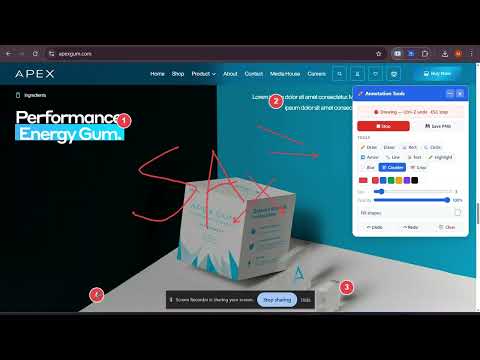
SnapFlow is an all-in-one Chrome extension for capturing screenshots, recording your screen, annotating content, and saving files directly to Google Drive — all from your browser. Designed for developers, designers, students, and creators, SnapFlow provides a complete visual toolkit for productivity and collaboration. 🔹 Key Features: • Screenshot Capture Capture visible area, full page, or selected region with precision. • Screen Recording Record your screen with multiple resolution and FPS options, including audio and camera overlay. • Annotation Tools Draw, highlight, and annotate directly on web pages or captured images. • Image Editor Edit, crop, and enhance screenshots in a dedicated editor. • Google Drive Integration Upload screenshots and recordings directly to your Drive using secure Google OAuth. • AutoScroll Recording Automatically scroll pages while recording — perfect for demos and walkthroughs. • Automation Tools Auto-upload captures to Drive and copy images instantly to clipboard. 🔹 Supported Formats: Screenshots: PNG, JPG, WebP, PDF Recordings: WebM, MP4 🔹 Perfect For: • Developers and QA testers • UI/UX designers • Content creators • Students and professionals 🔹 Privacy First SnapFlow does not collect or store any personal data. All processing happens locally in your browser. Google Drive access is limited to files created by the extension only. Boost your productivity with SnapFlow — your all-in-one screenshot and recording solution.
0 out of 5No ratings
Details
- Version3.0.0
- UpdatedApril 5, 2026
- Offered bymedkonxapps
- Size196KiB
- LanguagesEnglish
- DeveloperAman Dastageer Boral
Diamond Welfer So. Chawl No.4, Room No.1. Joseph Patel Road Gate no 7 Malwani Malad west Mumbai, Maharashtra 400095 INEmail
medkonxapps@gmail.comPhone
+91 99301 50047 - TraderThis developer has identified itself as a trader per the definition from the European Union and committed to only offer products or services that comply with EU laws.
Privacy

SnapFlow - Screenshot & Recorder has disclosed the following information regarding the collection and usage of your data. More detailed information can be found in the developer's privacy policy.
SnapFlow - Screenshot & Recorder handles the following:
This developer declares that your data is
- Not being sold to third parties, outside of the approved use cases
- Not being used or transferred for purposes that are unrelated to the item's core functionality
- Not being used or transferred to determine creditworthiness or for lending purposes