

SnapFind – Search by Image

Overview
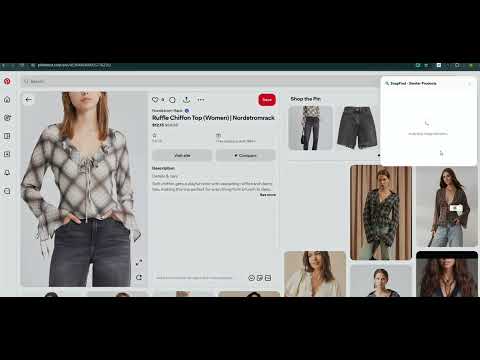
Search by image to find similar clothes and products online. Right-click a web image or capture an area to discover matches.
Find similar clothes and products from pictures with SnapFind, a visual product search tool for things you see online. Start with an item on a webpage—even when you don’t know its name—and browse visual matches in an on-page panel. SEARCH BY IMAGE IN TWO WAYS • Right-click a web image and choose “Search image with SnapFind.” • Click the SnapFind toolbar icon and drag to select part of the visible webpage. Focus on a jacket, pair of shoes, accessory, or another item within a larger picture. EXPLORE SIMILAR PRODUCTS See matching images, product titles, sources, and prices when available. Open a result link to check the details at its source. Product names, store names, prices, and links appear as provided by the results; SnapFind does not translate these shopping details. AI STYLE ANALYSIS IN YOUR LANGUAGE AI analysis runs with your search. For fashion images, explore style tags, color palettes, garment features, and suggested occasions. Use these suggestions for outfit inspiration; AI can make mistakes. The interface, right-click menus, and AI style insights follow your Chrome language. Supported languages are English, Simplified Chinese, Traditional Chinese, Japanese, Spanish, and German. Other languages fall back to English. 10 FREE SEARCHES, WITH AN OPTIONAL BONUS Start with 10 free searches in total, with no daily reset. Searches that fail or return no matches do not use your free allowance. AI analysis is included with your search, with no separate charge or extra search credit. Use Share on X to unlock 5 more free searches once. The bonus is added when you start the sharing action; you do not need to finish publishing the post. Lifetime Pro unlocks unlimited searches and AI style analysis with a one-time purchase. SnapFind currently shows $4.99 (USD); check the final price at Gumroad checkout. ONLINE PROCESSING AND WHAT TO EXPECT An internet connection is required. Image URLs or the webpage image areas you select are sent to online services for product image search and AI analysis. Capture works within supported webpages, not across your entire desktop. Matches, prices, and product availability can change. An exact match is not guaranteed, some result pages may not offer a purchase option, and not every website is supported. SnapFind is designed to help you explore similar products, not identify an image’s original source. Support: fishglobal.net@gmail.com
0 out of 5No ratings
Details
- Version1.1.2
- UpdatedOctober 23, 2026
- Offered byfishglobal.net
- Size36.89KiB
- Languages6 languages
- Developer
Email
fishglobal.net@gmail.com - Non-traderThis developer has not identified itself as a trader. For consumers in the European Union, please note that consumer rights do not apply to contracts between you and this developer.
Privacy

SnapFind – Search by Image has disclosed the following information regarding the collection and usage of your data. More detailed information can be found in the developer's privacy policy.
SnapFind – Search by Image handles the following:
This developer declares that your data is
- Not being sold to third parties, outside of the approved use cases
- Not being used or transferred for purposes that are unrelated to the item's core functionality
- Not being used or transferred to determine creditworthiness or for lending purposes
Support
For help with questions, suggestions, or problems, visit the developer's support site