Item logo image for Snap Trace

Snap Trace

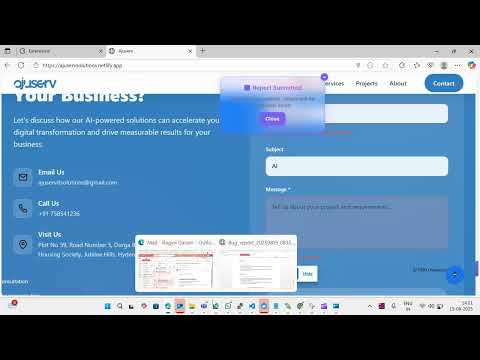
Item media 4 (screenshot) for Snap Trace
Item video thumbnail
Item media 2 (screenshot) for Snap Trace
Item media 3 (screenshot) for Snap Trace
Item media 4 (screenshot) for Snap Trace
Item video thumbnail
Item media 2 (screenshot) for Snap Trace
Item media 3 (screenshot) for Snap Trace
Item media 4 (screenshot) for Snap Trace

Overview

Capture, track, and report bugs effortlessly with automated screenshot recording and intelligent error detection.

Snap Trace streamlines bug reporting for developers, QA teams, and users by automatically capturing screenshots and generating professional bug reports. 🚀 Key Features: • Screenshot Capture - Record bug occurrences with automatic 2-second intervals • Smart Detection - Automatically captures page URL, browser info, and error context • Professional Reports - Generates formatted Word documents with all bug details • Email Identity - Optional "Reported by" field using Chrome profile email • Privacy-Focused - Data collected only when you submit, with clear privacy notices 🔧 How It Works: 1. Click the Snap Trace icon when you encounter a bug 2. Start capture to record screenshots automatically 3. Stop when you've captured the issue 4. Add optional description of what went wrong 5. Submit to generate and send the bug report 🔒 Privacy & Security: • No background data collection • Email used only for report identification (not stored) • All data transmission via HTTPS • No OAuth or third-party logins required • Clear privacy notice: "Used only for tagging Word document • Not stored" 📊 Perfect For: • Software Development Teams • QA and Testing Professionals • Customer Support Teams • Anyone who needs to report bugs clearly ⚡ Benefits: • Save hours on bug documentation • Ensure consistent bug reports • Improve developer-tester communication • Reduce back-and-forth clarifications Snap Trace respects your privacy while making bug reporting simple and professional. Try it today to streamline your bug tracking workflow!

Details

  • Version
    3.0.0
  • Updated
    September 4, 2025
  • Offered by
    ajuservitsolutions
  • Size
    139KiB
  • Languages
    English
  • Developer
    Email
    ajuservitsolutions@gmail.com
  • Non-trader
    This developer has not identified itself as a trader. For consumers in the European Union, please note that consumer rights do not apply to contracts between you and this developer.

Privacy

Snap Trace has disclosed the following information regarding the collection and usage of your data. More detailed information can be found in the developer's privacy policy.

Snap Trace handles the following:

Personally identifiable information
Location
Website content

This developer declares that your data is

  • Not being sold to third parties, outside of the approved use cases
  • Not being used or transferred for purposes that are unrelated to the item's core functionality
  • Not being used or transferred to determine creditworthiness or for lending purposes

Support

For help with questions, suggestions, or problems, visit the developer's support site

Related

Twitch Auto Refresh Plus

4.3

Automatically refreshes Twitch.tv streams during connection issues. Smart detection and custom settings for uninterrupted viewing.

BetterBugs: A Fresh Approach to Bug Reporting

4.9

Catch, report and fix bugs faster.

Birdie

4.2

Record your screen, capture logs, and document repro steps—all in one click. Simplify bug reporting and speed up issue resolution.

Capture: Screen recording & sharing

4.9

Capture videos, screenshots, events and more to report bugs faster.

Stark Accessibility Checker

3.8

Find and fix compliance issues in record time with automated checks and smart suggestions.

Capture - Instant bug reports

5.0

The fastest way to create bug reports from your website.

Redpen: Report bugs with screenshot/recording

5.0

Capture screenshot and record screen to report bugs and visual feedback.

Console Copy Tool

5.0

Automatically captures and copies formatted console messages from Chrome DevTools

Disbug: Superior bug reporting

5.0

Report bugs with technical logs, screencasts and screenshots and post directly to your favorite project management tool.

meetXcc: AI Meeting Notes for Google Meet

4.5

Automated meeting documentation via transcripts, summaries and intuitive AI-generated mind maps.

Browster: AI Assistant & Performance/RAM Optimizer

4.6

Your intelligent browser assistant. Optimizes memory, freezes inactive tabs, and automates tasks with AI.

BrowserStack Bug Capture: Report & resolve bugs faster

4.8

Bug reporting tool with shareable screen recordings & screenshots for faster debugging.

Twitch Auto Refresh Plus

4.3

Automatically refreshes Twitch.tv streams during connection issues. Smart detection and custom settings for uninterrupted viewing.

BetterBugs: A Fresh Approach to Bug Reporting

4.9

Catch, report and fix bugs faster.

Birdie

4.2

Record your screen, capture logs, and document repro steps—all in one click. Simplify bug reporting and speed up issue resolution.

Capture: Screen recording & sharing

4.9

Capture videos, screenshots, events and more to report bugs faster.

Stark Accessibility Checker

3.8

Find and fix compliance issues in record time with automated checks and smart suggestions.

Capture - Instant bug reports

5.0

The fastest way to create bug reports from your website.

Redpen: Report bugs with screenshot/recording

5.0

Capture screenshot and record screen to report bugs and visual feedback.

Console Copy Tool

5.0

Automatically captures and copies formatted console messages from Chrome DevTools

Google apps