

Snap Schedule
평점 2개
)
개요
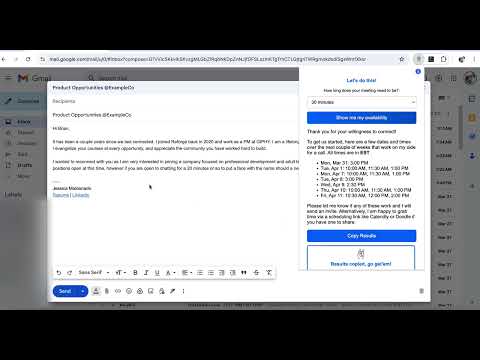
Instantly generates a list of available time slots from your Google Calendar.
Snap Schedule – The Smarter Way to Share Your Availability ✨ 🚀 Why Snap Schedule? Sometimes, dropping a scheduling link like Calendly is awesome, but feels impersonal—especially when you're the one asking for time. Snap Schedule makes it effortless to grab and share your availability without bouncing between your calendar and email. Quickly generate formatted time slots, copy them with one click, and paste them wherever you need. No friction, no digging through your calendar—just instant availability at your fingertips. Keep it simple. Keep it seamless. Try Snap Schedule today! 🚀 🔹 How It Works 1️⃣ Click the Snap Schedule icon in your browser. 2️⃣ Select your preferred meeting duration (15, 20, 30, 45, 60, or 90 minutes). 3️⃣ After the one-time calendar authentication, Snap Schedule scans your and pulls only your real availability! No double-booked slots, no manual searching. 4️⃣ Click "Copy Results" and paste it directly into an email, message, or anywhere else. 5️⃣ No extra steps, no scheduling headaches. Just a clear, fast answer to "When are you free?" ✨ What Makes Snap Schedule Different? ✅ Selects a variety of dates within a two week timeframe. Designed for variety and an organic feel, like you pulled these options yourself! ✅ Auto-Formatted Results – Ready to paste into emails, Slack, LinkedIn, or anywhere else. ✅ Custom Meeting Durations – Choose how much time you want to offer (15 to 90 mins). ✅ Smart Availability Detection – Only shows truly free slots, spaced naturally throughout your day. ✅ Works Anywhere – Use Snap Schedule even when you're on a call, drafting an email, or in a meeting. 📌 Who Needs Snap Schedule? 🔹 Networking professionals trying to request the favor of time from other busy professionals 🔹 Anyone who just need to quickly know when they are free! 🔹 Busy professionals who don’t have time to manually check their calendar. 🔹 Sales & recruiters who want to send quick availability without making the recipient pick a slot. 🔹 Anyone who wants a more natural way to schedule meetings. Currently, we define "free time" based on the following criteria: 1️⃣ Business Hours Window → We search for availability between 10:00 AM - 4:30 PM on weekdays. Weekends are excluded (Saturday & Sunday). 2️⃣ Checking for Event Conflicts → We fetch events from the user's primary Google Calendar. Any slot that overlaps with an event is skipped. If an event is marked as "Busy," that time is considered unavailable. 3️⃣ Generating Time Slots → We start at 10:00 AM each available day. We find the first free slot and then jump 1.5 hours ahead to find the next slot. This prevents back-to-back meetings and spaces out availability. We stop searching at 4:30 PM each day. 4️⃣ Limit on Available Time Slots Per Day → We return a maximum of 3 free slots per day (this avoids overwhelming options). If fewer than 3 slots are available, we return what we can find. 🔒 Private & Secure Snap Schedule only reads your availability—it never edits or modifies your Google Calendar. Your data stays yours. 📥 Get Snap Schedule Today! Next time someone asks, “When are you free?”, don’t scramble—just Snap Schedule it. 👉 Click “Add to Chrome” to install now!
5점 만점에 5점평점 2개
세부정보
- 버전1.0
- 업데이트됨2025년 4월 2일
- 제공JGMaldonado424
- 크기23.0KiB
- 언어English
- 개발자
이메일
jgmaldonado424@gmail.com - 비판매자판매자로 식별되지 않은 개발자입니다. 유럽 연합에 거주하는 소비자의 경우, 이 개발자와 체결한 계약에 대해서는 소비자 권리가 적용되지 않을 수 있음을 유의해야 합니다.
개인정보 보호

Snap Schedule에서 데이터 수집 및 사용과 관련하여 다음 정보를 공개했습니다. 더 자세한 정보는 개발자의 privacy policy을 참고하세요.
Snap Schedule 항목은 다음을 처리합니다.
개발자가 사용자 데이터에 관해 다음과 같이 선언했습니다
- 승인된 사용 사례를 제외하고 서드 파티에 판매하지 않음
- 항목의 핵심 기능과 관련 없는 목적으로 사용하거나 전송하지 않음
- 신용도 판단 또는 대출 목적으로 사용하거나 전송하지 않음
지원
질문, 제안 또는 문제와 관련하여 도움이 필요하면 데스크톱 브라우저에서 이 페이지를 여세요.