

Snabby
4 ratings
)
Overview
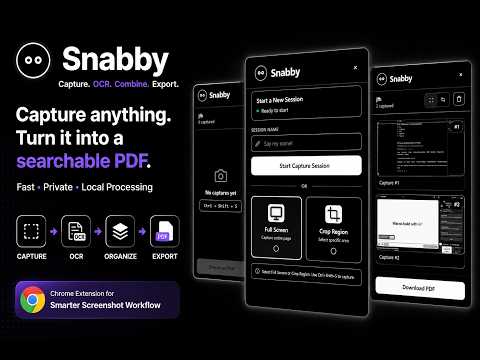
Snabby lets you capture screenshots from any webpage across multiple tabs and combine them into a PDF. In a click!
Snabby is a screenshot capture and PDF productivity tool for your browser. Capture important content from webpages, organize multiple screenshots into a single session, extract text automatically with OCR, and export your captures as a searchable PDF. What you can do with Snabby: • Capture your screen — Quickly capure the current webpage using the keyboard shortcut [ ctrl + shift + s ] same for MAC users control(^) + shift + s . • Capture a specific region — Select and capture only the part of the webpage you need. • Organize captures into sessions — Keep multiple screenshots together in the order you captured them. • Automatic OCR — Snabby extracts text from captured screenshots and preserves word-level positioning for searchable PDFs. • Create searchable PDFs — Combine your captures into a single PDF while retaining an invisible selectable text layer when OCR is available. • Export instantly — Download your completed PDF directly from the Snabby panel. • Preview your captures — Review screenshots before exporting them. • Works across webpages — Capture content while browsing without leaving the current page. Designed for fast workflows Snabby is useful for students, researchers, developers, and anyone who frequently needs to collect information from webpages and turn it into an organized document. Capture → organize → extract text → export. Privacy Snabby is designed to process your captures locally in the browser. Your screenshots and OCR data are not intentionally uploaded to a Snabby backend.
5 out of 54 ratings
Details
- Version1.0.2
- UpdatedAugust 31, 2026
- Offered byAvishkar
- Size19.27MiB
- LanguagesEnglish
- Developer
Email
avishkarc600@gmail.com - Non-traderThis developer has not identified itself as a trader. For consumers in the European Union, please note that consumer rights do not apply to contracts between you and this developer.
Privacy

Snabby has disclosed the following information regarding the collection and usage of your data. More detailed information can be found in the developer's privacy policy.
Snabby handles the following:
This developer declares that your data is
- Not being sold to third parties, outside of the approved use cases
- Not being used or transferred for purposes that are unrelated to the item's core functionality
- Not being used or transferred to determine creditworthiness or for lending purposes
Support
For help with questions, suggestions, or problems, please open this page on your desktop browser