

Smartest Dark Mode for Google Docs

Overview
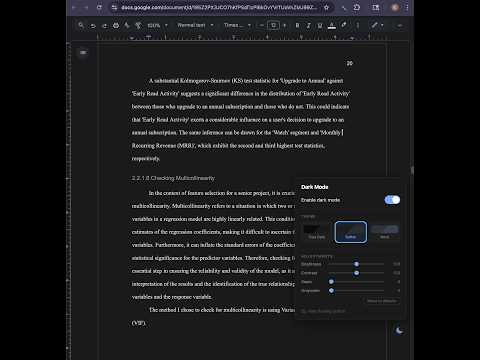
4 presets, saveable profiles, floating toggle, auto-schedule, print-safe.
What makes us different: • 4 handcrafted presets — True Dark, Softer Dark, Nord, and Vintage. Fine-tune each with brightness, contrast, sepia, and grayscale sliders. • Floating in-page toggle — switch dark mode without touching the toolbar. • Save-able profiles — save your favorite adjustment combinations and switch between them instantly. • Auto-schedule — automatically enables at sunset and disables at sunrise, or set a custom time range. • Highly customizable — adjust the look exactly how you want and create your own perfect dark mode. • Print-safe — dark mode auto-disables when you print or export to PDF, so your documents look perfect. • Minimal permissions — we only use "storage". No access to your browsing data, no access to other websites.
0 out of 5No ratings
Details
- Version1.2.0
- UpdatedMarch 6, 2026
- FeaturesOffers in-app purchases
- Offered bytzhang808
- Size37.68KiB
- LanguagesEnglish
- Developer
Email
tzhang808@gmail.com - Non-traderThis developer has not identified itself as a trader. For consumers in the European Union, please note that consumer rights do not apply to contracts between you and this developer.
Privacy

This developer declares that your data is
- Not being sold to third parties, outside of the approved use cases
- Not being used or transferred for purposes that are unrelated to the item's core functionality
- Not being used or transferred to determine creditworthiness or for lending purposes
Support
For help with questions, suggestions, or problems, please open this page on your desktop browser