Item logo image for Smart Translation

Smart Translation

5.0(

1 rating

)
ExtensionEducation15 users
Item media 5 (screenshot) for Smart Translation
Item media 1 (screenshot) for Smart Translation
Item media 2 (screenshot) for Smart Translation
Item media 3 (screenshot) for Smart Translation
Item media 4 (screenshot) for Smart Translation
Item media 5 (screenshot) for Smart Translation
Item media 1 (screenshot) for Smart Translation
Item media 2 (screenshot) for Smart Translation
Item media 3 (screenshot) for Smart Translation
Item media 4 (screenshot) for Smart Translation
Item media 5 (screenshot) for Smart Translation

Overview

免费的双语对照翻译插件。支持全局翻译与 CEFR(A1-C2) 分级翻译,让每一次浏览都是学习的机会。

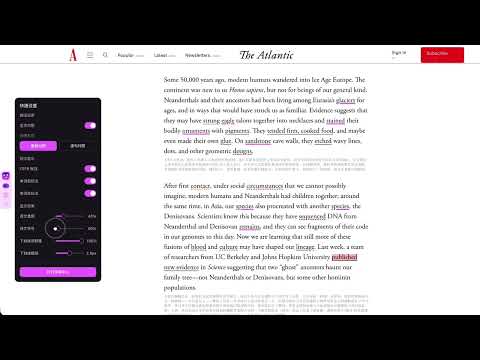
Smart Translation - 让浏览变成学习 Smart Translation 是一款免费的双语对照翻译扩展,专为语言学习者设计。它不仅提供高质量的翻译服务,更通过创新的 CEFR 分级翻译功能,帮助你根据自己的语言水平逐步提升阅读能力。 🌟 核心功能 1. 双语对照翻译 在保留原文的同时显示翻译,兼顾理解与学习。支持中文、英文、日语、韩语之间的互译,实时翻译,不打断阅读流程。 2. CEFR 分级翻译(A1-C2) 根据你的语言水平智能选择翻译内容: • 初学者(A1-A2):翻译更多基础词汇,降低阅读门槛 • 中级学习者(B1-B2):平衡翻译与原文,逐步提升 • 高级学习者(C1-C2):只翻译复杂词汇,挑战更高水平 • 可调节难度偏移(-1 到 +2),个性化学习体验 3. 两种翻译模式 • 全局模式:快速理解,翻译所有内容 • 智能模式:按 CEFR 等级选择性翻译,更适合学习 4. 浮动翻译组件 轻量级交互设计,不干扰阅读。可随时开启/关闭,灵活控制。 5. 单词本功能 双击网页上的单词即可保存到单词本,支持发音和复习,巩固学习成果。本地存储,保护隐私。 6. 个性化设置 多种主题(自动/浅色/深色/玻璃效果),支持多语言界面(中文、英文、日语、韩语),右键菜单快速切换。 🎯 适用人群 • 语言学习者:想要通过阅读真实网页内容提升语言水平 • 词汇积累者:在阅读中收集生词,建立个人词汇库 • 日常使用者:需要快速理解双语内容的用户 💡 使用场景 • 阅读英文新闻、博客、技术文档 • 学习外语网站内容 • 浏览社交媒体和论坛 • 学习专业领域的文章 🔒 隐私保护 所有设置和单词本数据存储在本地,翻译请求通过安全的后端 API 处理,不收集个人身份信息,完全免费,无广告。 ⚙️ 技术特性 基于 Manifest V3,安全可靠。支持所有网站,轻量级设计,不影响浏览器性能。智能回退机制,确保服务稳定。 📚 开始使用 1. 安装扩展后,点击工具栏图标打开设置 2. 选择翻译模式:全局或智能 3. 在智能模式下,设置你的 CEFR 等级和难度偏移 4. 开始浏览网页,享受双语对照学习体验 5. 双击单词保存到单词本,随时复习 🔄 持续更新 我们持续改进产品,添加新功能和优化用户体验。如果你有任何建议或遇到问题,欢迎通过支持页面联系我们。 Smart Translation - Turn Browsing into Learning Smart Translation is a free bilingual translation extension designed for language learners. It not only provides high-quality translation services but also helps you gradually improve your reading skills through innovative CEFR level-based translation that matches your current language proficiency. 🌟 Core Features 1. Bilingual Side-by-Side Translation Display translations while keeping the original text for both comprehension and learning. Support translation between Chinese, English, Japanese, and Korean. Real-time translation without interrupting your reading flow. 2. CEFR Level-Based Translation (A1-C2) Intelligently select translation content based on your language level: • Beginners (A1-A2): Translate more basic vocabulary to lower reading barriers • Intermediate learners (B1-B2): Balance translation and original text for gradual improvement • Advanced learners (C1-C2): Translate only complex vocabulary for higher challenges • Adjustable difficulty offset (-1 to +2) for personalized learning experience 3. Two Translation Modes • Global Mode: Quick understanding with full translation • Smart Mode: Selective translation based on CEFR levels, better for learning 4. Floating Translation Widget Lightweight interaction design that doesn't interfere with reading. Can be enabled/disabled anytime for flexible control. 5. Wordbook Feature Double-click any word on web pages to save it to your wordbook. Support pronunciation and review to consolidate learning. Local storage for privacy protection. 6. Personalized Settings Multiple themes (Auto/Light/Dark/Glass effect), multi-language interface (Chinese, English, Japanese, Korean), right-click menu for quick toggles. 🎯 Who It's For • Language learners who want to improve through reading real web content • Vocabulary builders who collect new words while reading • Daily users who need quick bilingual understanding 💡 Use Cases • Reading English news, blogs, and technical documentation • Learning content from foreign language websites • Browsing social media and forums • Studying articles in specialized fields 🔒 Privacy Protection All settings and wordbook data stored locally. Translation requests processed through secure backend API. No personal information collection. Completely free, no ads. ⚙️ Technical Features Built on Manifest V3 for security and reliability. Works on all websites. Lightweight design that doesn't affect browser performance. Smart fallback mechanism ensures stable service. 📚 Getting Started 1. After installation, click the toolbar icon to open settings 2. Choose translation mode: Global or Smart 3. In Smart mode, set your CEFR level and difficulty offset 4. Start browsing and enjoy bilingual learning experience 5. Double-click words to save to wordbook for review 🔄 Continuous Updates We continuously improve the product by adding new features and optimizing user experience. If you have any suggestions or encounter issues, please contact us through the support page.

Details

  • Version
    1.0.0
  • Updated
    January 12, 2026
  • Offered by
    URANUS
  • Size
    103KiB
  • Languages
    English (United States)
  • Developer
    Email
    chetesy@gmail.com
  • Non-trader
    This developer has not identified itself as a trader. For consumers in the European Union, please note that consumer rights do not apply to contracts between you and this developer.

Privacy

Manage extensions and learn how they're being used in your organization
The developer has disclosed that it will not collect or use your data. To learn more, see the developer’s privacy policy.

This developer declares that your data is

  • Not being sold to third parties, outside of the approved use cases
  • Not being used or transferred for purposes that are unrelated to the item's core functionality
  • Not being used or transferred to determine creditworthiness or for lending purposes
Google apps
