Item logo image for Smart Search

Smart Search

Featured
3.0(

2 ratings

)
Item media 2 (screenshot) for Smart Search
Item media 3 (screenshot) for Smart Search
Item video thumbnail
Item media 2 (screenshot) for Smart Search
Item media 3 (screenshot) for Smart Search
Item video thumbnail
Item media 2 (screenshot) for Smart Search
Item video thumbnail
Item media 2 (screenshot) for Smart Search
Item media 3 (screenshot) for Smart Search

Overview

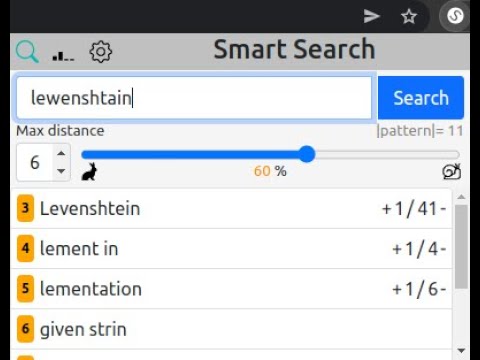
Better than Ctrl+F. It shows also similar matches. Shortkey: Ctrl+Shift+F

IMPORTANT: To ensure the compatibility of this extension, it NEEDS TO BE TESTED ON ANOTHER WEBSITE. This is necessary because certain sites (like this) and their security measures may prevent the extension from accessing and reading their content. The extension serves as a replacement for the built-in Ctrl+F search functionality, offering the additional capability to find similar matches, starting with the closest matches. With this extension, misspellings are no longer an issue. It can handle slight variations and still locate the intended search pattern. Moreover, there are no limitations on the length of the search pattern.

Details

  • Version
    0.2
  • Updated
    June 28, 2023
  • Offered by
    Mateusz Wojciechowski
  • Size
    1014KiB
  • Languages
    English
  • Developer
    Email
    mwojciechowski296@gmail.com
  • Non-trader
    This developer has not identified itself as a trader. For consumers in the European Union, please note that consumer rights do not apply to contracts between you and this developer.

Privacy

The developer has disclosed that it will not collect or use your data.

This developer declares that your data is

  • Not being sold to third parties, outside of the approved use cases
  • Not being used or transferred for purposes that are unrelated to the item's core functionality
  • Not being used or transferred to determine creditworthiness or for lending purposes

Related

Ctrl+F AI

0.0

Supercharge Your Browsing Experience.

Smart Search

0.0

Smart Search helps find information on Google easier by utilizing Google search tricks

Find Lite

3.0

Find Lite is a simple extension that allows you to search for text on the current page.

Supersearch

3.9

This plugin enables you to fulltext-supersearch all your tabs. Find more on https://gitlab.com/Schuemann/chrome-supersearch

Locus — Smart CTRL + F

3.6

AI-powered CTRL + F for easy document search

Findr | A better Ctrl + F

1.0

Like Ctrl + F, but with the features you wish it had

Ctrl-F Plus: Ctrl + F Search Across All Tabs

3.9

Find words and phrases across ALL your open tabs! 🔍

Better Ctrl+F

4.3

An enhanced version of the default Ctrl+F.

Multi-Finder Pro

2.0

Find and highlight multiple words on a webpage.

Find on Page Pro | Multi-Keyword & Highlight

4.0

Find and hghlight multiple keywords with custom colors

Find whatever - regex & auto re-find

4.8

Enhance your browser's find capabilities.Case recognition、Word recognition、regular expressions、Listen for DOM changes in real time

Ctrl-F GPT

3.6

An extension enabling multiple types of searches for highlighting matches on a web page, in place of Chrome's CTRL+F.

Ctrl+F AI

0.0

Supercharge Your Browsing Experience.

Smart Search

0.0

Smart Search helps find information on Google easier by utilizing Google search tricks

Find Lite

3.0

Find Lite is a simple extension that allows you to search for text on the current page.

Supersearch

3.9

This plugin enables you to fulltext-supersearch all your tabs. Find more on https://gitlab.com/Schuemann/chrome-supersearch

Locus — Smart CTRL + F

3.6

AI-powered CTRL + F for easy document search

Findr | A better Ctrl + F

1.0

Like Ctrl + F, but with the features you wish it had

Ctrl-F Plus: Ctrl + F Search Across All Tabs

3.9

Find words and phrases across ALL your open tabs! 🔍

Better Ctrl+F

4.3

An enhanced version of the default Ctrl+F.

Google apps