

Smart Screen Capture
1 rating
)
Overview
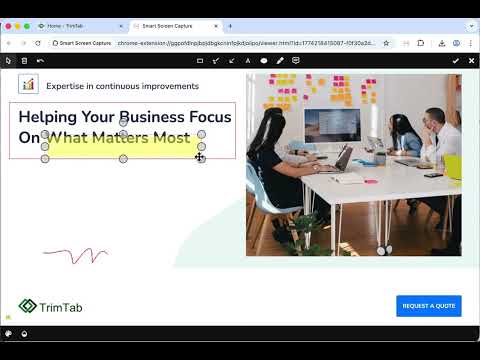
Smart Screen Capture for full-page screenshots with preview, crop, annotate, and download.
Smart Screen Capture helps you capture screenshots quickly and cleanly from the page you are viewing. Use it to capture: • full-page screenshots of webpages • screenshots for bug reports, documentation, research, and support workflows After capture, you can: • preview the screenshot • crop the image • annotate with drawing tools • copy the result to your clipboard • download as PNG • optionally enable PDF export in settings as a trial feature Smart Screen Capture is designed to stay simple: • one-click capture from the active tab • full-page scrolling capture • built-in viewer for editing and exporting • local-first workflow without a required upload step
5 out of 51 rating
Details
- Version1.13
- UpdatedApril 10, 2026
- Offered byTrimTab AB
- Size1.0MiB
- LanguagesEnglish
- DeveloperTrimTab AB
Barkarbyvägen 91, Lgh 1301 Järfälla 177 47 SEEmail
habash@gmail.comPhone
+46 73 376 10 60 - TraderThis developer has identified itself as a trader per the definition from the European Union and committed to only offer products or services that comply with EU laws.
- D-U-N-S353050488
Privacy

Smart Screen Capture has disclosed the following information regarding the collection and usage of your data. More detailed information can be found in the developer's privacy policy.
Smart Screen Capture handles the following:
This developer declares that your data is
- Not being sold to third parties, outside of the approved use cases
- Not being used or transferred for purposes that are unrelated to the item's core functionality
- Not being used or transferred to determine creditworthiness or for lending purposes
Support
For help with questions, suggestions, or problems, visit the developer's support site