Item logo image for Smart Previewer by Adzymic

Smart Previewer by Adzymic

adzymic.co
5.0(

2 ratings

)
Item media 5 (screenshot) for Smart Previewer by Adzymic
Item video thumbnail
Item media 2 (screenshot) for Smart Previewer by Adzymic
Item media 3 (screenshot) for Smart Previewer by Adzymic
Item media 4 (screenshot) for Smart Previewer by Adzymic
Item media 5 (screenshot) for Smart Previewer by Adzymic
Item video thumbnail
Item media 2 (screenshot) for Smart Previewer by Adzymic
Item media 3 (screenshot) for Smart Previewer by Adzymic
Item media 4 (screenshot) for Smart Previewer by Adzymic
Item media 5 (screenshot) for Smart Previewer by Adzymic

Overview

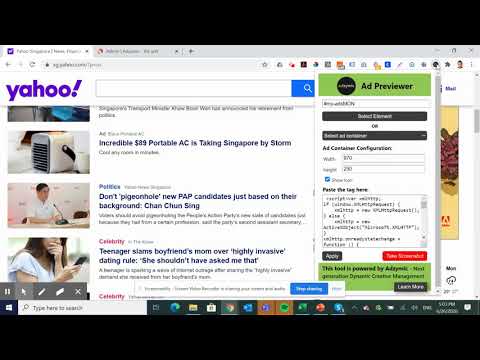
Smart Previewer allows users to preview display ad on live environment by replacing existing ad slot with creative tag.

Save time on doing screenshots on how the ad looks like in real publisher's environment. . Rather than relying on manually doing screenshot and replacing the ad using photo editor, using Adzymic Smart Previewer is fast and easy. You can now use Adzymic Smart Previewer to preview creative tags on any live websites, by easy selection of elements and ad container. Once done, you can download the screenshot. This Chrome extension allows user to select the ad container of a particular web page and replace it with a creative ad tag. User can specify the dimension of the ad. Once the creative ad tag is placed, the ad will be shown on the selected ad container. User can then take a screenshot and download the screenshot as png. How to use Select Element - Once selected, the mouse pointer will change to "+". Mouse over and click on area beside any ad slot that you want to replace. OR Select Ad Container - Choose the ad container that you want replace. Our chrome extension scan the list of ad container available for the page. Choose Ad Size - Select the dimension of the ad size you want to replace. e.g. 300x250, 970x250. Show Icon - Select this if you would like to display "Ad Choice" icon. Paste the Tag - Paste creative tag here. We accept any creative tags. Click on Apply. Once apply, you should see the existing ad replace with the ad that you inserted. Take a Screenshot - Click on this button to download the screenshot of the page rendered with the new ad.

Details

  • Version
    2.0
  • Updated
    March 7, 2025
  • Size
    22.82KiB
  • Languages
    English
  • Developer
    Website
    Email
    support@adzymic.co
  • Non-trader
    This developer has not identified itself as a trader. For consumers in the European Union, please note that consumer rights do not apply to contracts between you and this developer.

Privacy

The developer has disclosed that it will not collect or use your data. To learn more, see the developer’s privacy policy.

This developer declares that your data is

  • Not being sold to third parties, outside of the approved use cases
  • Not being used or transferred for purposes that are unrelated to the item's core functionality
  • Not being used or transferred to determine creditworthiness or for lending purposes

Support

Related

Professor Prebid

3.8

Extension to validate your prebid.js setup, list AdUnits and bids, visualise latencies and timings of your webpages header-bidding…

Tag Explorer

4.3

Tag Explorer is designed to simplify and enhance your tag monitoring process.

Sidenote2Obsidian

0.0

Quickly record ideas to Obsidian from Chrome Side Panel

AdTech Ad Inspector

5.0

AdTech Ad Inspector allows you to monitor and view Google Publisher Tag (GPT) ad units and their associated targeting on web pages.

Adwizard

4.6

An industry-leading ad ops extension that allows publishers to view data on their AdExchange and Prebid Ads.

URL Webhook Clipper

5.0

Send URLs, notes, and files via webhook or Airtable with right-click context menu

share spot

5.0

share web content through beautiful picture.

Azerion Ad Expert

5.0

Explore Prebid and GAM auction details for display and video. Check the web page GDPR TCFv2 readiness.

HighlightShare-划线分享

0.0

快速将浏览器选中的文字和图片生成精美卡片

ObservePoint Debugger

4.2

Troubleshoot analytics tags, variables, events, cookies, and more. Supports Adobe Analytics, Google Analytics, and thousands more.

iFinder

0.0

iFinder, a Web search assistant to enhance your search efficiency.

Peek Pop

4.9

A lightweight, open-source browser extension lets you preview, search, and save pages to read later.

Professor Prebid

3.8

Extension to validate your prebid.js setup, list AdUnits and bids, visualise latencies and timings of your webpages header-bidding…

Tag Explorer

4.3

Tag Explorer is designed to simplify and enhance your tag monitoring process.

Sidenote2Obsidian

0.0

Quickly record ideas to Obsidian from Chrome Side Panel

AdTech Ad Inspector

5.0

AdTech Ad Inspector allows you to monitor and view Google Publisher Tag (GPT) ad units and their associated targeting on web pages.

Adwizard

4.6

An industry-leading ad ops extension that allows publishers to view data on their AdExchange and Prebid Ads.

URL Webhook Clipper

5.0

Send URLs, notes, and files via webhook or Airtable with right-click context menu

share spot

5.0

share web content through beautiful picture.

Azerion Ad Expert

5.0

Explore Prebid and GAM auction details for display and video. Check the web page GDPR TCFv2 readiness.

Google apps