


Overview
Mark and highlight any web page with keyboard shortcuts: outline elements, draw areas, and save layouts.
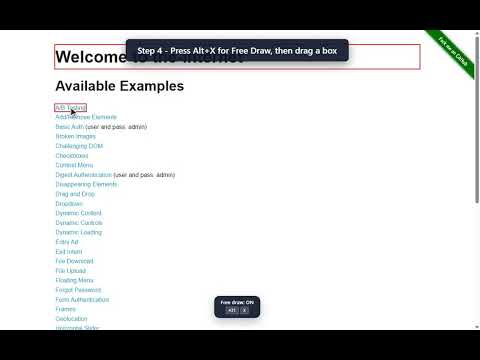
Smart Mark lets you mark and highlight any element or area on a web page using keyboard shortcuts -- no toolbar, no menus, no mouse clicks required. Three marking modes: - Element mode (Alt+Z): hover over any HTML element and press Shift+Z to mark it. - Free draw mode (Alt+X): drag to draw a marker rectangle anywhere on the page. - Merge mode (Alt+Q): click two elements to mark the area spanning between them. Customize your markers: - Six color slots, each independently configurable. - Three shapes: rectangle, oval, diamond. - Adjustable border width, radius, and fit style. - Save a marker layout with Ctrl+Shift+Alt+0-9 and restore it with Alt+0-9 (up to 10 slots per page). More shortcuts: - Ctrl+Z / Ctrl+Y: undo and redo marker actions. - Ctrl+Shift+D: remove a single targeted marker. - Ctrl+Shift+Alt+D: clear all markers on the page. - Ctrl+,: open the popup. Ctrl+Alt+,: open the options page. All shortcuts are rebindable from the options page. Works on any web page. No data is collected. All marker layouts are stored locally (chrome.storage.local) and never transmitted anywhere.
5 out of 51 rating
Details
- Version1.0.0
- UpdatedJune 18, 2026
- Size216KiB
- LanguagesEnglish
- DeveloperWebsite
Email
hoducanh123@outlook.com - Non-traderThis developer has not identified itself as a trader. For consumers in the European Union, please note that consumer rights do not apply to contracts between you and this developer.
Privacy

This developer declares that your data is
- Not being sold to third parties, outside of the approved use cases
- Not being used or transferred for purposes that are unrelated to the item's core functionality
- Not being used or transferred to determine creditworthiness or for lending purposes
Support
For help with questions, suggestions, or problems, visit the developer's support site