


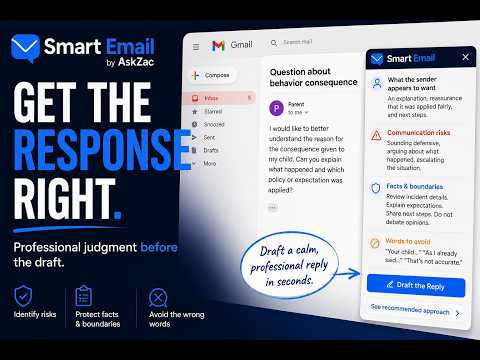
Overview
Draft, analyze, improve, and discuss educator email without leaving Gmail or Google Docs.
Draft, reply, summarize, improve, and discuss email without leaving Gmail or Google Docs. Smart Email by AskZac is an AI email assistant that helps professionals write routine emails faster and think through important communication before they hit Send. Smart Email works directly inside Gmail, so you can draft, reply, summarize, improve, and discuss email without switching tabs or copying conversations into another AI tool. For routine emails, Smart Email saves time. Turn a few bullet points into a complete message, shorten a draft, improve clarity, adjust tone, summarize a conversation, or create a professional reply in seconds. For important emails, Smart Email helps you think through the communication before you respond. Use it when: A client is angry. A colleague misunderstood what happened. You need to give corrective feedback. Your first draft sounds defensive. Someone is asking you to accept blame unfairly. You need to hold a boundary without escalating the situation. The message is important enough that good grammar isn’t enough. More than an AI email writer Most AI email assistants help you write better emails. Smart Email also helps you decide what the message needs to accomplish before you respond. You can ask: “Does this sound defensive?” “What am I missing?” “How can I acknowledge the concern without accepting inaccurate blame?” “What part of this could be misunderstood?” “Should I respond now?” “How can I be firm without sounding hostile?” Smart Email can use the Gmail conversation you choose, your draft, and your instructions to identify communication risks, suggest a response strategy, and draft a response that you can continue refining through conversation with AskZac. A complete response workflow Understand it. Think it through. Write it. Improve it. Send it. Smart Email can help you: Draft complete emails from a few bullets Reply using the selected conversation Improve tone, grammar, clarity, and structure Shorten or expand a draft Summarize lengthy email threads Reduce defensive or emotionally charged language Preserve important facts and boundaries Identify missing context or possible misunderstandings Clarify the next step You remain in control Smart Email does not send emails for you. You review the response, make changes, ask follow-up questions, and decide what gets inserted into Gmail and what gets sent. Smart Email uses only the email conversation or draft you choose to share. It does not scan your entire inbox. For routine emails, save time. For difficult emails, get help before you send something that matters. Before you send it, let AskZac check it first. Draft routine emails quickly and think through difficult responses before you send them. Need help? https://www.askzacai.com/legal/privacy https://www.askzacai.com/legal/terms
0 out of 5No ratings
Details
- Version0.11.1
- UpdatedAugust 5, 2026
- FeaturesOffers in-app purchases
- Size48.1KiB
- LanguagesEnglish (United States)
- DeveloperZahzoe Financial, LLCWebsite
1309 Coffeen Ave Ste 1200 Sheridan, WY 82801-5777 USEmail
support@askzacai.comPhone
+1 617-388-5992 - TraderThis developer has identified itself as a trader per the definition from the European Union and committed to only offer products or services that comply with EU laws.
- D-U-N-S138145413
Privacy

Smart Email has disclosed the following information regarding the collection and usage of your data. More detailed information can be found in the developer's privacy policy.
Smart Email handles the following:
This developer declares that your data is
- Not being sold to third parties, outside of the approved use cases
- Not being used or transferred for purposes that are unrelated to the item's core functionality
- Not being used or transferred to determine creditworthiness or for lending purposes
Support
For help with questions, suggestions, or problems, visit the developer's support site