

Smart Copy — Dev Tools

Overview
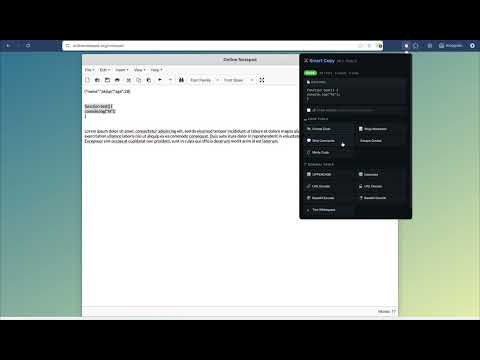
Upgrades copy-paste into something intelligent. Detects what you copied and offers useful developer actions.
Smart Copy — Dev Tools turns your clipboard into a developer Swiss Army knife. Every time you copy text, Smart Copy instantly detects what it is — JSON, URL, color code, CSV, HTML, regex, JWT, Base64, email, IP address, or plain code — and offers one-click actions tailored to that type. What it does: • Detects copied content type automatically • Shows a subtle on-page notification with the detected type • Opens a popup with smart actions when you click the extension icon Actions by type: • JSON — Prettify, minify, generate TypeScript types, convert to HTML table • HTML — Format/prettify, convert tables to JSON • CSV — Convert to JSON • Colors — Hex ↔ RGB ↔ HSL conversion • Code — Format, minify, wrap in markdown code block • URLs — Decode, extract query parameters • Regex — Explain pattern in plain English • Base64 — Decode to plain text • JWT — Decode payload • All types — Character/word count, UPPERCASE, lowercase, trim whitespace Key features: • Works with any copy method — Ctrl+C, right-click copy, and site copy buttons (ChatGPT, Stack Overflow, etc.) • Chain actions — feed the result of one action into the next • Undo support — revert any transformation instantly • Zero permissions beyond clipboard read — no data leaves your browser • Dark theme UI designed for developers No account required. No tracking. No network requests. Everything runs locally in your browser.
0 out of 5No ratings
Details
- Version1.0.0
- UpdatedApril 16, 2026
- Offered bypickzoid
- Size68.72KiB
- LanguagesEnglish
- Developer
Email
pickzoid@gmail.com - Non-traderThis developer has not identified itself as a trader. For consumers in the European Union, please note that consumer rights do not apply to contracts between you and this developer.
Privacy

This developer declares that your data is
- Not being sold to third parties, outside of the approved use cases
- Not being used or transferred for purposes that are unrelated to the item's core functionality
- Not being used or transferred to determine creditworthiness or for lending purposes
Support
For help with questions, suggestions, or problems, please open this page on your desktop browser