

Smart Booking Autofill

Overview
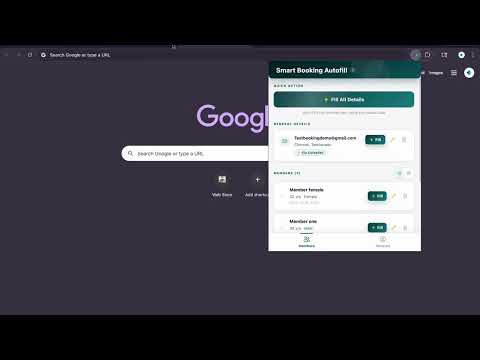
Autofill tool for booking forms. Saves time by auto-filling member details and general information.
⚠ IMPORTANT DISCLAIMER This extension is an independent, third-party tool. It is NOT affiliated, nor endorsed and not connected to any government body or official organization. The extension only assists with filling forms on supported booking websites. You must still complete the booking and payment yourself on the official site. ★ KEY FEATURES ✓ Save up to 6 member profiles — name, age, gender, Aadhaar or Passport details ✓ Save general booking details once — email, city, state, pincode ✓ One-click "Fill All" to autofill the entire booking form instantly ✓ Fill individual members or just general details when needed ✓ Drag-and-drop to reorder members in the list ✓ Grid and list view modes ✓ Clean, fast, and user-friendly popup UI ✓ 2-day free trial — try before you subscribe. ★ HOW IT WORKS 1. Click the extension icon and sign in with Google 2. Add your general details (email, address, optional booking fields) 3. Add member profiles with their ID details 4. Visit the booking page on the supported site 5. Click "Fill All Details" — the form is populated instantly 6. Review the filled data and submit on the official site ★ PLANS & PRICING • Basic : Standard single-profile form autofill • 2-days free trial included for new users • All payments are non-refundable. Cancel anytime. ★ PRIVACY & DATA • Your member data is stored locally via chrome.storage.local • Google Sign-In is used only for account authentication and subscription management • Subscription status is stored securely on Firebase (Google Cloud) • We do NOT sell or share your personal data with third parties • We do NOT use advertising or third-party tracking • Uninstalling the extension removes all locally stored data Read the full privacy policy: https://github.com/vinayvemu/Autofill-Assist/blob/main/PRIVACY_POLICY.md ★ PERMISSIONS EXPLAINED • storage — Save member and booking details locally • activeTab — Detect the current tab for autofill • scripting — Inject autofill script into booking pages • identity — Google Sign-In for account management • alarms — Periodically verify subscription status ★ SUPPORT Found a bug or have a feature request? https://smart-booking-autofill-94c7e.web.app/contact Not affiliated with any government organization. An independent tool to save you time.
5 out of 53 ratings
Details
- Version2.0.9
- UpdatedMay 14, 2026
- FeaturesOffers in-app purchases
- Size191KiB
- LanguagesEnglish
- DeveloperWebsite
Email
smartbookingautofill@gmail.com - Non-traderThis developer has not identified itself as a trader. For consumers in the European Union, please note that consumer rights do not apply to contracts between you and this developer.
Privacy

Smart Booking Autofill has disclosed the following information regarding the collection and usage of your data. More detailed information can be found in the developer's privacy policy.
Smart Booking Autofill handles the following:
This developer declares that your data is
- Not being sold to third parties, outside of the approved use cases
- Not being used or transferred for purposes that are unrelated to the item's core functionality
- Not being used or transferred to determine creditworthiness or for lending purposes
Support
For help with questions, suggestions, or problems, please open this page on your desktop browser