


Overview
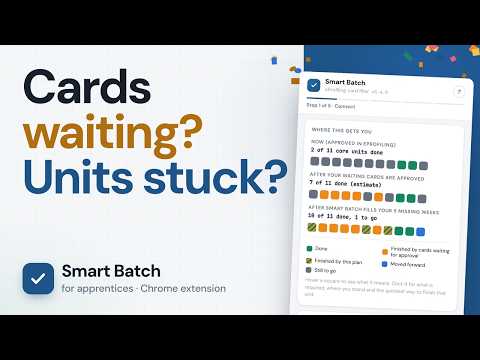
Fill your missing eProfiling cards from your real progress, waiting cards included. Check every line, then send for sign-off.
Smart Batch fills your missing eProfiling cards with the work that moves your units forward. It works out whether your organisation uses weekly, fortnightly or monthly cards, reads your whole profile first, plans each card around what you still need, checks everything with eProfiling, and shows you every line before anything is sent. This extension is an independent tool and is not affiliated with, endorsed by, or connected to the eProfiling platform or its developers. It helps you fill in cards for work you actually did. It doesn't make up work and it doesn't approve anything: every card still goes to your supervisor, who decides. WHAT IT READS FIRST - Your approved progress, exactly as eProfiling counts it: points per work area and what each unit still needs - Cards waiting for approval, so it never plans work they already cover - Draft cards (it warns you when one may be blocking a period) and the weeks or months eProfiling says have no card - Your organisation's card rule: weekly, fortnightly or monthly HOW IT PLANS EACH CARD - One card per missing week, fortnight or month (whichever your organisation uses), oldest first, each one starting from what the earlier cards cover - Up to three work lines a card: line 1 finishes the unit closest to done, the rest of the period moves the next ones, so one card can push several units forward (you can choose one or two lines instead) - For the electrical certificates (UEE30820 and UEE33020) points follow eProfiling's own published formula, checked against your approved cards every time it loads; anything that doesn't match is shown as an estimate. Other qualifications use rates measured on real cards, labelled as estimates - A line that takes a work area past a points mark gets a spare hour from the same period, so trimming an hour before approval doesn't leave the unit open - Public holidays, RDOs and shutdowns from your state's industry calendar come off the period and go on the same card as Leave/Training. Set your normal week, add weekend hours, or type the hours for every day BEFORE ANYTHING IS SENT - Smart Batch shows which card period it detected on the Configure screen, then checks every card against that rule and rebuilds any that don't fit - Every period goes through eProfiling's own date check, and every line is checked against eProfiling's current work areas and activities and your organisation's card rules - The first card is sent on its own. If eProfiling refuses it, the batch stops, so one problem never turns into dozens - Review shows what each card does, the equipment ticked on each line, and where every core unit ends up. Open any unit for the points it holds, what is waiting, what it needs and the hours left - A reminder to check every line matches the work you actually did. You can still edit a card in eProfiling until it's approved - Send to a supervisor, or to an admin account that passes cards on to one, picked from the same list eProfiling's card form uses HOW IT WORKS 1. Open eProfiling and log in like normal 2. Click the Smart Batch icon to see your progress 3. Choose your cards, who signs off, your supervision level, your normal week and your state's days off 4. Check the hours for each card 5. Review every card and line, then send. A clean send gets a small celebration WHO IT IS FOR Australian apprentices who log their cards in eProfiling, weekly, fortnightly or monthly. It reads your own qualification from eProfiling, so it is not locked to one trade; it has been built and checked on the electrical certificate. Weekly cards are well tested. Monthly and fortnightly cards are new: check them on Review, and email the log if anything looks wrong. PRIVACY - Your eProfiling data stays between your browser and eProfiling. Nothing about your account is stored or sent anywhere else - To work out days off it asks dataquoll.io, a calendar service run by the developer (SEY Solutions), for your chosen state's public holidays, RDOs and shutdowns. Only the state and a date range are sent; the calendar is kept on your device for a day - No accounts, no analytics, no tracking, no ads Smart Batch costs nothing to use. If it saves you a few hours, there is an optional Buy Me a Coffee link; the tool is the same either way. Built by an electrical apprentice who got sick of filling in cards one at a time. What's new in 1.5.1: Smart Batch now works out whether your organisation uses weekly, fortnightly or monthly cards, builds them to match, and shows what it detected on the Configure screen. Before anything is sent every card is checked against your rule and rebuilt if it doesn't fit, and the first card goes on its own so a refusal stops the batch. Monthly and fortnightly cards are new, so check them on Review. Also new since 1.4.0: a clearer failure message, and a Download log that explains itself. For troubleshooting please watch - https://youtu.be/l_R-zhNcehk
0 out of 5No ratings
Details
- Version1.5.1
- UpdatedNovember 6, 2026
- Size158KiB
- LanguagesEnglish
- Developer
- Non-traderThis developer has not identified itself as a trader. For consumers in the European Union, please note that consumer rights do not apply to contracts between you and this developer.
Privacy

This developer declares that your data is
- Not being sold to third parties, outside of the approved use cases
- Not being used or transferred for purposes that are unrelated to the item's core functionality
- Not being used or transferred to determine creditworthiness or for lending purposes
Support
For help with questions, suggestions, or problems, visit the developer's support site