


Overview
Detects a wrong PDF label format, suggests a fix and aligns the label on an A4 sheet for printing.
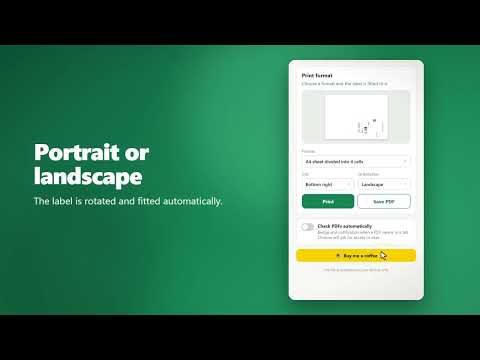
Smart Adaptive Label Printing checks your PDF shipping label before you print it and puts it on a sheet the way you need. Many carriers and marketplaces give you a label that fills a whole A4 page. Printing it as is wastes paper and a sticker sheet. This extension finds that problem and fixes it in a couple of clicks. WHAT IT DOES • Detects the wrong format. Open a PDF label and the extension reads its page size and tells you whether it matches a label format (A6, 100 × 150 mm, 100 × 100 mm, 100 × 125 mm, 4 × 6 in) or is a full A4 page. • Fits the label to a format. Choose a single A6 page (105 × 148 mm) or an A4 sheet divided into 4 cells (105 × 148.5 mm each). • Pick the cell and orientation. Put the label in any of the 4 cells, in portrait or landscape. The label is rotated and scaled automatically, and thin cut lines show where to cut. • Preview with a magnifier. See the finished sheet before printing and hover over it to zoom into any detail. • Print right away or save. Print without saving a file, or save the result as a PDF. • Automatic check (optional). Turn it on and the extension marks PDF tabs with a badge and a notification when the format needs attention. • 6 languages: English, Русский, Українська, Deutsch, Polski, Čeština. The language follows your browser and can be changed in the popup. HOW TO USE 1. Open a PDF label in a tab and click the extension icon, or drag a PDF file into the popup. 2. Read the result and choose a format, cell and orientation. 3. Check the preview, then press Print or Save PDF. 4. Print at 100% scale (actual size), not "fit to page". PRIVACY • Your PDF is analyzed on your device. Nothing is uploaded to our servers, and there are no analytics or trackers. • Manual check works with the current tab only. • Automatic check is off by default. When you turn it on, Chrome asks for access to sites, and the extension then downloads the PDF from the tab's address to read its page size. You can turn it off at any time. • Only your language, format and orientation choices are stored in your browser. NOTES • The extension reads standard PDFs. Some PDFs that use special compression may not be recognized; in that case choose the file manually. • This extension is not affiliated with any carrier, marketplace or printer manufacturer. Company names in labels belong to their owners. If it saves you time, you can support the project with the "Buy me a coffee" button in the popup. Thank you!
0 out of 5No ratings
Details
- Version0.4.0
- UpdatedOctober 29, 2026
- Size606KiB
- LanguagesEnglish
- DeveloperWebsite
Email
vitaliitsarov.dev@gmail.com - Non-traderThis developer has not identified itself as a trader. For consumers in the European Union, please note that consumer rights do not apply to contracts between you and this developer.
Privacy

This developer declares that your data is
- Not being sold to third parties, outside of the approved use cases
- Not being used or transferred for purposes that are unrelated to the item's core functionality
- Not being used or transferred to determine creditworthiness or for lending purposes
Support
For help with questions, suggestions, or problems, please open this page on your desktop browser