


Overview
Mop the slop out of your LinkedIn feed. Folds or highlights low-value posts and shows why. Not an AI detector.
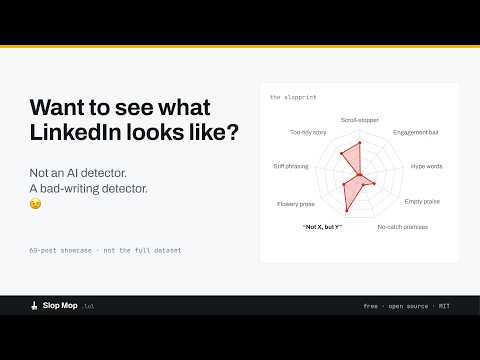
LinkedIn is getting crowded. AI makes posting easier, which means more to wade through for the few things worth reading. Slop Mop reads posts before you reach them, scores the writing, and either leaves them alone, flags them, or folds the mess into a tidy little strip. It is a bad-writing detector which can often mean AI but is specifically not an AI detector. Useful posts survive the mop however they were drafted. Free. Open source. No account. No API key. And because Slop Mop will sometimes be wrong, nothing it does is permanent. HOW THE MOP WORKS As you scroll LinkedIn, Slop Mop picks up posts before they reach your screen and asks twelve questions about the writing. Nine look for signs of slop. Two look for reasons to spare the post: whether it sounds like a person and whether it contains something genuinely useful. One asks how machine-written the post reads (that answer nudges the score, but never decides the verdict by itself). Twelve answers go into the Jev powered decision. One slop score comes out. Depending on your settings, the post gets highlighted, folded, or left completely alone. THE NINE SIGNS OF SLOP 1. Scroll-stopper One short line. Dramatic gap. You know the type. 2. Engagement bait “Agree?” “Comment YES below.” “Thoughts?” 3. Hype words Unlock. Paradigm shift. Game-changing. The usual suspects. 4. Empty praise “Meaningful.” “Powerful.” “Insane!” Meaningful how? 5. No-catch promises Better at everything. Worse at nothing. Miraculously. 6. Not X, but Y Definition by contrast. Again. And again. And again. 7. Flowery prose A flourish where a normal sentence would have survived just fine. 8. Stiff phrasing Furthermore. May provide. It is worth noting. Nobody talks like this over lunch. 9. Too-tidy story An anecdote that somehow lands its lesson with the precision of a corporate keynote. The library began with Graphite's research on AI-writing tells, then got renamed because they're really slop tells. Plenty of humans can hit all nine without mechanical assistance. TWO INPUTS LOOK FOR REASONS TO NOT MARK IT Slop Mop also looks for reasons not to mop. - If a post sounds recognizably human, its score comes down. - If it contains something genuinely useful, it gets extra protection. That means a slightly formulaic post that actually teaches you something can survive the mop. That's deliberate because useful beats authentic. TWO WAYS TO MOP HIDE MODE Suspected slop gets wrung down into a thin strip showing its score and two strongest signals. Click once and the post unfolds in place, like a piece of paper flattening back out. Nothing is ever deleted. HIGHLIGHT MODE Everything stays exactly where LinkedIn put it. Questionable posts get a colored icon: - Yellow for possibly slop. - Red for likely slop. In either case, you can hover the icon to get all of the details. Highlight mode is useful when you want to inspect the mess before deciding how aggressively to clean it up. THREE SENSITIVITY SETTINGS Both modes work with Mild, Moderate, and Aggressive sensitivity based on analyzing thousands of posts. - Hide + Mild: Just mop the worst puddles. - Hide + Moderate: A better LinkedIn, most days. - Hide + Aggressive: For feeds that may already be beyond saving. - Highlight + Mild: See where the slop is collecting. - Highlight + Moderate: Good for inspecting and voting. - Highlight + Aggressive: See just how much of your feed is setting off the alarms. Change the mode or sensitivity whenever you like. Whatever is already on your screen updates immediately. FOUR POSSIBLE VERDICTS. Slop Mop never relies on color alone. Every judgment has a written verdict attached. - Likely slop: Red outline, or folded. - Possibly slop: Yellow outline. - Not sure: Grey and hatched. Slop Mop is explicitly telling you it could easily be wrong. - Looks fine: Nothing happens. And if Slop Mop can't make a judgment confidently, it assumes the best not the worst. - Timeout? Leave the post alone. - Network problem? Leave the post alone. - Rate limit? Leave the post alone. - Answer looks unreliable? Leave the post alone. Something you would normally have read should never disappear because the mop tripped over its own bucket. YOU GET THE LAST WORD Every post also gets a Slop Mop control. Open it and vote: No, Maybe or Probably. Your vote overrides the model for your own feed. Vote No on something Slop Mop folded and it opens back up. Your vote can also contribute to the aggregate research behind the scoring. The current thresholds were fitted on a relatively small number of votes and are marked provisional in the source code because they are, in fact, provisional. Slop Mop starts with a simple assumption: Automated judgments about writing will sometimes be wrong. So it shows its reasoning. It admits uncertainty. And it gives you the override. “We think this is slop, and we could be wrong” is less impressive than pretending to know everything but it is also true. THIS IS NOT AN AI DETECTOR - Slop Mop does not try to prove that a robot wrote something. - It does not accuse authors. - It does not put “written by AI” labels on posts. - And it does not pretend reliable AI-authorship detection is a solved problem. That was never the point. AI-assisted writing can be excellent. Human-written content can be spectacular slop. The interesting question is not "Who typed this?" It is "Was this worth your attention?" That's the question Slop Mop is trying to answer. The machine-written question still exists, but it only adjusts the score. WHY IS THIS FREE? Slop Mop judges every post in your feed continuously, several questions at a time. Using conventional AI economics, that would be an excellent way to build a surprisingly large bill. Slop Mop runs on Jev from Typesafe AI, which is fast and inexpensive enough to make continuous judging practical at this scale. IN SUMMARY: 1. No signup or account needed. 2. No API key. 3. No per-post charge. 4. No bill waiting for someone to pass on to you. Slop Mop is a research project and a working demonstration of what becomes possible when AI judgment gets cheap enough to run this often. THERE IS NO PAID TIER because this is a research project on how Jev and technologies like it are becoming part of the AI ecosystem. WHAT SLOP MOP DOESN'T TOUCH Slop Mop does not: - Change anything on your LinkedIn account - Read your messages - Read your profile - Read your connections - Post, like, comment, or connect on your behalf - Follow you around the web - Delete posts - Report authors - Mute or block accounts Its job is much smaller. Read the feed in front of you. Judge the writing. Help bring the greatness of LinkedIn back to your feed. Turn Slop Mop off and LinkedIn goes right back to being LinkedIn for better or worse. PRIVACY, WITHOUT THE INTERPRETIVE DANCE Post text and public engagement counts are sent to Slop Mop's server at api.slopmop.lol and then to Jev so the writing can be judged. - Your name is not sent. - The author's name is not sent. WHAT GETS KEPT - A one-way hash of the post text, so the same post doesn't need to be judged over and over - Jev's answers - The resulting score - Public engagement counts - When the post was first seen - Vote totals. Note: votes are stored under a salted hash of a random installation ID because there are no accounts, email addresses or anything that can identify YOU. - The post text itself is not retained. - Check logs are kept for 90 days. - There are no advertising vendors. - No cookies set by the extension. - No browsing-history collection. - No LinkedIn profile-data collection. Usage is capped at 250 checks per installation per day, which is already more LinkedIn than most people should probably be consuming. Full privacy policy: slopmop.lol/privacy.html OPEN THE MOP CUPBOARD Slop Mop is also MIT licensed for both the extension and the server. You can read the source, change the weights, rewrite the nine signs, replace the whole sign library, whatever. You can point the extension at your own /judge endpoint or fork it into something for another feed. No permission needed and nothing about your custom installation reports back home. If you think the scoring is wrong, excellent. The code is right there for you to go make a better mop. WHAT IT SUPPORTS TODAY - LinkedIn via desktop browser only. - Browsers: Chrome and Chromium-compatible browsers. - Price: Free. - Paid tier: None. - License: MIT. Other feeds and browsers may come later and the part tied specifically to LinkedIn is the feed reader but the judging system could potentially work anywhere. THE WHOLE THING IN ONE LINE Less slop. More control. Your call. Slop Mop reads ahead, tells you what it noticed, clears questionable writing out of your way, admits when it has no idea, and leaves the final decision with you. Slop Mop is a bad-writing detector not an AI detector. Useful posts survive the mop however they were drafted.
5 out of 52 ratings
Details
- Version0.2.7
- UpdatedOctober 31, 2026
- Size195KiB
- LanguagesEnglish (United States)
- DeveloperWebsite
Email
support@slopmop.lol - Non-traderThis developer has not identified itself as a trader. For consumers in the European Union, please note that consumer rights do not apply to contracts between you and this developer.
Privacy

Slop Mop has disclosed the following information regarding the collection and usage of your data. More detailed information can be found in the developer's privacy policy.
Slop Mop handles the following:
This developer declares that your data is
- Not being sold to third parties, outside of the approved use cases
- Not being used or transferred for purposes that are unrelated to the item's core functionality
- Not being used or transferred to determine creditworthiness or for lending purposes
Support
For help with questions, suggestions, or problems, please open this page on your desktop browser