


概述
Make Google Slides Captions Multi Line
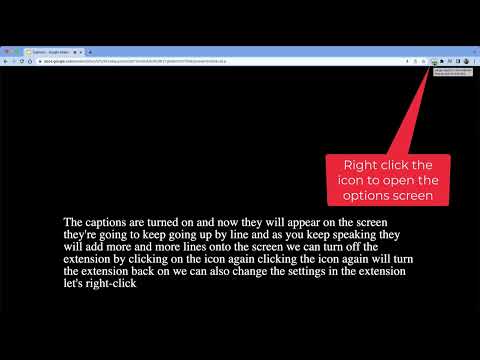
Slides Captions allows you to turn Google Slides into a full screen captioning tool idea for those who have hearing loss, auditory processing disorders, or foreign language learners. It allows you to: • Choose the font, • Line spacing, • Font size • Font colours, The extension puts you in control of your Google Slides Captions. To use the extension load your presentation by using /present in the URL with Google Slides, enable captions and then click the extension icon. Preferences can be set by right clicking on the extension icon. You can then enter full screen if you wish. Some example use cases: - In a school auditorium, it can be used for providing captions on a projector or TV for students with hearing loss, or auditory processing issues. - In an office, it can be used for captioning a meeting or presentation - At a comedy club, it could be used for captioning the comedy show - There are many other possible uses for the extension. If you're enjoying Slides Captions, try out Zip Captions our browser based dedicated tool at https://zipcaptions.app
5 星(5 星制)1 个评分
详情
隐私权

该开发者已声明,您的数据:
- 不会因未获批准的用途出售给第三方
- 不会为实现与产品核心功能无关的目的而使用或转移
- 不会为确定信用度或放贷目的而使用或转移
支持
若有任何疑问、建议或问题,请在桌面浏览器中打开此页面