

Slesh: Ask, Search & Automate Any Website with AI

Overview
Talk to your tabs, search and navigate faster, and fully automate tasks. Trigger Slesh with Ctrl + /
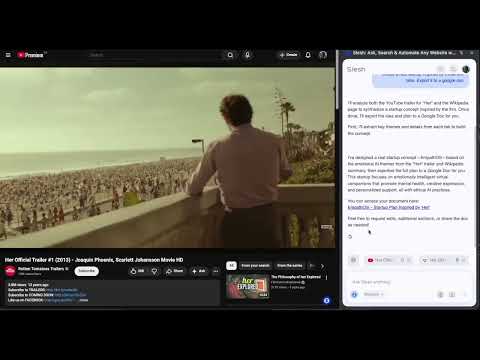
Slesh is an AI browser assistant that answers any questions on any page, compares tabs, and works with your apps: Google docs, sheets, slides and more. ⚡ What You Can Do with Slesh ❓ Ask any page, pdf, videos anything—Slesh reads and understands visuals, searches the internet for more sources, and answers in real time. 🔁 Copilot Mode - Tell slesh to take control of your browser and have it do tasks for you ⚙️ Ask Slesh to edit or scrape any content and export to apps like Gdocs, Gsheets and more ✍️ Get writing help, feedback, or problem-solving on Docs, Sheets, Slides, Canva, and more 📄 Summarize PDFs directly in your browser, no downloads needed 🎬 Get instant TL;DRs of YouTube videos, Shorts, and Reels 🧠 Compare tabs and recall content — ask Slesh to remember and compare what you were reading 💬 Why It’s Different Slesh isn’t just a sidebar chatbot or a summarizer. It’s a real AI copilot that understands what’s on your screen — and acts on it. Whether you’re working, researching, shopping, or learning, Slesh turns every site into something you can talk to and control. ✨ Why You’ll Love Slesh - 💬 Sidebar Chat Interface – Ask questions, summarize, help , or interact with any page - ⚙️ End-to-End Automation –Effortlessly execute multi-step tasks with simple commands like "Email every person on this google sheet" - 🧠 Tab Memory & Smart Switching – Slesh remembers what’s in each tab and lets you compare, summarize, or act across them. Get instant TL;DRs of articles, videos, and complex documents - 🔍 Smart Site Navigation – Use natural language to explore Gmail, Twitter, GitHub, Amazon, and everywhere on the internet. Skip the guesswork of finding where to go. - 📎 Always-On Assistant – The sidebar stays with you as you browse, with no need to copy-paste or switch tabs 🧪 Sample Prompts - “Summarize this article” - "Make a gsheet from this page" - "Email every person on this google sheet" - “Unread emails from this week” - “What’s the main point of this video?” - "What do you think of this draft? Does this match the other page I saw?" - “Click the Apply button” - “List open PRs” 🔗 Links & Community 🧪Use cases : https://slesh.ai/blogs 🌎 Website: https://slesh.ai/ 📘 Docs: https://docs.slesh.ai/ 💬 Discord: https://discord.com/invite/7JG597AfWd 🐦 Updates: https://x.com/getslesh
4.4 out of 510 ratings
Details
- Version3.1.3
- UpdatedMarch 13, 2026
- Size6.28MiB
- LanguagesEnglish
- DeveloperWebsite
Email
getslesh@gmail.com - Non-traderThis developer has not identified itself as a trader. For consumers in the European Union, please note that consumer rights do not apply to contracts between you and this developer.
Privacy

Slesh: Ask, Search & Automate Any Website with AI has disclosed the following information regarding the collection and usage of your data. More detailed information can be found in the developer's privacy policy.
Slesh: Ask, Search & Automate Any Website with AI handles the following:
This developer declares that your data is
- Not being sold to third parties, outside of the approved use cases
- Not being used or transferred for purposes that are unrelated to the item's core functionality
- Not being used or transferred to determine creditworthiness or for lending purposes
Support
For help with questions, suggestions, or problems, please open this page on your desktop browser