


Overview
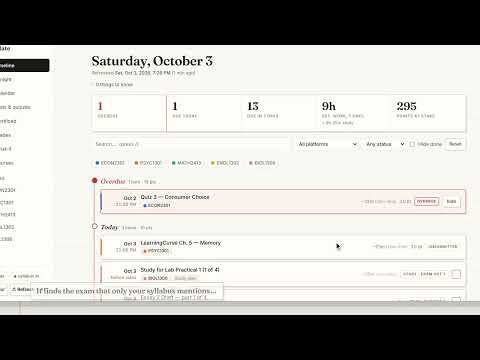
Every Canvas deadline plus the ones hiding in your syllabus, with a plan for tonight and times that learn your pace. Read-only.
Slate turns your Canvas into one timeline: every assignment, quiz, exam and reading, in the order it's due, with a plan for tonight that fits the hours you actually have. FINDS WHAT CANVAS DOESN'T LIST Readings assigned in class, exams that only exist on the syllabus schedule, homework posted on a course Home page. Slate reads your syllabus (including Simple Syllabus), Home pages and Modules, and every deadline it finds shows the exact sentence it came from. No quote, no deadline: Slate never invents dates. PLANS YOUR NIGHT Pick how long you have. Late work first, then what's due today and tomorrow. Exams turn into study sessions on the days before them, sized by how much of your grade they're worth. Big assignments split into parts so nothing lands on one night. Readings are marked "reading, not due" and never pile up as overdue. LEARNS HOW LONG THINGS TAKE YOU Every time estimate blends the assignment's size (pages, words, problems), the usual times you give it, your real times, and anonymous medians from classmates in the same course. Slate counts the minutes an assignment's Canvas page is open in front of you (breaks don't count) and asks once after you submit. The more you use it, the more the numbers are yours, and every estimate shows exactly what went into it. ALSO - Live grade math from your professor's own weights, with what-if for the final. - Workload by week, a calendar you can export, and every exam in one list. - Re-syncs whenever you open Canvas. Professor posts "quiz moved to Friday"? It shows under "things to know." READ-ONLY, AND HONEST ABOUT IT - Slate reads Canvas through your own logged-in session. No password, no token. Chrome labels site access "read and change," but Slate only reads: it never submits, edits, posts or changes anything in Canvas. - Your courses, grades, check-offs and timed minutes stay in your browser. What leaves: your syllabus, so its dates can be read (one switch in the popup turns that off), and, when you log how long something took, an anonymous minute count for the class medians. - Stale data is labeled, sources that can't be reached say so, and every number shows its work. Slate is $7 a month: installing is free, and your personal code from slateforcanvas.com unlocks syncing. Cancel anytime. New to Slate? The two-minute guide is at slateforcanvas.com/guide.
5 out of 53 ratings
Details
- Version1.4.5
- UpdatedOctober 8, 2026
- Size371KiB
- LanguagesEnglish
- DeveloperWebsite
Email
roxtonb@smu.edu - Non-traderThis developer has not identified itself as a trader. For consumers in the European Union, please note that consumer rights do not apply to contracts between you and this developer.
Privacy

Slate for Canvas has disclosed the following information regarding the collection and usage of your data. More detailed information can be found in the developer's privacy policy.
Slate for Canvas handles the following:
This developer declares that your data is
- Not being sold to third parties, outside of the approved use cases
- Not being used or transferred for purposes that are unrelated to the item's core functionality
- Not being used or transferred to determine creditworthiness or for lending purposes