Item logo image for SkwareStashify

SkwareStashify

https://skwarestashify.com/
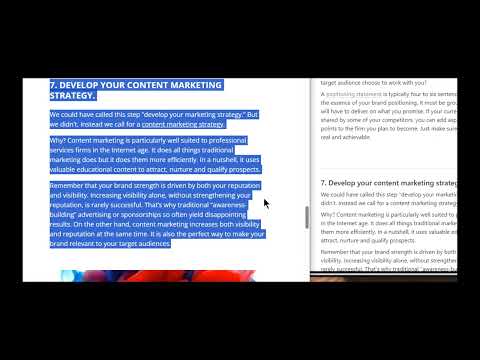
Item media 2 (screenshot) for SkwareStashify
Item video thumbnail
Item media 2 (screenshot) for SkwareStashify
Item video thumbnail
Item media 2 (screenshot) for SkwareStashify

Overview

Saves web page content to your Notion Workspace in the form of content snippets or batch Task-creation.

Save selected browser content and URLs directly to your Notion pages or databases with this extension. Saving content can be in the form of just paragraphs of content, or sent to Notion in the form of multiple tasks in a single-batched transfer to a database that is used for Tasks. This extension also allows you to perform quick saves of a URL using right click context, which uses a second, different right click menu than the primary functionality. Note: This extension does support the recent Data Sources capability that was added to Notion.

Details

  • Version
    0.0.1.7
  • Updated
    December 4, 2025
  • Features
    Offers in-app purchases
  • Size
    2.21MiB
  • Languages
    English
  • Developer
    Steven Bailey
    178 Avenida Del Rio Drive West Twin Falls, ID 83301 US
    Website
    Email
    SkwareStashify@gmail.com
    Phone
    +1 310-719-5904
  • Trader
    This developer has identified itself as a trader per the definition from the European Union and committed to only offer products or services that comply with EU laws.

Privacy

SkwareStashify has disclosed the following information regarding the collection and usage of your data. More detailed information can be found in the developer's privacy policy.

SkwareStashify handles the following:

Personally identifiable information
Authentication information
Website content

This developer declares that your data is

  • Not being sold to third parties, outside of the approved use cases
  • Not being used or transferred for purposes that are unrelated to the item's core functionality
  • Not being used or transferred to determine creditworthiness or for lending purposes

Support

For help with questions, suggestions, or problems, visit the developer's support site

Related

Q-SAVE Web Content Saver

0.0

Save selected web content with multi-area selection and format preservation

Page Pouch

5.0

Grab and save web content with Page Pouch. Organize and export your articles in various formats to local files or cloud storage.

Contai Extractor

5.0

Extract and save content from web pages

Save Page as MHTML

4.0

Save a page's content and combine all of the resources into one file!

Web Page Text Extractor

5.0

This extension extracts and saves the text from a web page.

Save as MHTML

3.5

Edit and save active tab or selected area in MHTL/MHT (MIME HTML) archive format to have a clean single-file backup

Save as MHTML (MIME HTML)

3.7

Save a page content & incorporate all resources (i.e. images) in a single file!

Edit with Sublime Text™

3.7

Live editing text and HTML content of the page with the Sublime Text from the page context or DevTools.

Excelio Web Scraper

5.0

Automates web data extraction, matching the current page to stored tasks. Provides controls for data formatting and transformation.

Benable

5.0

Save things to beautiful shareable lists, while browsing the web.

Tab Stacks: Tab group launcher

5.0

Tab Stacks lets you instantly open sets of saved websites grouped by workflow. Launch all your tabs for a task with one click.

Internet Archive Assistant

5.0

Save web pages to the Internet Archive or view their latest version. Perfect for preserving content and retrieving snapshots.

Q-SAVE Web Content Saver

0.0

Save selected web content with multi-area selection and format preservation

Page Pouch

5.0

Grab and save web content with Page Pouch. Organize and export your articles in various formats to local files or cloud storage.

Contai Extractor

5.0

Extract and save content from web pages

Save Page as MHTML

4.0

Save a page's content and combine all of the resources into one file!

Web Page Text Extractor

5.0

This extension extracts and saves the text from a web page.

Save as MHTML

3.5

Edit and save active tab or selected area in MHTL/MHT (MIME HTML) archive format to have a clean single-file backup

Save as MHTML (MIME HTML)

3.7

Save a page content & incorporate all resources (i.e. images) in a single file!

Edit with Sublime Text™

3.7

Live editing text and HTML content of the page with the Sublime Text from the page context or DevTools.

Google apps
