


Overview
Look up SKUs, find warehouse bin locations, and check fulfillment progress alongside the page you're working on.
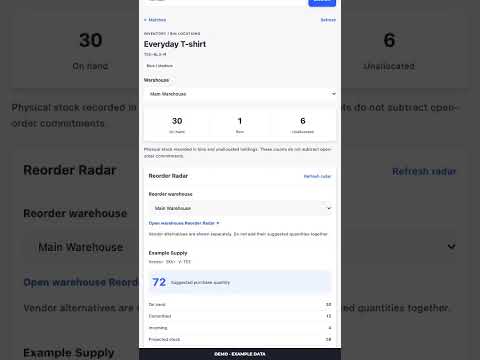
Your warehouse, within reach. SKUSavvy Sidekick brings inventory, warehouse reorder recommendations, and outbound-order lookups into Chrome's side panel. Highlight a SKU, barcode, product name, or order number, right-click, and choose a SKUSavvy lookup. Or search directly in the panel. • Find an item's warehouse, bin, shelf, and level. • See recorded on-hand quantities and separate unallocated holdings. • Filter inventory by warehouse and inspect returned lot and serial details. • View vendor-specific suggested purchase quantities in Reorder Radar. The first warehouse is selected automatically; switch warehouses whenever needed. • Open the selected warehouse's Reorder Radar in SKUSavvy to review recommendations and take action. • Choose between matching records instead of silently selecting one. • Check outbound order progress, shipments, and tracking numbers. • Copy a concise summary or open the record in SKUSavvy. Requires an existing SKUSavvy account, enabled company API access, and an API token with the applicable viewing permissions, including replenishment access for Reorder Radar. A token connects to its associated company. Data is fetched on demand; on-hand stock is not an available-to-promise count. Reorder recommendations use SKUSavvy's default sales window and vendor lead times. Vendor alternatives are shown separately. Sidekick is read-only. It does not create purchase orders, modify inventory or orders, scrape webpages, or track browsing history. Tokens stay in extension storage, with session-only storage by default and an optional “Remember on this device” setting.
0 out of 5No ratings
Details
- Version0.1.4
- UpdatedOctober 26, 2026
- Size271KiB
- LanguagesEnglish (United States)
- DeveloperWebsite
Email
support@skusavvy.com - Non-traderThis developer has not identified itself as a trader. For consumers in the European Union, please note that consumer rights do not apply to contracts between you and this developer.
Privacy

SKUSavvy Sidekick has disclosed the following information regarding the collection and usage of your data. More detailed information can be found in the developer's privacy policy.
SKUSavvy Sidekick handles the following:
This developer declares that your data is
- Not being sold to third parties, outside of the approved use cases
- Not being used or transferred for purposes that are unrelated to the item's core functionality
- Not being used or transferred to determine creditworthiness or for lending purposes
Support
For help with questions, suggestions, or problems, please open this page on your desktop browser