

Skool Video Translator - Subtitles & Dub

Overview
Translate, caption and dub course videos on Skool, Whop, YouTube, Udemy, TED and more
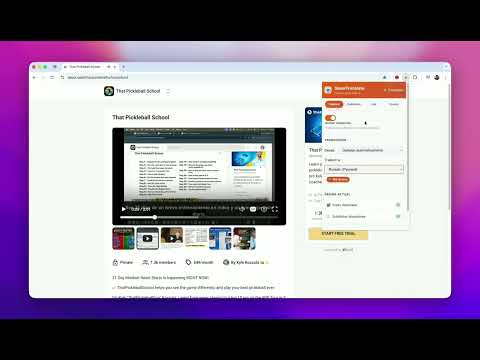
🌍 Understand, translate and learn from videos on Skool, Whop, YouTube, Udemy and TED. Skool Subtitle Translator helps you translate subtitles, generate live captions for videos without subtitles and listen with AI voice dubbing. You can also use study tools to create summaries, ask questions about video content, build mind maps, take quizzes, review flashcards and save notes. ✨ Subtitle Translation & Live Captions • Translate existing subtitles while watching a supported video. • Generate live translated captions from tab audio when subtitles are unavailable. • Listen with AI voice dubbing. • Choose from 109 languages. • Display bilingual subtitles and adjust how subtitles appear on screen. • Save your preferred settings for each player. • Hide original subtitles when needed. • Detect available subtitle tracks. • Reuse cached subtitles for faster re-translation. • Translate page content on Skool. 🧠 AI-Powered Study Tools • Create video summaries with key concepts. • Ask questions about video content. • Generate mind maps, quizzes and flashcards. • Save notes linked to videos. • Search your saved summaries and learning library. 🚀 Getting Started 1. Install the extension. 2. Open a supported video. 3. Translate its subtitles or generate live captions from audio. 4. Use the study tools to review the content. 🔑 Your Own API Key Connect your own API key from OpenAI, Google Gemini, Groq or OpenRouter for supported AI features. Support: support@skooltranslate.com Website: https://skooltranslate.com
1 out of 52 ratings
Details
- Version2.6.47
- UpdatedSeptember 30, 2026
- FeaturesOffers in-app purchases
- Size460KiB
- Languages15 languages
- DeveloperFrancisco LeónWebsite
Av. de la República Argentina 1 Sevilla, Sevilla 41011 ESEmail
support@skooltranslate.com - Non-traderThis developer has not identified itself as a trader. For consumers in the European Union, please note that consumer rights do not apply to contracts between you and this developer.
Privacy

Skool Video Translator - Subtitles & Dub has disclosed the following information regarding the collection and usage of your data. More detailed information can be found in the developer's privacy policy.
Skool Video Translator - Subtitles & Dub handles the following:
This developer declares that your data is
- Not being sold to third parties, outside of the approved use cases
- Not being used or transferred for purposes that are unrelated to the item's core functionality
- Not being used or transferred to determine creditworthiness or for lending purposes
Support
For help with questions, suggestions, or problems, visit the developer's support site