

skool Harbor: Downloader For Skool
37 ratings
)
Overview
Download videos from Skool, Vimeo, Loom, and Wistia as MP4.
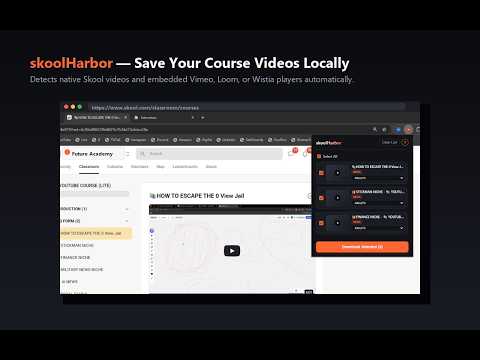
Download Skool videos from classrooms, community posts, and course modules. Bulk Skool video download (UPDATED) skoolHarbor is a Chrome extension for saving videos from Skool.com before access changes, cohorts close, or lessons get removed. It works across classroom lessons, community posts, about pages, and course modules, then downloads supported videos as standard MP4 files directly to your computer. Skool can surface video through its native Mux player as well as embedded This extension detects the underlying player automatically, reads Skool's page data for reliable extraction, and converts supported streams to MP4 inside Chrome. No external tools, no screen recording, and no technical setup. ✅ Bulk Download: Accumulate multiple videos across pages and download them all in a single click ✅ Download videos from Skool classrooms, modules, and community posts ✅ Detect Skool native Mux video plus supported Loom, Vimeo, and Wistia embeds ✅ Choose from available qualities before saving the files ✅ Convert HLS streams to MP4 locally inside Chrome ✅ Read Skool page data for reliable video detection on the single-page app ✅ Save videos for offline study, backup, or review ### HOW TO USE (BULK DOWNLOAD) 1. Install skoolHarbor from the Chrome Web Store. 2. Open any Skool lesson, module, or post with video. 3. Press play so the stream and player data are detected. 4. (Optional) Navigate to other lessons or posts to accumulate multiple videos in your queue. 5. Click the extension icon to see your list of accumulated videos. 6. Use the checkboxes to select specific videos, or check **"Select All"** to download the entire list. 7. Choose your preferred quality for each video. 8. Click **"Download Selected"** to download the queue as MP4 files directly to your computer. ### PERFECT FOR — Saving entire Skool course modules for offline study in one go. — Downloading community post videos before membership access changes. — Backing up your own Skool-hosted training content. ### PRICING * **Free Trial:** 3 free downloads included after email sign-in. No credit card required. * **Premium Access:** Upgrade to unlock unlimited and bulk downloads via Monthly ($7.99/mo) for unlimited downloads and Yearly ($50/yr) for 10% off unlimited downloads. --- ### Disclaimer This extension is not affiliated with or endorsed by Skool. Users are responsible for ensuring they have the right to download content. This tool is intended for downloading content you own or have purchased access to. Respect course creators' intellectual property.
4.7 out of 537 ratings
Details
- Version1.3.1
- UpdatedOctober 21, 2026
- FeaturesOffers in-app purchases
- Offered byLeksautomate
- Size9.84MiB
- LanguagesEnglish
- Developer
Email
leksautomate@gmail.com - Non-traderThis developer has not identified itself as a trader. For consumers in the European Union, please note that consumer rights do not apply to contracts between you and this developer.
Privacy

skool Harbor: Downloader For Skool has disclosed the following information regarding the collection and usage of your data. More detailed information can be found in the developer's privacy policy.
skool Harbor: Downloader For Skool handles the following:
This developer declares that your data is
- Not being sold to third parties, outside of the approved use cases
- Not being used or transferred for purposes that are unrelated to the item's core functionality
- Not being used or transferred to determine creditworthiness or for lending purposes
Support
For help with questions, suggestions, or problems, please open this page on your desktop browser