Item logo image for Skipit

Skipit

skipit.tech
5.0(

1 rating

)
Item media 6 (screenshot) for Skipit
Item video thumbnail
Item media 2 (screenshot) for Skipit
Item media 3 (screenshot) for Skipit
Item media 4 (screenshot) for Skipit
Item media 5 (screenshot) for Skipit
Item media 6 (screenshot) for Skipit
Item video thumbnail
Item media 2 (screenshot) for Skipit
Item media 3 (screenshot) for Skipit
Item media 4 (screenshot) for Skipit
Item media 5 (screenshot) for Skipit
Item media 6 (screenshot) for Skipit

Overview

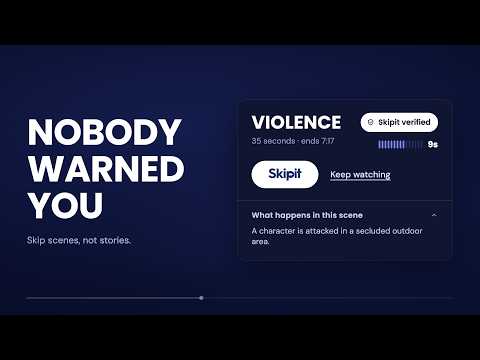
A heads-up before sexual assault, self-harm, violence and more, scene by scene, while you stream. Skip it or read what happened.

Skipit gives you more control over what you see. When a distressing scene is coming up, Skipit shows a calm heads-up first, so you can skip the scene or read a short summary and keep watching. You choose what you want a heads-up for. Turn on the categories that matter to you, and decide whether Skipit quietly notifies you before a scene or skips it for you. You are in control the whole time, and you never need a reason. How it works - A gentle warning card appears just before a flagged scene, with a few seconds to decide. - Skip the scene, or read a short, neutral summary so you do not miss the story. Mark scenes as you watch. If Skipit misses something, or you think a scene needs a different category, you can flag it directly while watching to help improve the experience. Adjust your categories and settings any time. What you can turn on Eleven categories, each with its own setting: violence, sexual content, self-harm and mental health, abuse and manipulation, death and grief, medical, discrimination and hate, substance use, animals, fear and phobia, and sensory. Where it works Netflix, YouTube, Disney+ and Paramount+. Built with care No ads, no trackers, and no profile built about you. You can export a copy of your data or delete it. Warnings are plain and factual, not graphic. Skipit is a tool for choice and pacing, not a medical or therapy service. Still improving We are just getting started. Around thirty titles are fully covered today and we are adding more every week. Most scene data comes from our software and people are beginning to check it title by title, so we will get some wrong, and we would rather tell you that than pretend otherwise. If Skipit misses a scene, gets one wrong, or you want to mark something you encountered while watching, you can let us know. Your feedback helps make Skipit better for everyone. Skipit is free right now.

Details

  • Version
    6.1.45
  • Updated
    September 15, 2026
  • Size
    12.43MiB
  • Languages
    English (United States)
  • Developer
    Skip It.
    231 Forest St Babson Park, MA 02457 US
    Website
    Email
    skipit.tech@gmail.com
  • Non-trader
    This developer has not identified itself as a trader. For consumers in the European Union, please note that consumer rights do not apply to contracts between you and this developer.

Privacy

Manage extensions and learn how they're being used in your organization

Skipit has disclosed the following information regarding the collection and usage of your data. More detailed information can be found in the developer's privacy policy.

Skipit handles the following:

Personally identifiable information
Authentication information
Personal communications
Web history
User activity
Website content

This developer declares that your data is

  • Not being sold to third parties, outside of the approved use cases
  • Not being used or transferred for purposes that are unrelated to the item's core functionality
  • Not being used or transferred to determine creditworthiness or for lending purposes

Support

For help with questions, suggestions, or problems, visit the developer's support site

Related

Bookmarkoftheday

4.4

Bookmark of the day is a chrome extension which shows you one bookmark everyday.

HaramBlur - Blur Haram & NSFW Images & Videos

4.9

Protect your privacy and uphold Islamic values by auto detecting & blurring images and videos of unwanted or impermissible content.

VideoSkip

4.4

Skips/mutes/blanks selected parts of streaming videos

Stream Clean

4.1

Filters profanity and other user-defined words on Netflix, Amazon, Hulu, Disney+, and more using closed captions.

MuviSafe: Family-Friendly AI-Generated Movie Filtering

5.0

AI-Generated filters allow you to automatically skip scenes you prefer not to watch based on your selections.

BestCraft - Minecraft Tips/Guides

5.0

AI Minecraft tips, guides & crafting recipes. Survival, building, redstone, enchanting, potions & 1.21 Tricky Trials. Free!

Very Practical Clock & Notepad

5.0

A clean, customizable on-top clock with a multi-tab notepad — great for notes, reminders and drafting AI chat prompts.

CleanFlix - Sensitive Scenes Filter & Netflix Content Control

4.8

CleanFlix — Netflix, Disney+, Prime Video, Paramount+: filter nudity, violence, profanity, age ratings & parental controls.

Clearplay

3.7

What it does: ClearPlay enables families to skip and mute content in streaming movies so you can enjoy the show with your family…

VidAngel for Chrome

4.2

Enhance your VidAngel experience!

Pause.do: AI pause & attention tracker

5.0

Privacy-first extension that adds pause prompts to scroll, tab overload, long sessions, and AI tools so you think before acting.

Skipit - Skip Inappropriate Scenes on Netflix

5.0

Skip nudity, sex, and gore scenes on Netflix movies and TV shows automatically.

Bookmarkoftheday

4.4

Bookmark of the day is a chrome extension which shows you one bookmark everyday.

HaramBlur - Blur Haram & NSFW Images & Videos

4.9

Protect your privacy and uphold Islamic values by auto detecting & blurring images and videos of unwanted or impermissible content.

VideoSkip

4.4

Skips/mutes/blanks selected parts of streaming videos

Stream Clean

4.1

Filters profanity and other user-defined words on Netflix, Amazon, Hulu, Disney+, and more using closed captions.

MuviSafe: Family-Friendly AI-Generated Movie Filtering

5.0

AI-Generated filters allow you to automatically skip scenes you prefer not to watch based on your selections.

BestCraft - Minecraft Tips/Guides

5.0

AI Minecraft tips, guides & crafting recipes. Survival, building, redstone, enchanting, potions & 1.21 Tricky Trials. Free!

Very Practical Clock & Notepad

5.0

A clean, customizable on-top clock with a multi-tab notepad — great for notes, reminders and drafting AI chat prompts.

CleanFlix - Sensitive Scenes Filter & Netflix Content Control

4.8

CleanFlix — Netflix, Disney+, Prime Video, Paramount+: filter nudity, violence, profanity, age ratings & parental controls.

Google apps