

Skipper - Tab management that works with ADHD brains

Overview
Meet your brain's new best friend: adaptive tab management that keeps you focused, even when ADHD makes task-switching tough.
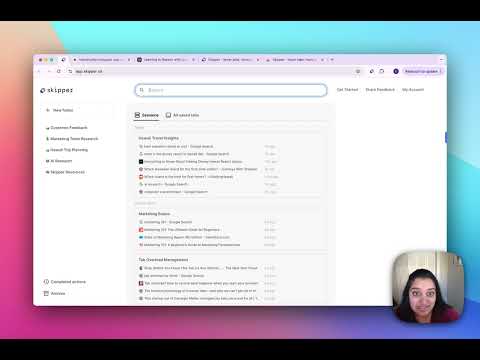
Meet your brain's new best friend: tab management that saves everything automatically, so you never lose track of what you were working on. Developed from Carnegie Mellon research on focus and distraction, Skipper is a game-changer particularly for ADHD entrepreneurs and anyone who juggles multiple projects. Skipper automatically saves your tabs as you browse — no manual organizing, no bookmarking, no effort. When you're ready to pick up where you left off, everything's right where your brain expects it to be. Organize your most important tabs into folders, and launch them all with one click. Whether you're deep in client work, researching, or tackling technical tasks, Skipper keeps you focused with smooth transitions between everything you're working on. Key Features: 💾 Automatic Tab Saving: Every tab you use is saved automatically — nothing slips through the cracks 📁 Folders: Organize your most important tabs into groups you can reopen with one click 🔍 Search: Find any tab you've ever used, instantly 🔄 Effortless Switching: Move between projects without losing focus or getting sidetracked 🤝 Share with Ease: Organize and share collections of tabs seamlessly with your team or clients Upgrade to Pro for AI-powered Sessions that automatically group your tabs based on how you browse, plus up to 100 folders. Especially effective for ADHD minds and anyone who works differently, Skipper's research-backed design works with your natural habits. Experience working in sync with your brain — try Skipper and see the difference. Want a peek? Watch our quick demo! Have questions or ideas? Reach out at hello@skipper.co
3.7 out of 559 ratings
Details
- Version101
- UpdatedMarch 29, 2026
- FeaturesOffers in-app purchases
- Size15.04MiB
- LanguagesEnglish (United States)
- Developer
- Non-traderThis developer has not identified itself as a trader. For consumers in the European Union, please note that consumer rights do not apply to contracts between you and this developer.
Privacy

Skipper - Tab management that works with ADHD brains has disclosed the following information regarding the collection and usage of your data. More detailed information can be found in the developer's privacy policy.
Skipper - Tab management that works with ADHD brains handles the following:
This developer declares that your data is
- Not being sold to third parties, outside of the approved use cases
- Not being used or transferred for purposes that are unrelated to the item's core functionality
- Not being used or transferred to determine creditworthiness or for lending purposes