

SiteShelf - Website Reference Library

Overview
Save websites, organize by folder and color, compare full-page designs side by side, and export images or PDFs.
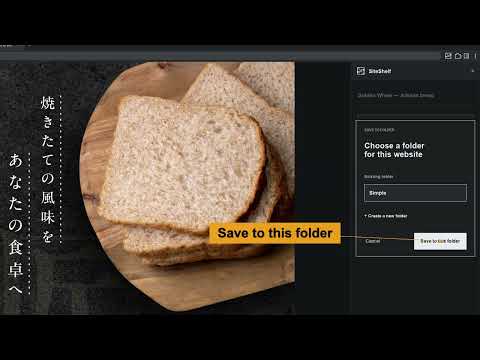
Keep the websites that inspire you, ready for your next design. SiteShelf helps web and landing-page designers collect website references and build a personal visual library, right in Chrome. SAVE A WEBSITE WITHOUT LEAVING THE PAGE Open the extension, choose Save website, and pick a folder. SiteShelf scrolls through the current page to capture it, then saves the images and website URL locally on your device. BROWSE YOUR REFERENCES VISUALLY Browse a three-column grid of consistent portrait previews. Use folders, title and URL search, favorites, and sorting to find the reference you need. ORGANIZE BY FOLDER AND COLOR Create and rename folders or move saved websites between them. Filter by the main color visible in each preview. You can adjust an automatically detected color manually. SEE A LONG PAGE AT A GLANCE Click a saved preview to open that website's full-page design. Long pages are split into tall columns, arranged horizontally. Adjust the display size to change the column width and the number of columns. EXPORT YOUR REFERENCE Export as PNG, JPEG, or PDF. Choose a single long image or the current column layout. LIGHT AND DARK THEMES Choose your preferred appearance. The interface supports English and Japanese, based on Chrome's display language. FREE AND ACCOUNT-FREE Saved URLs, titles, images, and folders are managed locally. SiteShelf does not send them to developer or third-party servers and does not include analytics or ads. Save a backup file to move your library to another computer manually. PLEASE NOTE • Chrome internal pages, the Chrome Web Store, and other browser-restricted pages cannot be captured. • Animations, video, lazy-loaded elements, and custom scrolling may not be reproduced exactly. • Capture is limited to 50 screenfuls. Very long pages are saved partially. • Captures can include personal information visible on the page. Check saved or exported content before sharing it. • There is no automatic cross-device sync. Back up important references regularly.
0 out of 5No ratings
Details
- Version1.0.0
- UpdatedNovember 8, 2026
- Offered byMavshine Tools
- Size56.03KiB
- Languages2 languages
- Developer杉山 浩之
3-17-5-4 横浜市鶴見区馬場, 神奈川県 2300076 JPEmail
mavshine.tools@gmail.comPhone
+81 90-8007-2422 - TraderThis developer has identified itself as a trader per the definition from the European Union and committed to only offer products or services that comply with EU laws.
Privacy

SiteShelf - Website Reference Library has disclosed the following information regarding the collection and usage of your data. More detailed information can be found in the developer's privacy policy.
SiteShelf - Website Reference Library handles the following:
This developer declares that your data is
- Not being sold to third parties, outside of the approved use cases
- Not being used or transferred for purposes that are unrelated to the item's core functionality
- Not being used or transferred to determine creditworthiness or for lending purposes
Support
For help with questions, suggestions, or problems, visit the developer's support site