

SitesBuddy: Visual Builder for Google Sites

Overview
The design tools Google Sites editor is missing. Widgets, templates & visual builder for Google Sites designers.
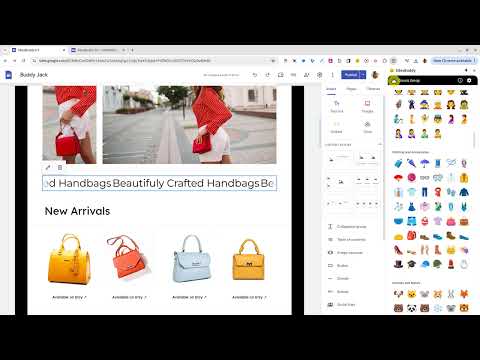
................................................................................................................................................................................................................................................................... SitesBuddy adds professional design tools directly inside Google Sites. Create custom widgets, style images, access thousands of icons, and add interactive elements like popups, countdown timers, sliders, flip cards, logo carousels, and more. Think of it as Elementor for Google Sites. ................................................................................................................................................................................................................................................................... 👋 Hi there. I originally built SitesBuddy for myself while creating Google Sites for clients. Why? It's simple, on Google Sites I wanted the same experience I have when building websites for clients on WordPress and Elementor. I've been using multiple website builders for 20 years and know exactly what I need on Google Sites. You know what I mean? Interactive custom widgets and pre-designed templates library so I can quickly kick-start a new project. Without managing multiple tabs, hunting on the internet for custom code, or going back and forth with AI agent for 45 minutes trying to get a snippet of code to fit correctly into a native Sites embed box... btw. I did all that so you don't have to ;) So... After I built this extension for myself to make my workflow smoother, friends kept asking me to publish it because they are willing to pay for an extension like that, so I did. Now 2,000+ Google Sites designers use it, which still blows my mind. Every widget and every template in the extension is something I coded and designed over the last 3 years and now I'm handing it over to you. I made some basic features free and made advanced pro stuff for paid members only. I'm constantly improving the extension based on members feedback and we are currently on Version 4. The cool part is that this extension doesn't lock you in. That means that even when you stop using or uninstall extension, everything you've built and added to your Google Sites projects keeps working forever. That's a promise. If you find it useful, and it helps you prototype and deliver Google Sites websites to clients faster, subscribing to pro features is the best way to keep the project going and new features coming. - Robert, Creator of SitesBuddy ................................................................................................................................................................................................................................................................... Here's everything that's inside the extension, free and paid: FREE WIDGETS Ok. So here are some free widgets. Just because they are free don't think that they are not valuable. I made them free so you can dip-your-toes and see what possible with Google Sites, how everything works, and see if it's right fit for you before you upgrade to pro and support the project. Interactive elements: ✅ RESPONSIVE BUTTON Create responsive call-to-action buttons. You can customize colors (font, background, border), hover effects, and call-to-actions. Button is responsive and fits nicely in embed box. ✅ PiP VIDEO Add a video player with picture-in-picture mode that stays visible while visitors scroll. Your video remains fixed at the bottom of the page, letting viewers watch and browse simultaneously. Perfect for long-form content where you want the video accessible throughout. ✅ YOUTUBE FRAME STYLE Style embedded YouTube videos with custom borders to match your site's aesthetic. Btw. Native youtube embed shows related videos after you video ends.. this player does not.. it simply refreshes your video back to the begining (no competitors and random videos on your site - how cool is that) ✅ GOOGLE FORM STYLER Customize your Google Forms with unique styles, colors, and borders to match your site's vibe. Images: ✅ IMAGE STYLING Transform images with frame and border similar to Canva frames, ensuring they align with your site’s style. You can create round images, add custom colored border, convert images to letters from A to Z, or mask images with frames (stars, blob, capsule, heart, etc). Then simply drag and drop them into Google Sites (no external tools needed) ✅ PEXELS PHOTOS The entire Pexels library when you need copyright-free photos for your build. Search, resize, drag&drop directly into Google Sites. Symbols and Icons: Huge library of icons with ability to change size and set your custom colors ✅ SYMBOLS LIBRARY ASCII characters, arrows (left. right, up, down), check-marks, stars, boxes, numbers, etc. ✅ NOTO EMOJI Use Google's Noto Emoji as icon-like symbols for your Google Sites. Unlike standard emojis, these look crisp, clean, and icon-like - plus you can color them to match your brand. Simply copy/paste to Google Sites (no need to manually change font style for each emoji) ✅ CLASSIC EMOJI Every emoji, grouped by category. Find it, copy it, paste it. Done. ✅ SOCIAL ICONS A library of icons covering major social media networks, popular design tools, and developer platforms. You can fully customize the icon sizes, apply your own custom brand colors, and drag them directly into your Google Sites project. ✅ MUSIC ICONS Icons for leading audio networks, music streaming platforms, and marketplace channels. Change the icon sizes, set your custom colors, and use them instantly on your pages. ✅ 1300+ PRO ICONS Professional icons in different styles (outline, filled, sharp). Drag directly into your site (or download as PNG). With ability to change size and set your custom colors. Productivity: ✅ NOTEPAD Capture every brilliant idea the moment it hits. A lightweight to-do list built right into extension keeps track of what's next... style that header, add those testimonials, test on mobile. Check things off, watch progress happen, keep momentum going. Everything saves automatically, nothing gets forgotten. ✅ COLOR PICKER Grab color from any website with HEX codes. Color are saved so you can reuse them later. ✅ QR CODE MAKER Custom QR codes with your logo, custom colors, and styles. No expiration, no tracking. Perfect for client deliverables - or just scanning your own site on mobile to see how it actually looks. ................................................................................................................................................................................................................................................................... PRO WIDGETS (exclusive to paid members): If you think free stuff is cool. Thanks. Now here are some advanced goodies for pro members where we break thru Google Sites limitations even further. Popup: Btw. I tried to create popup similar to popups on WordPress but it doesn't work because how Google Sites embed sandbox works. So I created the next best thing which unlocks some cool new benefits on Google Sites. ✅ GOOGLE FORM POPUP Turn any Google Form into a popup window that opens when visitors click a button. Collect responses, RSVPs, or feedback without sending people away from your page. The best part, if users accidentally close your website the contact form will stay in new window so they can fill their info later. ✅ SPOTIFY PLAYLIST POPUP Add a button that opens a Spotify player in a popup window. Visitors can listen to your playlist, album, or track while browsing your page. Great for music portfolios, event pages, or adding a personal soundtrack to your site. Without this popup, if you embed player on one page and users click to visit another page then music will stop.. with this popup in new window.. music will play in the background when web visitors click and visit other pages on your site. ✅ YOUTUBE VIDEO POPUP Add a button that opens any YouTube video in a popup window. Perfect for tutorials, intros, testimonials, or any video content you want to feature without embedding a full player on the page. ✅ HTML EMBED POPUP Turn any embed code into a popup. Paste HTML from SoundCloud, Mailchimp, Calendly, Typeform, Vimeo, or any other platform. Visitors see the embed in a popup window when they click your button. Design elements: ✅ MARQUE BAR Create smooth, scrolling text that glides across the screen, making announcements, sales, and important messages impossible to miss. (with ability to add custom url) ✅ ROTATING TEXT Spinning text animations that makes websites feel premium & modern (with ability to add custom url) Interactive elements: ✅ LOGO CAROUSEL Display a smooth, infinite scrolling strip of logos, brand partners, or sponsor badges. Fully customizable speed, direction, and responsive sizing. ✅ CAROUSEL/SLIDER Fully customizable slider with multi-image showcase, custom text, etc (includes ability to upload images). ✅ FLIP CARDS Cards that flip on hover to reveal hidden content. Team bios, product features, service showcases - anything that benefits from a reveal. Includes ability to upload your images. ✅ SEARCH BOX Add fully styled, responsive search functionality for Google Sites. Supports custom domain and free Google Sites domain. ✅ COUNTDOWN TIMER Create customizable countdown timers that count down to any date and time, building anticipation for launches, events, sales, and special moments. ✅ RESPONSIVE BUTTON (ADVANCED) The full-featured button builder... gradient text, gradient borders, mesh glow shadows, custom fonts, hover effects, and built-in presets. Everything the standard button does, plus much more. Social & Forms: ✅ SOUNDCLOUD PLAYER Embed a customizable SoundCloud player on your Google Site. Choose between classic or mini player styles, customize accent and border colors, and toggle artwork, playcount, and more. ✅ SHARE BUTTONS Add social sharing buttons to your Google Sites, letting visitors share your content across their favorite platforms with a single click. ✅ WHATSAPP BUTTON One click, straight to WhatsApp. Add a button that opens a chat with a pre-filled message. Great for customer support, quick inquiries, or just making it dead easy for people to reach you. ................................................................................................................................................................................................................................................................... So there it is. If you read it to the end. Thanks. I hope you have found something useful what you'll use on your Google Sites projects. I guarantee it will save you a ton of time and give you some "aha, that's possible on Google Sites" moments. Yea, I know it's a big wall of text which most AI agents recommend shortening. But on the other hand, if it's not a wall of text, the algorithm and AI won't know what SitesBuddy is or what it does. Now. Install the extension and see if that is something you need. Talk soon. 👋
5 out of 54 ratings
Details
- Version4.0.5
- UpdatedSeptember 27, 2026
- FeaturesOffers in-app purchases
- Size6.87MiB
- LanguagesEnglish
- DeveloperWebsite
Email
sitesbuddy.team@gmail.com - Non-traderThis developer has not identified itself as a trader. For consumers in the European Union, please note that consumer rights do not apply to contracts between you and this developer.
Privacy

This developer declares that your data is
- Not being sold to third parties, outside of the approved use cases
- Not being used or transferred for purposes that are unrelated to the item's core functionality
- Not being used or transferred to determine creditworthiness or for lending purposes
Support
For help with questions, suggestions, or problems, please open this page on your desktop browser