

Site Operator Check — What company runs this site?

Overview
See who runs this site: the operator stated on the current page, with the evidence, before you start typing.
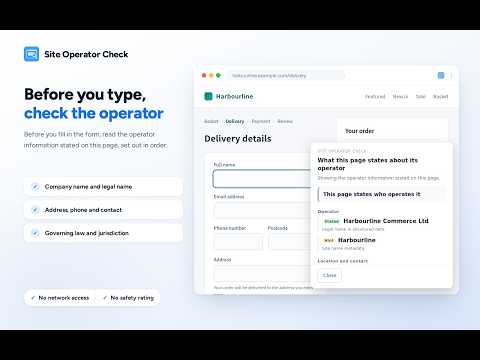
See who runs this site before you type. Press the toolbar icon and the extension shows you what the page you are on states about its own operator, with the evidence for each statement. It is a few seconds of checking who someone claims to be, before you give them your name, email address, postal address or card details. Primarily designed for Japanese websites. WHAT IT DOES - Shows a panel in the corner of the page when you ask for it from the toolbar. It never appears on its own, and it never interrupts you: your cursor stays in the field you were typing in - Collects the operator information stated on that page and separates it into "Stated", "Hint" and "Not confirmed" - Shows company name, address, governing law, jurisdiction, data storage location and data transfer destination as separate lines - Lists every company name found, instead of merging several names into one - Shows the evidence: where on the page each statement was found, with an excerpt - Shows what it could not confirm, instead of leaving it out - Shows a form's declared destination when the markup points it at another origin (a form's action, a submit button's formaction) - Shows the other origins the page loads from (embedded frames and scripts), so a third-party payment button whose destination is only decided when pressed still leaves something you can see - Common domains (Google, Cloudflare, jQuery, Stripe and about 120 others) are named from a table bundled with the extension, and collapsed by default. The count is always on screen and one click opens them - They are collapsed so that the origins nobody can place stay visible — not because they are safe - Where the site's own legal notice, terms, privacy policy or footer writes a domain down, the panel says so and quotes the sentence. An origin on the site's own domain is marked as such - If you visited this same site's legal notice, terms, privacy policy or company page earlier in this session, shows what was found there, marked "Other page" - Lists candidate related pages (company profile, terms, privacy policy, statutory notice) as links — it never opens them for you - Works in Japanese and English It reads the footer, address elements, structured data (JSON-LD and microdata), meta tags, link text and URLs, the src of embedded frames and scripts, and the page body only when the page itself is a legal notice, terms, privacy policy or company page. It does not read articles, blog posts, product descriptions or user-generated content. WHAT IT DOES NOT DO - It does not read what you type. It never touches value, files, FormData, the selection or the clipboard. - It does not talk to any server. No network API — fetch, XMLHttpRequest, WebSocket, sendBeacon and the rest — exists anywhere in the shipped code. - It does not judge whether a site is safe. There is no score, no trust rating, no stars, no red-or-green verdict. It only tells you what the page states and what it does not. - It contains no ads, no analytics and no third-party SDK. The absence of input-value access and of network APIs is not a promise in a comment — it is checked mechanically at build time by "npm run check". PLEASE READ: LIMITS This extension reports what a page states. It verifies none of it. In particular, it: - Does not prove that the company exists - Does not verify that the statements are correct - Cannot fully identify parent companies, subsidiaries or ownership - Reads only the destination declared in the markup (a form's action, a submit button's formaction). It cannot know a destination that JavaScript decides at submit time - Lists only the origins named in the page's markup. Those are where the page loads from, which is not necessarily where what you type is sent - Names operators from a bundled table that can be out of date. A name is not a promise about what that origin serves today - Finding no information does not mean a site is safe - Is not a substitute for a security product, for legal advice, or for your own judgement about whether to transact The panel never appears on its own. Nothing here blocks input or warns you about danger — it watches no page events at all, and when to check is your decision. It does not run on chrome:// pages, the Chrome Web Store, the PDF viewer, local files or view-source pages, because Chrome does not allow it. Right after the extension is updated, a page that was already open has to be reloaded before it can answer. HOW TO USE IT 1. Browse as usual 2. Click the toolbar icon and press "Check this page's operator" 3. Read the panel. Your cursor stays where it was, so you can carry on typing 4. Open "Show details and evidence" for the excerpts, what could not be confirmed, the origins the page loads from, and related pages 5. Close it when you are done (Esc also closes it once the focus is inside the panel) The panel never appears on its own. The content script subscribes to no page events at all, so nothing a page does can make it appear. Run the check as often as you like — neither running it nor closing it is recorded anywhere. DATA Nothing is collected, sent or shared. There is no server, no analytics and no advertising. Only one thing is kept, in chrome.storage.session, and it disappears when the browser restarts: - The operator information read from this site's own legal notice, terms, privacy policy or company page, so it can be shown as "Other page" when you later reach a form on the same site (per origin, at most 30 origins, at most 64KB each) What you do with the panel is not recorded. The extension verifies nothing, so there is no "approved" state to store. The only permission declared is "storage". No host permissions are declared.
5 out of 51 rating
Details
- Version1.0.1
- UpdatedOctober 11, 2026
- Size91.72KiB
- Languages2 languages
- DeveloperWebsite
Email
support@legacy-tools.dev - Non-traderThis developer has not identified itself as a trader. For consumers in the European Union, please note that consumer rights do not apply to contracts between you and this developer.
Privacy

Site Operator Check — What company runs this site? has disclosed the following information regarding the collection and usage of your data. More detailed information can be found in the developer's privacy policy.
Site Operator Check — What company runs this site? handles the following:
This developer declares that your data is
- Not being sold to third parties, outside of the approved use cases
- Not being used or transferred for purposes that are unrelated to the item's core functionality
- Not being used or transferred to determine creditworthiness or for lending purposes
Support
For help with questions, suggestions, or problems, visit the developer's support site