


Overview
Site Ease is a tool designed to enhance web accessibility for individuals with visual impairments and color blindness.
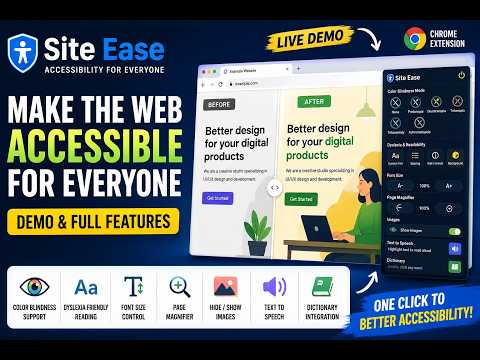
Site Ease is a powerful Chrome extension designed to make the web more inclusive, comfortable, and accessible for everyone. Whether you experience colour blindness, dyslexia, visual impairments, reading difficulties, or simply want a more customizable browsing experience, Site Ease helps you interact with websites in a way that works best for you. With real-time accessibility enhancements and user-friendly controls, Site Ease transforms webpages instantly-without reloads or interruptions. Site Ease intelligently adjusts webpage colours to improve visibility and distinction for users with colour vision deficiencies. It supports Protanopia (red blindness), Deuteranopia (green blindness), Tritanopia (blue blindness), Tritanomaly and Achromatopsia (complete colour blindness with grayscale mode). Every adjustment is dynamically applied across text, images, and UI elements to ensure a more accessible browsing experience. To improve readability and reduce visual strain, Site Ease provides: 1. OpenDyslexic font support 2. Adjustable text spacing 3. High contrast mode 4. Customizable background colours 5. Dynamic font size controls (increase or decrease text size instantly) These features help reduce letter confusion, improve focus, and create a cleaner reading experience across websites. Site Ease gives users greater control over webpage visibility and layout with features such as: 1. Page magnifier for zooming webpage content 2. Increase or decrease page scaling easily 3. Show or hide webpage images to reduce distractions and improve focus These tools are especially useful for users with low vision, attention difficulties, or content-heavy browsing environments. Site Ease also includes interactive assistive learning features: 1. Highlight any text on a webpage and have it read aloud using text-to-speech 2. Instantly discover word meanings through integrated dictionary support These tools help improve comprehension, pronunciation, and learning accessibility while browsing the web. All accessibility changes are applied instantly in real time. No page refreshes, no interruptions. Features can be toggled on or off with a single click, and every setting is designed with accessibility-first interactions and colour-safe indicators. Your preferences are automatically saved and persist across browsing sessions, ensuring your web experience always remains personalised and comfortable. Site Ease is more than just a browser extension-it’s a step toward a web that welcomes everyone. Whether you need improved readability, colour accessibility, enhanced focus tools, or assistive reading support, Site Ease empowers you to browse the internet with confidence, comfort, and ease.
4.9 out of 514 ratings
Details
- Version1.5
- UpdatedMay 29, 2026
- Size86.02KiB
- LanguagesEnglish
- DeveloperWebsite
Email
aashish17405@gmail.com - Non-traderThis developer has not identified itself as a trader. For consumers in the European Union, please note that consumer rights do not apply to contracts between you and this developer.
Privacy

This developer declares that your data is
- Not being sold to third parties, outside of the approved use cases
- Not being used or transferred for purposes that are unrelated to the item's core functionality
- Not being used or transferred to determine creditworthiness or for lending purposes
Support
For help with questions, suggestions, or problems, please open this page on your desktop browser