


Overview
Your business brain, on every tab.
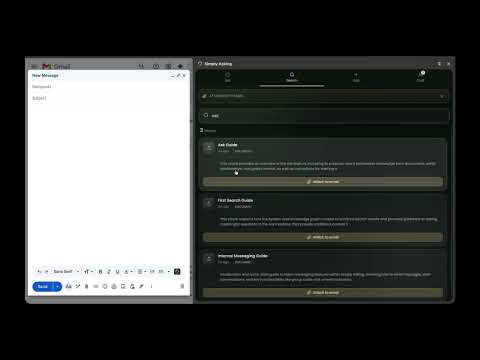
When you're working (reading an email, browsing a doc, chatting with a customer), your knowledge base is usually in another tab. Simply Asking's browser extension changes that. It lives as a side panel on every page, so you can ask, search, save, or chat without context-switching. WHAT YOU CAN DO • ASK: Type a question into the Ask tab and get a grounded answer with citations. Same Lumen AI, same trust contract, same "I don't know" honesty as the main app, just available wherever you are. • SEARCH: Search your entire knowledge base by typing or pasting. Drag results into Slack, Notion, or any drop zone. Click "Attach to email" to put a file into your open Gmail draft. • ADD: Save the current page, paste a URL, type a quick note, or use AI to generate content. Knowledge gets captured at the moment of insight, not later. • CHAT: Message your team without leaving your current tab. @Lumen still works. Notifications fire when teammates message you. Gold-glowing conversation cards make it easy to triage at a glance. THE GMAIL COMPOSE BUTTON A Simply Asking icon appears in Gmail's compose toolbar (next to the paperclip). Click it, search your knowledge base in the side panel, then click "Attach to email". The file is now attached to the email you're writing. No tab-switching, no manual download. FAITHFUL TO THE BRAND We don't fabricate. Lumen's answers in the extension cite their sources just like in the main app, with [1], [2] superscript chips that link to the underlying documents. If we don't know, we say so. The extension is an extension, not a different brain. REQUIREMENTS • An active Simply Asking account. The extension is a companion to the web app, not a standalone tool. • Chrome 114+ (for side panel support). • A Google account for sign-in via OAuth. WHAT WE DO NOT DO • We do not read your emails. The extension reads only the compose toolbar's structure to inject our button. • We do not monitor your browsing. The extension only acts on tabs you explicitly invoke it on. • We do not sell or share your data. Read our privacy policy for full details. PRICING The extension is free with any Simply Asking plan. Premium features (advanced search, agent integration, etc.) are gated server-side, not in the extension itself. GETTING STARTED 1. Click "Add to Chrome" 2. Click the Simply Asking icon in your Chrome toolbar 3. Sign in with your Google account (the same one you use for Simply Asking) 4. The 4-tab side panel appears. Pin it open or open it on demand. The extension auto-installs the Gmail compose button on next page load. No need to refresh Gmail. SUPPORT For help: simplyasking.io/support/extension For issues: report at simplyasking.io/support For privacy questions: simplyasking.io/privacy
0 out of 5No ratings
Details
- Version1.1.1
- UpdatedAugust 2, 2026
- Size1.86MiB
- LanguagesEnglish (United States)
- DeveloperSimply Asking LLCWebsite
600 E Ohio St suite c Indianapolis, IN 46202-3990 USEmail
hello@simplyasking.io - Non-traderThis developer has not identified itself as a trader. For consumers in the European Union, please note that consumer rights do not apply to contracts between you and this developer.
Privacy

Simply Asking has disclosed the following information regarding the collection and usage of your data. More detailed information can be found in the developer's privacy policy.
Simply Asking handles the following:
This developer declares that your data is
- Not being sold to third parties, outside of the approved use cases
- Not being used or transferred for purposes that are unrelated to the item's core functionality
- Not being used or transferred to determine creditworthiness or for lending purposes
Support
For help with questions, suggestions, or problems, visit the developer's support site