“Simplescraper — 快速且免费的 AI 网页抓取工具”的产品徽标图片

Simplescraper — 快速且免费的 AI 网页抓取工具

simplescraper.io
精选
4.0(

365 个评分

)
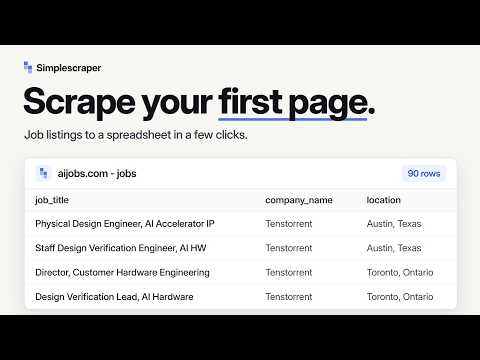
Simplescraper — 快速且免费的 AI 网页抓取工具的项目媒体 5(屏幕截图)
Simplescraper — 快速且免费的 AI 网页抓取工具的项目媒体 6(屏幕截图)
产品视频缩略图
Simplescraper — 快速且免费的 AI 网页抓取工具的项目媒体 2(屏幕截图)
Simplescraper — 快速且免费的 AI 网页抓取工具的项目媒体 3(屏幕截图)
Simplescraper — 快速且免费的 AI 网页抓取工具的项目媒体 4(屏幕截图)
Simplescraper — 快速且免费的 AI 网页抓取工具的项目媒体 5(屏幕截图)
Simplescraper — 快速且免费的 AI 网页抓取工具的项目媒体 6(屏幕截图)
产品视频缩略图
Simplescraper — 快速且免费的 AI 网页抓取工具的项目媒体 2(屏幕截图)
产品视频缩略图
Simplescraper — 快速且免费的 AI 网页抓取工具的项目媒体 2(屏幕截图)
Simplescraper — 快速且免费的 AI 网页抓取工具的项目媒体 3(屏幕截图)
Simplescraper — 快速且免费的 AI 网页抓取工具的项目媒体 4(屏幕截图)
Simplescraper — 快速且免费的 AI 网页抓取工具的项目媒体 5(屏幕截图)
Simplescraper — 快速且免费的 AI 网页抓取工具的项目媒体 6(屏幕截图)

概述

快速的 AI 网页抓取。将网站转为结构化数据。立即下载,或按计划、通过 API 或 MCP 批量抓取。

💡 Watch the short video above to see how Simplescraper 3.0 scrapes pages in seconds. 💡 Simplescraper instantly scrapes any web page into clean, structured data. Download as a spreadsheet, JSON, or copy to your clipboard. Version 3.0 brings a new side panel built around AI that finds your data, names it and scrapes every page. You can even enrich the data you scrape - categorize, classify, extract and modify it. All scrape runs of up to 5 pages are free, and you don't need an account to start. Sign up if you'd like to save recipes that run again in one click. 👉 How to scrape data: 1. Open Simplescraper on any website and click 'Start scraping'. It finds every list on the page and picks the best one for you automatically 2. Confirm the fields you want. Rename them with AI in one click, add or remove fields, or even add an AI field (see below) 3. Choose a single page or multiple pages to scrape, then download your results as CSV or JSON Want it even faster? 'Quick scrape' does all three steps in one click. ⭐ New in 3.0: ⚡ Lists found for you: AI finds every list on the page and marks the best match ⚡ AI rename: turn column names like "sc-1x2y3z" into relevant names like "title" and "price" in one click ⚡ AI fields: add a column that summarizes, extracts, rewrites or categorizes every row, or answers a yes or no question about it ⚡ Every page: AI finds the 'Next page' or 'Load more' button for you, or scrolls endless pages, up to 1,000 pages in your browser ⚡ Single fields: no list on the page? Pick individual values, like a product's name and price, one click at a time ⚡ Quick scrape: go from page to data in one click ⚡ Free to start: runs of up to 5 pages are free for everyone, with no account needed ☁️ Save it and run it in the cloud Recipes that you save can be run again in the browser or the cloud. This allows you to: - Run them on a schedule - Call them from the API or an AI agent - Send the results to Google Sheets, Airtable, Zapier or Make from your Simplescraper dashboard Free accounts get 100 credits for longer runs and cloud scraping. 🎯 What people scrape - Online stores: product names, prices and ratings from a category page - Lead lists: names, companies and links from a directory or search results - Job boards: titles, companies, locations and salaries - Research: articles, listings or reviews gathered from many pages into one table

4.0 星(5 星制)365 个评分

详细了解结果和评价。

详情

  • 版本
    3.0.6
  • 上次更新日期
    2026年11月13日
  • 大小
    737KiB
  • 语言
    55 种语言
  • 开发者
    网站
    邮箱
    mike@simplescraper.io
  • 非交易者
    该开发者尚未将自己标识为交易者。欧盟地区消费者须知:消费者权利可能不适用于您与该开发者达成的合约。

隐私权

管理扩展程序并了解它们在组织中的使用情况

“Simplescraper — 快速且免费的 AI 网页抓取工具”已就收集和使用用户数据披露了以下信息。 如需了解详情,请查看开发者的privacy policy。

Simplescraper — 快速且免费的 AI 网页抓取工具会处理以下数据:

个人身份信息
身份验证信息

该开发者已声明,您的数据:

  • 不会因未获批准的用途出售给第三方
  • 不会为实现与产品核心功能无关的目的而使用或转移
  • 不会为确定信用度或放贷目的而使用或转移

支持

相关

DataGrab

3.7

Extract web data at scale without coding.

Agenty - Advanced Web Scraper

3.1

Free web scraping Chrome extension with AI to extract leads, products, prices, and website data. Export to CSV or Excel.

Databar for Chrome

4.7

Turn any website into a database. Send pages and lists to Databar tables with reusable recipes, or export any page to CSV.

Spider Free - The simplest web scraper

3.9

Spider let's you turn websites into organized data, download them as JSON/CSV. No coding or configuration required.

Instant Data Scraper

4.9

Instant Data Scraper extracts data from web pages and exports it as Excel or CSV files

迷你派采集器-最简单网页自动采集监控

3.7

技术小白网页采集器,免费赠送积分!自动识别,中英文网页采集。京东亚马逊淘宝虾皮拼多多电商价格采集监控知乎微博小红书携程内容采集

AnyPicker - A.I. powered No Code Web Scraper

3.7

AnyPicker is a free web data scraper. Powered by A.I. pattern recognition engine, You can scrape any website with just a few clicks.

Simple Web Scraper (Free)

3.7

Scraping the values ​​of multiple web page META tags, JS variables, etc. at once.

Visual Web Scraper

4.5

Easily extract data from any website and export as CSV or JSON files.

Web Scraper - 免费网页抓取

4.7

面向现代网页的网页数据提取工具,提供简便的点击式界面

Easy Web Data Scraper

3.7

Free & No-code scraper tool can automatically flip pages to extract or export any data you need

Data Scraper - Easy Web Scraping

3.6

Data Scraper extracts data out of HTML web pages and imports it into Microsoft Excel spreadsheets

DataGrab

3.7

Extract web data at scale without coding.

Agenty - Advanced Web Scraper

3.1

Free web scraping Chrome extension with AI to extract leads, products, prices, and website data. Export to CSV or Excel.

Databar for Chrome

4.7

Turn any website into a database. Send pages and lists to Databar tables with reusable recipes, or export any page to CSV.

Spider Free - The simplest web scraper

3.9

Spider let's you turn websites into organized data, download them as JSON/CSV. No coding or configuration required.

Instant Data Scraper

4.9

Instant Data Scraper extracts data from web pages and exports it as Excel or CSV files

迷你派采集器-最简单网页自动采集监控

3.7

技术小白网页采集器,免费赠送积分!自动识别,中英文网页采集。京东亚马逊淘宝虾皮拼多多电商价格采集监控知乎微博小红书携程内容采集

AnyPicker - A.I. powered No Code Web Scraper

3.7

AnyPicker is a free web data scraper. Powered by A.I. pattern recognition engine, You can scrape any website with just a few clicks.

Simple Web Scraper (Free)

3.7

Scraping the values ​​of multiple web page META tags, JS variables, etc. at once.

搜索
清除搜索内容
关闭搜索框
Google 应用
主菜单
