


Overview
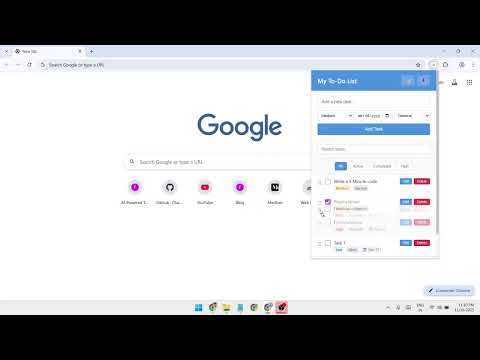
A powerful yet simple to-do list with priorities, due dates, categories, dark mode, and drag-and-drop task management.
Stay organized and boost your productivity with Simple To-Do List, a powerful yet easy-to-use task manager designed for Chrome users who value simplicity and privacy. Unlike other to-do list apps that require accounts, sync subscriptions, or cloud storage, Simple To-Do List works completely offline and stores everything locally on your device. No sign-ups, no data collection, no tracking – just pure productivity. ━━━━━━━━━━━━━━━━━━━━━━━━━━━━━━━━━━━━━━━━━━━━━━━━━━━━ ✨ KEY FEATURES ━━━━━━━━━━━━━━━━━━━━━━━━━━━━━━━━━━━━━━━━━━━━━━━━━━━━ 🎯 PRIORITY LEVELS Set tasks as High, Medium, or Low priority with color-coded visual badges. Never lose sight of what's urgent with red priority tags for high-priority tasks, orange for medium, and blue for low-priority items. 📅 DUE DATES & DEADLINES Add due dates to any task and get automatic overdue detection. Tasks past their deadline are highlighted in red, so you never miss an important commitment. 🏷️ TASK CATEGORIES Organize your work with 5 built-in categories: • General - Default tasks and miscellaneous items • Work - Professional projects and business tasks • Personal - Life admin, errands, and personal goals • Shopping - Items to buy and shopping lists • Other - Everything else 📝 TASK NOTES & DESCRIPTIONS Add detailed notes to any task (up to 500 characters). Perfect for including instructions, links, context, or reminders about why the task matters. 🔄 DRAG & DROP REORDERING Grab the handle (☰) and reorder tasks based on your priorities. Organize tasks exactly the way you want them, and changes save automatically. ✏️ EDIT TASKS COMPLETELY Made a mistake or need to update a task? Click "Edit" to open a full-featured modal editor where you can modify: • Task title • Task notes/description • Priority level • Due date • Category 🔍 SMART SEARCH & FILTERS Find tasks instantly with the built-in search bar. Search across task titles, notes, and categories. Combine search with filter buttons (All, Active, Completed, High Priority) for powerful task management. 🌙 DARK MODE Toggle between light and dark themes with one click. Your preference is saved automatically. Dark mode is easy on the eyes and perfect for night-time productivity. 📥 EXPORT YOUR TASKS Download all your tasks as a JSON file for backup or data migration. Export includes all task properties: text, notes, priorities, dates, and categories. 📊 ENHANCED STATISTICS Track your progress with real-time stats showing: • Number of active tasks • Number of completed tasks • Clear visual separation for better insights ━━━━━━━━━━━━━━━━━━━━━━━━━━━━━━━━━━━━━━━━━━━━━━━━━━━━ 🚀 WHY CHOOSE SIMPLE TO-DO LIST? ━━━━━━━━━━━━━━━━━━━━━━━━━━━━━━━━━━━━━━━━━━━━━━━━━━━━ ✅ NO ACCOUNT REQUIRED Start using the extension immediately. No registration, no login, no personal information needed. ✅ 100% OFFLINE & PRIVATE All your tasks are stored locally using Chrome's secure storage API. No cloud sync, no servers, no data collection. Your tasks stay on your device. ✅ COMPLETELY FREE All features are included at no cost. No premium tiers, no subscriptions, no locked features. ✅ POPUP DESIGN Access your tasks with one click on the extension icon. Doesn't replace your new tab page or interfere with your browsing. ✅ LIGHTWEIGHT & FAST The extension is optimized for performance. It loads instantly and uses minimal system resources. ✅ CLEAN, INTUITIVE INTERFACE Beautiful design with simple controls. No learning curve, no complex menus – just straightforward task management. ✅ BETTER THAN COMPETITORS Unlike Todoist (requires account), Microsoft To Do (needs Microsoft account), or Google Tasks (requires Google sign-in), Simple To-Do List works instantly with no barriers. ━━━━━━━━━━━━━━━━━━━━━━━━━━━━━━━━━━━━━━━━━━━━━━━━━━━━ 📖 HOW TO USE ━━━━━━━━━━━━━━━━━━━━━━━━━━━━━━━━━━━━━━━━━━━━━━━━━━━━ ADDING TASKS: 1. Click the extension icon in your Chrome toolbar 2. Type your task in the input field 3. Select priority level (Low, Medium, or High) 4. Optionally set a due date 5. Choose a category 6. Click "Add Task" or press Enter MANAGING TASKS: • Check the box to mark tasks as complete • Click "Edit" to modify any task property • Click "Delete" to remove tasks • Drag the ☰ handle to reorder tasks • Use search bar to find specific tasks • Click filter buttons to view different task groups ADDITIONAL FEATURES: • Toggle dark mode with 🌙 icon • Export tasks with 📥 icon • Clear all completed tasks with "Clear Completed" button ━━━━━━━━━━━━━━━━━━━━━━━━━━━━━━━━━━━━━━━━━━━━━━━━━━━━ 🎯 PERFECT FOR ━━━━━━━━━━━━━━━━━━━━━━━━━━━━━━━━━━━━━━━━━━━━━━━━━━━━ ✓ Students managing assignments and deadlines ✓ Professionals organizing work projects ✓ Freelancers tracking client tasks ✓ Anyone who wants a simple, distraction-free to-do list ✓ Privacy-conscious users who prefer local storage ✓ People tired of complex task managers with too many features ✓ Users who want instant access without accounts or subscriptions ━━━━━━━━━━━━━━━━━━━━━━━━━━━━━━━━━━━━━━━━━━━━━━━━━━━━ 🛡️ PRIVACY & SECURITY ━━━━━━━━━━━━━━━━━━━━━━━━━━━━━━━━━━━━━━━━━━━━━━━━━━━━ Your privacy matters. Simple To-Do List: • Stores all data locally on your device • Never sends data to external servers • Doesn't require internet connection • Doesn't track your activity • Doesn't collect personal information • Doesn't use analytics or cookies • Only requests "storage" permission (required for saving tasks) ━━━━━━━━━━━━━━━━━━━━━━━━━━━━━━━━━━━━━━━━━━━━━━━━━━━━ 💪 COMPARE TO ALTERNATIVES ━━━━━━━━━━━━━━━━━━━━━━━━━━━━━━━━━━━━━━━━━━━━━━━━━━━━ Simple To-Do List vs. Todoist: ✓ No account required (Todoist requires sign-up) ✓ 100% free (Todoist has paid tiers) ✓ Completely offline (Todoist needs internet) ✓ Instant access (Todoist has loading time) Simple To-Do List vs. Microsoft To Do: ✓ No Microsoft account needed ✓ Works on all Chromium browsers ✓ Simpler interface ✓ Faster and more lightweight Simple To-Do List vs. Google Tasks: ✓ No Google sign-in required ✓ Better features (categories, priority levels, notes) ✓ Drag-and-drop reordering ✓ Dark mode included ━━━━━━━━━━━━━━━━━━━━━━━━━━━━━━━━━━━━━━━━━━━━━━━━━━━━ 🌟 USER TESTIMONIALS ━━━━━━━━━━━━━━━━━━━━━━━━━━━━━━━━━━━━━━━━━━━━━━━━━━━━ "Finally, a to-do list that doesn't require creating yet another account. Simple and effective!" - Chrome User "Love the dark mode and priority tags. Exactly what I needed without the bloat of other apps." - Chrome User "The fact that it works completely offline is a game-changer for me. No privacy concerns." - Chrome User ━━━━━━━━━━━━━━━━━━━━━━━━━━━━━━━━━━━━━━━━━━━━━━━━━━━━ 📞 SUPPORT & FEEDBACK ━━━━━━━━━━━━━━━━━━━━━━━━━━━━━━━━━━━━━━━━━━━━━━━━━━━━ Have questions or suggestions? We'd love to hear from you! Visit: www.forewrite.com If you enjoy using Simple To-Do List, please leave a review and rating. Your feedback helps us improve and helps other users discover the extension. ━━━━━━━━━━━━━━━━━━━━━━━━━━━━━━━━━━━━━━━━━━━━━━━━━━━━ 📦 TECHNICAL DETAILS ━━━━━━━━━━━━━━━━━━━━━━━━━━━━━━━━━━━━━━━━━━━━━━━━━━━━ • Version: 2.0.0 • Size: ~23 KB (extremely lightweight) • Permissions: Storage only (required for saving tasks) • Compatible with: Chrome, Edge, Brave, and all Chromium browsers • No remote code execution • Open-source friendly design
5 out of 52 ratings
Details
- Version2.0.0
- UpdatedNovember 17, 2025
- Size23.42KiB
- LanguagesEnglish
- DeveloperGagan SahayWebsite
84/1 Nai Basti Abdullapur Meerut Meerut, Uttar Pradesh 250001 INEmail
gagansahay695@gmail.comPhone
+91 97617 38451 - TraderThis developer has identified itself as a trader per the definition from the European Union and committed to only offer products or services that comply with EU laws.
Privacy

This developer declares that your data is
- Not being sold to third parties, outside of the approved use cases
- Not being used or transferred for purposes that are unrelated to the item's core functionality
- Not being used or transferred to determine creditworthiness or for lending purposes
Support
For help with questions, suggestions, or problems, please open this page on your desktop browser