

Simple Steps Recorder
2 ratings
)
Overview
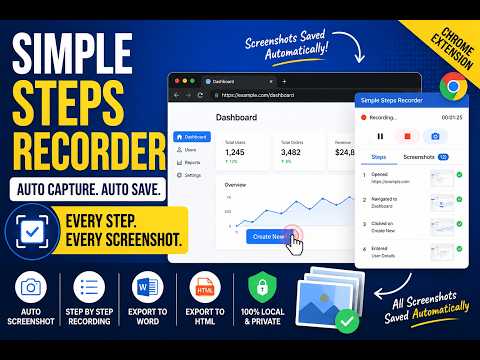
Record browser interactions with screenshots and generate step-by-step documentation for QA.
Simple Steps Recorder helps QA testers, support teams, and trainers document browser workflows effortlessly. How it works: • Click "Start Recording" — the extension captures your interactions only while recording is active. • Every click, dropdown change, and Enter press is automatically captured with a screenshot. • Optionally record voice narration while testing. Each voice clip is limited to 1 minute and is associated with the corresponding step and screenshot. • Pause, resume, review, reorder, delete, or drag and drop steps before exporting. • Protect sensitive information using Privacy Mode, including blurring, pixelating, or blacking out selected areas. • Highlight multiple regions of screenshots to emphasize important information. • Export your documentation as HTML or Microsoft Word (.docx). **Privacy: ** All screenshots, recordings, and recorded data are stored locally on your device using Chrome's built-in storage. No data is transmitted, uploaded, or shared with any server or third party. Voice recording is optional and starts only when you explicitly enable it. You have full control — start, pause, resume, stop, review, edit, and delete your recordings at any time. Shortcut can be used for entire page, partial page screenshot and enable privacy mode. **Permissions justification:** • <all_urls> — Required so the extension can capture interactions on websites you visit during testing • unlimitedStorage — Provides additional local storage capacity for larger recording sessions, with an application-enforced maximum of 100 MB • storage — The storage permission is used to save recording sessions, captured screenshots, recorded browser steps, etc.
5 out of 52 ratings
Details
- Version1.4.6
- UpdatedSeptember 3, 2026
- Offered byPradeep Mondal
- Size469KiB
- LanguagesEnglish
- DeveloperPersonal development
Male nellasandra villege Banglore, Karnataka 560105 INEmail
pradeepmondol1996@gmail.com - Non-traderThis developer has not identified itself as a trader. For consumers in the European Union, please note that consumer rights do not apply to contracts between you and this developer.
Privacy

Simple Steps Recorder has disclosed the following information regarding the collection and usage of your data. More detailed information can be found in the developer's privacy policy.
Simple Steps Recorder handles the following:
This developer declares that your data is
- Not being sold to third parties, outside of the approved use cases
- Not being used or transferred for purposes that are unrelated to the item's core functionality
- Not being used or transferred to determine creditworthiness or for lending purposes